

A Thanksgiving message to clients converts when it thanks them sincerely and offers one easy next step, such as booking a year-end review. The best client communication tools split by job: OnceHub turns the message into booked meetings with personalized, one-click booking links; HubSpot segments and personalizes; Mailchimp, Constant Contact and Klaviyo send the email; WhatsApp Business and Weave handle text; Canva designs cards; and Zapier connects handwritten-card services. Send it the week before Thanksgiving, keep subject lines under 50 characters, and make sure your calendar has open times when clients click.
The Best Tools for Your Thanksgiving Message at a Glance
Each tool does one job well. Most businesses pair one tool that sends the message with one that turns the reply into a meeting.
Why Most Thanksgiving Messages Don't Convert
Most client thank-yous are warm and well written. The client smiles, closes the email, and nothing happens.
That's fine if gratitude is the only goal. But most businesses also hope the message leads somewhere: a year-end review, a referral, a review, or a booking in the new year. Three things decide whether it does.
The gratitude is real: Name something specific about the year, keep the thank-you first, and leave the hard sell out entirely.
There is one clear next step: Not three links, one. For a service business, the most natural next step is the next meeting.
The next step takes seconds: This is where most messages fail. A "book a call" link that asks for details you already have, or lands on a calendar with no open times over the holidays, quietly undoes the warm words above it.
Picture a financial advisor who sends the same thank-you email to 200 clients. One version ends with "Let us know if you'd like to talk." Another ends with a personal link that opens straight to their calendar, with the client's name already filled in. The second version doesn't feel more salesy. It just removes the effort of replying, emailing back and forth, and finding a time.
The Best Client Communication Tools, by Job
Each tool below includes what it's best for, how to use it for your Thanksgiving message, and where it falls short.
1. OnceHub: Best for Turning Your Thanksgiving Message Into Booked Meetings
OnceHub is a scheduling platform, so it doesn't send bulk email itself. Its job is the moment after the client reads your message: it turns "I should book a review" into a meeting on your calendar, in one click.
What it adds to your Thanksgiving message:
- Personalized booking links: Add skip=1 to the link, and when every required question is prefilled, the booking form is skipped, as described in OnceHub's URL parameters guide.
- One link for every kind of meeting: a Booking Hub can offer a year-end review, a quick question call and a new-year kickoff behind one link.
- One-time links for top clients: a personal invitation that works for a single booking, so it can only be used once, even if it's forwarded.
- Reminders that carry the gratitude: customize confirmation and reminder emails, and SMS (from the Schedule plan, uses SMS credits) with a short thank-you line.
- Holiday-ready availability: block Thanksgiving and other days off so clients only see real openings.
- Proof it worked: hidden fields record which message produced each booking. Our lead attribution guide covers the setup.
How OnceHub Connects to the Tools You Already Use
OnceHub works alongside your email and CRM tools rather than replacing them. Four connections do most of the work:
- Email platforms, through merge tags: put the booking link inside your Mailchimp, HubSpot or Constant Contact email, and use the platform's merge tags to fill in each client's details. In Mailchimp, for example,
*|FNAME|*and*|EMAIL|*insert the first name and email address. OnceHub shows the exact parameter names to use in each calendar's Share options, under Personalization and Tracking. - Gmail, for one-to-one notes: the OnceHub for Gmail extension creates a personalized link from the recipient's name and email as you write. The client picks a time and confirms, with no booking form to fill in.
- Your CRM, both ways: native HubSpot and Salesforce integrations log each booking on the client's record. On the Route plan, OnceHub can also book each client with their CRM contact owner (see How To Assign Meetings To The CRM Contact Owner), so they reach the advisor or account manager they already know.
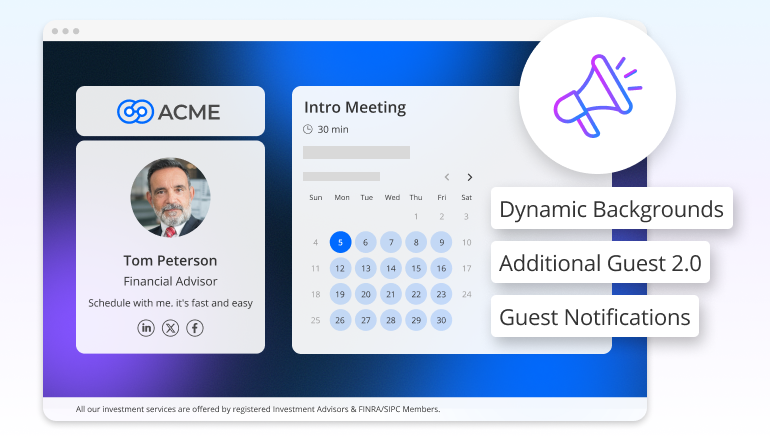
Proof it works: Here is a quick look at a personalized booking link skipping the form directly to available times for a year-end review:
[IMAGE 1: upload from the Google Doc. Alt text: Screenshot of a personalized OnceHub booking page with prefilled client details opening directly to available dates for a year-end review meeting.]
- Everything else, through Zapier: OnceHub's Zapier triggers fire when a meeting is booked, so a year-end review can automatically send a handwritten card, alert your team in Slack, or update a spreadsheet.
Use Cases: Who Gets the Most From This
The Thanksgiving message works best when there's a natural reason to meet before the year ends. These businesses all have one.
- Financial advisors and wealth managers: Year-end is planning season. Required minimum distributions generally have to be taken by December 31 (see IRS RMD guidance), and investment losses only count toward a tax year if they're realized by the end of it. A Thanksgiving email that thanks clients and offers a one-click link to book a year-end review turns goodwill into the meetings advisors need in December. See our guide to the best scheduling software for financial advisors. A Booking Hub can offer "Year-end review," "Quick question" and "Plan for next year" behind one link. For firms with stricter requirements, OnceHub's Security and Compliance Add-On (detailed on our Financial Advisors solution page) can send every client email from one approved company address and save a copy of each notification sent to clients. Check your firm's rules before any bulk send, since many compliance teams review client communications first.
- Accountants and tax professionals: Many year-end tax moves have to happen before December 31. A Thanksgiving note with a link to book a short planning call reaches clients while there's still time to act. A routing form (Route plan) can send individual clients and business owners to different calendars, so each books the right length of meeting with the right person.
- Medicare and insurance agents: Medicare's annual enrollment period runs from October 15 to December 7 (see Medicare.gov dates), so a Thanksgiving message lands in its final two weeks. Thanking clients and offering a quick plan review before the deadline is both helpful and timely. If many clients call rather than click, OnceHub's AI phone agent can answer and book those calls too. If the same booking calendar takes phone bookings, set its booking window in calendar days, because phone booking doesn't enforce a bookable-day window (see Booking Calendar Settings not Supported in Phone Booking).
- Coaches and consultants: Clients are already thinking about next year. Pair your thank-you with a link to a new-year planning session. Use one-time links for your top clients, so the invitation feels personal and stays that way.
- Account managers and customer success teams: Thanksgiving is a natural moment to thank B2B clients before renewal and planning season. With CRM owner routing, each client books straight onto their own account manager's calendar, and the meeting appears on their CRM record for the whole team to see.
Pricing: OnceHub has a free Basic plan. Paid plans start at $10 per seat per month billed yearly, or $12 monthly, and every new account gets a 14-day free trial with no credit card.
Limitation: OnceHub doesn't send bulk email or design cards. Pair it with one of the sending tools below and put your booking link inside the message.
2. HubSpot: Best for Segmenting and Personalizing
HubSpot is a CRM, so it knows who your clients are and how long they've been with you. That makes it the right place to build your Thanksgiving lists, such as long-time clients, new clients this year, and clients you haven't spoken to in six months.
How to use it for Thanksgiving: send a different version to each list, and use personalization tokens such as the client's first name and company.
Limitation: more advanced automation sits on higher-tier plans, and it isn't a scheduling tool on its own.
3. Mailchimp: Best for Email Campaigns
Mailchimp is a familiar choice for small businesses sending one well-designed email to a whole client list.
How to use it for Thanksgiving: start from a seasonal template, personalize with merge tags, and schedule the send for the client's morning.
Limitation: pricing grows with the size of your contact list.
4. Constant Contact: Best for Seasonal Newsletters
Constant Contact suits businesses that already send a regular newsletter and want the Thanksgiving message to fit into it.
How to use it for Thanksgiving: use a holiday template, add a short thank-you at the top, and include your booking link as the single call to action.
Limitation: it's built for newsletters rather than personal one-to-one notes.
5. Klaviyo: Best for Ecommerce Client Lists
Klaviyo connects to your store's purchase data, which suits product businesses more than service firms.
How to use it for Thanksgiving: send early-access offers to loyal customers, or a review request after a recent purchase.
Limitation: less relevant if you sell meetings and services rather than products.
6. WhatsApp Business: Best for Personal One-to-One Notes
For clients you already message directly, a short personal note on WhatsApp can feel warmer than any email.
How to use it for Thanksgiving: send a brief, personal thank-you, and add your booking link only if a meeting is a natural next step.
Limitation: it's best for one-to-one notes, and you should only message clients who've agreed to hear from you there.
7. Weave: Best for Local Practices
Weave combines phone, text and patient messaging for practices such as dental and veterinary offices.
How to use it for Thanksgiving: send a short thank-you text that uses each client's name, along with your holiday hours.
Limitation: built for local practices, not B2B firms.
8. Canva: Best for Visual Cards and Social Posts
Canva has ready-made Thanksgiving templates for e-cards, email headers and social posts.
How to use it for Thanksgiving: design one branded card, then use it in your email header and your social post so the message looks consistent everywhere.
Limitation: it designs the message but doesn't send or track it.
9. Zapier With Handwrytten or Thankster: Best for Handwritten Cards at Scale
A handwritten card stands out in a season full of emails. Zapier can connect your CRM or payment tool to handwritten-card services such as Handwrytten and Thankster.
How to use it for Thanksgiving: send cards to your top clients automatically, or trigger a card when a client books their year-end review.
Limitation: cards cost more per client than email, so save them for your most valued relationships.
10. Acuity Scheduling: Best for Notes in Appointment Reminders
Acuity lets you add custom notes to its automated appointment reminders and follow-ups.
How to use it for Thanksgiving: if you already book appointments in Acuity, add a short thank-you line to your November reminders.
Limitation: Acuity sends one text reminder per appointment, so longer thank-you notes belong in email reminders.
Thanksgiving Message Templates by Goal
Copy these and swap in your details. Start with pure gratitude, or pick a goal that adds one soft next step. Wherever you see [booking link], paste your personalized OnceHub link so the client's details are already filled in.
Pure Gratitude
Use this when the thank-you is the whole point.
Email:
Subject: Grateful for you this Thanksgiving
Hi [Name],
As the year winds down, we wanted to say thank you. Working with you this year, especially [specific project or milestone], has meant a great deal to our team. Wishing you and your family a warm, restful Thanksgiving.
With gratitude, [Your name]
Text:
Happy Thanksgiving, [Name]! We're thankful for clients like you. Wishing you a restful holiday. [Your name]
Gratitude Plus a Year-End Review
Use this when there's a natural reason to meet before the year ends.
Subject: Thank you, and a quick year-end check-in
Hi [Name],
Thank you for trusting us this year. As the year comes to a close, it's a good time to review where things stand and plan for the year ahead. If that would help, you can pick a time that suits you here: [booking link]. Either way, wishing you a happy Thanksgiving.
Warm regards, [Your name]
B2B Partners: Gratitude Plus a Planning Call
Use this for business clients heading into planning or renewal season.
Subject: Thank you for a great year together
Hi [Name],
On behalf of our team, thank you for your partnership this year. We're proud of what we achieved together on [project]. When you're ready to look ahead to next year, here's a link to book a planning call: [booking link]. Happy Thanksgiving to you and the team.
Best, [Your name]
Local Appointment Businesses: Gratitude, Holiday Hours and Booking
Use this short text for salons, clinics and studios.
Happy Thanksgiving from [Business]! Thank you for being part of our year. We're closed Thursday and Friday; book your next visit anytime here: [booking link]
Referral Request
Use this only with clients who've had a clearly good experience.
Subject: Thank you for a wonderful year
Hi [Name],
Thank you for choosing us this year. Many of our best clients come from introductions by people like you, so if you know someone who could use our help, they can book a time with us here: [booking link]. Wishing you a happy Thanksgiving.
Review Request
Use this as a short text after a recent, positive appointment.
Happy Thanksgiving, [Name]! Thank you for a great year. If we helped, a quick review would mean a lot: [review link]
Holiday Schedule Update
Use this when your hours change around the holiday.
Subject: Our Thanksgiving hours
Hi [Name], thank you for being with us this year. Our office will be closed on Thursday and Friday for Thanksgiving. You can still book a time for next week anytime here: [booking link]. Happy Thanksgiving!
Set Up the Booking Side Before You Hit Send
A booking link only converts if the calendar behind it is ready. These six steps take about half an hour in OnceHub:
When and How to Send: Channel and Timing Playbook
The right message on the wrong day gets lost. A few rules keep yours visible.
Send the week before Thanksgiving: Thanksgiving falls on the fourth Thursday of November, and Black Friday follows the next day. A thank-you sent on Black Friday competes with every sales email in the inbox. If clients open your message after the holiday, adapt the text into a year-end or new-year note with the same booking link.
Keep subject lines short: many email apps cut off longer subject lines, especially on phones, so aim for under 50 characters (as recommended in Omnisend's subject line research) and put the key words first.
Match the channel to the relationship:
Respect consent and time zones: only text clients who've agreed to receive texts, and schedule sends for each client's local morning.
How to Measure Whether Your Message Converted
Gratitude is the point, but it's still worth knowing what happened. Track five things:
- Replies: a warm reply is a strong signal, even without a booking.
- Bookings by campaign: hidden fields show which message produced each meeting.
- Show rate: whether those meetings actually happened.
- Referrals: new clients who mention a referral in December and January.
- Reviews: new reviews posted after the message went out.
Mistakes That Kill the Response
A few common mistakes undo even a well-written message:
Conclusion: Gratitude First, One Easy Next Step
A Thanksgiving message builds the relationship. A one-click next step turns that relationship into the next meeting.
Use whichever tool you already trust to send the message. Then make sure the link inside it opens a calendar that's ready, with the client's details already filled in and real times to choose from.
Ready to turn your Thanksgiving message into booked meetings? Start free with OnceHub, create a "Year-End Review" link, and add it to your message before you hit send.
Frequently Asked Questions
These are the questions businesses ask most when planning their Thanksgiving client messages.
What is the best tool to send a Thanksgiving message to clients?
It depends on the job. Email tools such as Mailchimp, Constant Contact and HubSpot send the message, while OnceHub turns it into booked meetings with personalized, one-click booking links. Most service businesses use one of each: an email tool to send, and OnceHub so clients can book a year-end review straight from the message.
Should a Thanksgiving message to clients include an offer?
Keep the thank-you first and any ask soft. A single, helpful next step, such as booking a year-end review or a planning call, works better than a discount, which can make gratitude feel like a sales pitch. If you add a booking link, a personalized OnceHub link fills in the client's details so booking takes seconds.
When should I send a Thanksgiving message to clients?
Send it the week before Thanksgiving. In 2026, Thanksgiving falls on November 26 and Black Friday on November 27, and messages sent on Black Friday compete with a flood of sales emails. Schedule the send for your clients' local morning.
How do I personalize Thanksgiving messages for many clients?
Segment your list in your CRM, then use your email tool's merge tags to add each client's name and details. To personalize the next step too, OnceHub's booking links can carry each client's name and email, so the booking form is already filled in or skipped entirely.
Can I add a booking link to a Thanksgiving email?
Yes, and it's the simplest way to make the message convert. Use a personalized link so the client's details are already filled in, and check that your calendar has open times around the holiday. In OnceHub, a booking window counted in bookable days skips the days you've blocked, so clients only see real openings.
Should I send a Thanksgiving message by email or text?
Email suits most client lists and longer messages with a booking link. Text works for short notes to clients who've agreed to receive texts, such as appointment-based businesses. OnceHub supports both, with customizable email and SMS (from the Schedule plan, uses SMS credits) reminders on paid plans.
How do I follow up after a Thanksgiving message?
Reply personally to anyone who answers, and remind clients who booked with a short message before the meeting. For clients who clicked but didn't book, a gentle note in early December is enough. If you use OnceHub, reminders can carry the same thank-you tone as your original message.
What should I write in a short Thanksgiving text to clients?
Keep it to one or two sentences: thank them by name, wish them a good holiday, and add a link only if there's a clear reason to. For example: "Happy Thanksgiving, [Name]! We're thankful for clients like you. Wishing you a restful holiday."