


During BFCM, capturing promotion-driven inbound demand means responding to hot leads within minutes: a booking option the moment they submit a form, and a phone call within five minutes. The most effective strategy is instant calendar routing, which qualifies prospects on the form and lets them book right away. To prevent holiday no-shows, keep the booking window tight, around three bookable days. Teams should plan rep coverage for Thanksgiving week, set real-time alerts, use CRM rules as a fallback for uncontacted leads, and sync every booking to the CRM, using tools like OnceHub so no high-intent buyer is lost to a competitor.
Why BFCM Promotions Break Your Funnel
Black Friday and Cyber Monday promotions do something unusual to a B2B funnel. They squeeze weeks of buying interest into a few days, with a deadline attached.
A prospect who requests a demo during a BFCM promotion isn't browsing. They want the discount, and they are often comparing more than one vendor at the same time. Whoever books them first has a real head start.
Speed Was Already the Problem
Most teams were slow before the holidays began. In Harvard Business Review's well-known study, The Short Life of Online Sales Leads, researchers sent test leads to 2,241 US companies and timed how long each took to respond.
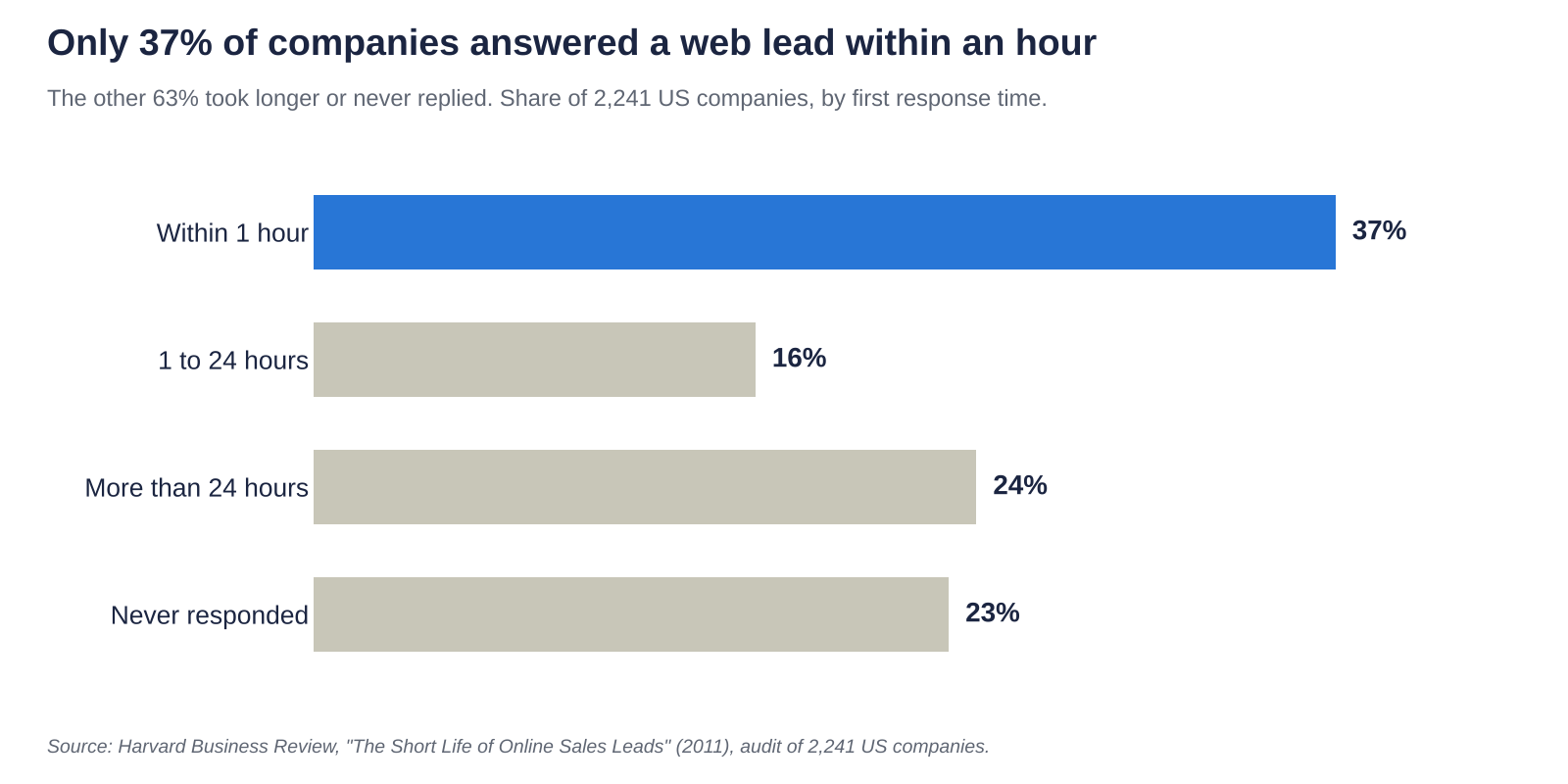
A companion analysis in the same HBR article, covering 1.25 million leads, found that firms that tried to contact a lead within an hour were nearly seven times as likely to qualify it (have a meaningful conversation with a decision-maker) as firms that tried an hour later.
Our guide to B2B lead generation with automated scheduling covers the full research and where the often-quoted "21x" figure really comes from.
The Holiday Gap
Here's what makes BFCM harder than any other week. If you run a BFCM offer, its demand lands inside the promotion window, which falls in Thanksgiving week, exactly when your team takes time off. Overall B2B demo volume tends to dip that week, but lead quality holds, so every lead that does arrive matters more.
Fewer reps, a burst of promotion leads and a hard promotion deadline add up to the gap where most holiday pipeline is lost. The rest of this playbook is about closing it.
Before the Rush: Prepare Your Team and Calendar
The best time to fix your BFCM response is two weeks before it starts. Changes made on Black Friday morning rarely land in time.
The BFCM Speed-to-Lead SLA, Minute by Minute
An SLA is only useful if everyone knows what happens at each minute. Here's a simple version you can adapt.
Minute 0: Instant Capture and Qualification
The clock starts when the form is submitted, so the form has to do the qualifying.
- Ask two to four questions: Use Routing Forms (Route plan) to ask what matters most, such as team size and current CRM. Each answer can change which questions come next and which calendar appears.
- Capture the campaign: Add hidden fields for UTM source and campaign, so you know which BFCM ad or email produced the meeting. Our lead attribution guide covers the setup.
- Keep half-finished forms: Holiday visitors get distracted. Progressive Form Capture (Route plan) saves each answer as it's given, even if the visitor leaves before finishing, so a partial lead is still a lead.
- Don't disqualify on budget: During a promotion, the discount may be exactly what brings a borderline budget into range. Qualify on fit, not on price.
Minute 1: Instant Calendar Route and Confirmation
A "Thanks, we'll be in touch" page throws away the moment of highest intent.
- Book inside the form: OnceHub's In-Form Scheduling Experience (Route plan) shows the right rep's live calendar as soon as the visitor qualifies. They pick a time without leaving the page.
- Send a plain confirmation: The confirmation email should say who they're meeting, when, and what to expect, in plain language rather than a heavy marketing template.
- Offer a conversation now: Some buyers want to talk immediately. On the Engage plan, a website chatbot can hand off to live chat or an instant meeting with an available rep.
Minute 5: The Human Phone Call
Call within five minutes, even if the prospect already booked a meeting. Research from InsideSales and MIT shows that responding within 5 minutes versus 30 minutes increases contact odds dramatically.
The call isn't about re-qualifying. It's about making a real connection before they go back to comparing vendors. A short "I saw you booked for Thursday, is there anything you want me to prepare?" turns a calendar slot into a relationship.
When the Phones Spike
BFCM traffic doesn't only arrive by form. Promotions drive phone calls too, and they peak when your reps are already on demos.
OnceHub's AI phone agent answers on a dedicated number and books callers into live availability, from the Schedule plan. On the Route plan, it can ask your routing form's questions on the call (supporting free-text, name, email, and phone questions), so callers are screened before they're booked. A caller at 7 p.m. on Black Friday gets a meeting instead of voicemail.
How to Configure Your Calendar for Peak Holiday Volume
The settings that work in a normal month can quietly work against you during BFCM. Four changes make the biggest difference.
Tighten the Booking Window With Bookable Days
A tight window keeps the urgency of the promotion. If a prospect can book three weeks out, the discount deadline has passed and the urgency is gone.
The holiday detail most teams miss is how the window counts days. A window of three calendar days counts Thanksgiving and Black Friday whether or not anyone is working. If your team is off, prospects open the calendar and find only one real day to choose from. Windows counted in business days skip weekends, but whether they also skip holidays depends on the tool.
OnceHub's Booking Window can count bookable days instead. Days with no open slots don't count, including blocked days and fully booked days. So a three-bookable-day window shows the next three days that have openings, skipping any holiday your team has blocked.
One important exception: OnceHub's phone booking doesn't enforce a booking window set by bookable days. If a booking calendar also takes calls through the AI phone agent, set its window in calendar days instead.
Use Shorter Discovery Slots
During BFCM, a 30-minute discovery call usually beats a 60-minute one. Shorter slots mean more open times on each rep's calendar, so more prospects find a time that suits them this week. Save the full demo for the second meeting.
Pool Your Team
Don't make prospects wait for one rep. On the Route plan, Maximum Availability Distribution shows prospects the team's combined open times and assigns each meeting by priority, while Round-Robin spreads meetings evenly across reps. Our comparison of lead routing software explains how the main approaches differ.
Protect Your Reps
A demand spike can bury your best closers. Booking Limits combine daily, weekly and monthly caps, and the strictest one applies. Note that limits are set per booking calendar, so a cap on a dedicated BFCM calendar does not count meetings on a rep's other calendars. Add buffers before and after each meeting, so reps can prepare and write notes. When a rep hits their cap, pooled availability sends the next prospect to someone with room.
Real-Time Alerts and Failover Routing
Automation catches most leads. Alerts and failovers catch the rest. This part is easy to get wrong, because there are really two different failures to plan for.
Instant Rep Alerts
Email notifications are easy to miss on a busy day. Many teams post new bookings to a shared Slack channel instead. OnceHub connects to Slack through Zapier, with a ready-made template that posts each new booking to the channel you choose, or through webhooks for a custom setup. Or text the rep directly with OnceHub's customizable SMS notifications for hosts (Schedule plan, uses SMS credits). Include the prospect's form answers in the alert, so the rep can prepare before the call.
Failover One: A Lead Nobody Has Called
If a lead submits a form but doesn't book, OnceHub's routing form alerts can immediately notify a rep or manager. As a backstop, set a workflow in your CRM that reassigns the lead if nobody has logged contact within your SLA, such as five minutes. Your CRM knows who called whom; your scheduler doesn't.
Failover Two: A Booked Meeting Whose Rep Is Out
This one is the scheduler's job. When a rep calls in sick the Monday after Thanksgiving, Meeting Reassignment (Route plan) allows a manager to manually reassign each of the rep's booked meetings to a teammate from the Activities page. OnceHub deletes the old calendar event, creates one for the new host, generates a new video link, and notifies the prospect. Nobody has to rebook, and the demo still happens.
Keep the CRM in Sync
Manual data entry is the first thing that slips during a spike. OnceHub's native integrations with HubSpot and Salesforce can log each booking against the contact automatically based on your field mapping settings, so reps can spend the week on calls instead of updating records.
How to Prevent BFCM No-Shows
Holiday weeks are risky for no-shows. Prospects are distracted, travel plans change, and a meeting booked in a burst of enthusiasm is easy to forget. Our guide to B2B lead generation shows how no-show rates climb the further out a meeting is booked, which is another reason to keep the window tight.
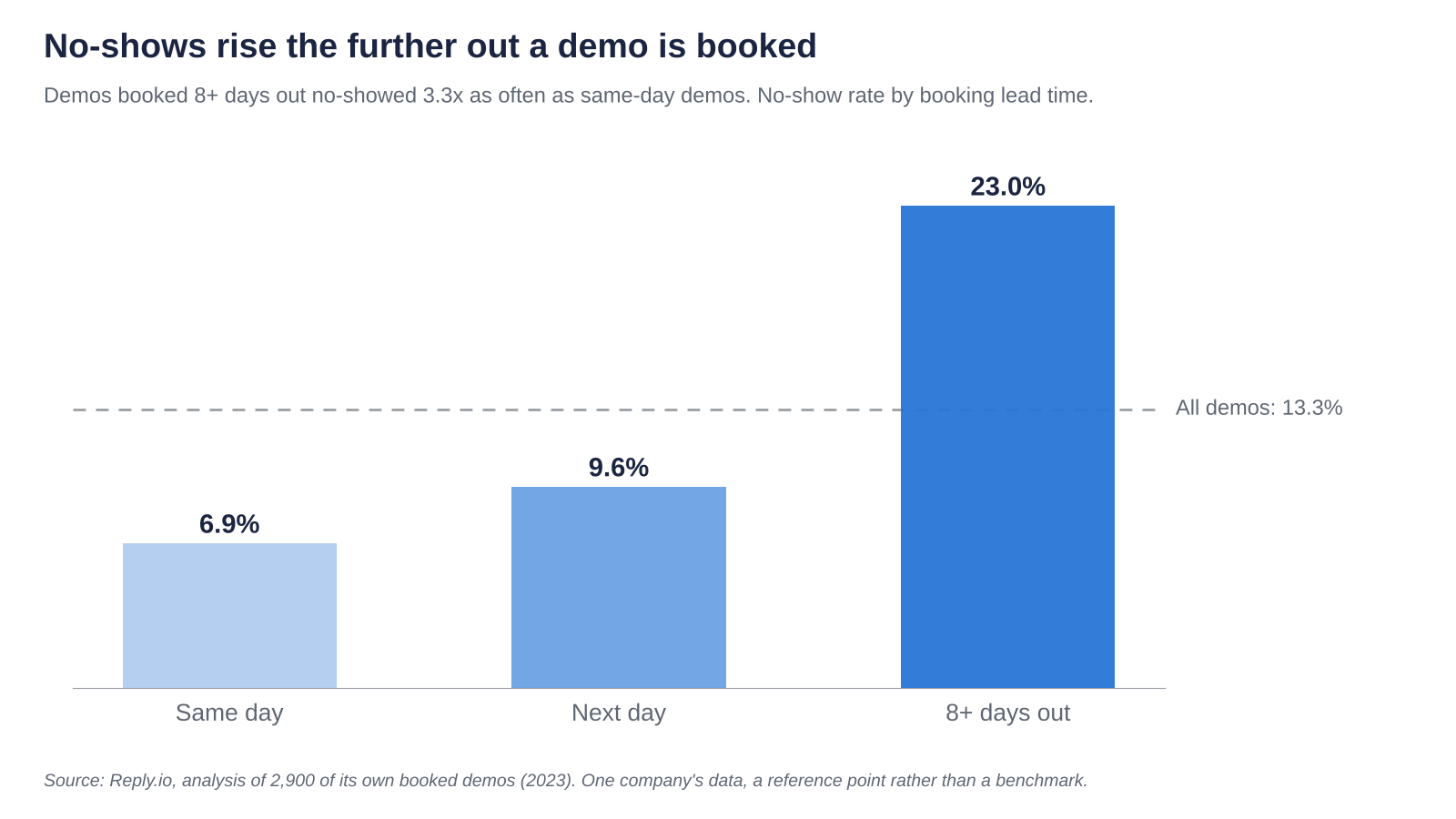
A few habits make the biggest difference:
- Remind twice, on two channels: Send an email 24 hours before and an SMS one hour before. OnceHub's Customizable SMS Notifications, from the Schedule plan, use SMS credits.
- Send an agenda email: Right after booking, ask what they want to cover. A prospect who replies has already committed to the conversation.
- Make rescheduling easy: A self-service link lets a busy prospect move the meeting instead of skipping it. Hosts can also send a Request Reschedule asking the prospect to pick a new time.
- Recover fast: If someone doesn't show, send a rebooking email within 48 hours, while the promotion is still live. Zapier has a OnceHub "booking no-show" trigger to automate Slack alerts or trigger the email sequence.
For the full playbook, see our guide to reducing no-show appointments.
Feed Meetings, Not Form Fills, to Your Ad Platforms
If you run paid campaigns during BFCM, tell the ad platforms which clicks became real meetings, not just which ones filled in a form. OnceHub's Google Tag Manager integration (Enhanced Analytics Integration, Schedule plan) tracks booking events that can be passed to ad platforms as conversions. When you optimize for form fills, the platform finds more people who fill in forms. When you optimize for booked and held meetings, it learns to find people who show up. Our guides to Google Ads for high-ticket sales and lead attribution for booked meetings walk through the setup.
After BFCM: Measure What Worked
The week after Cyber Monday is the best time to learn, while the details are fresh. Four numbers tell you most of the story:
Write down what to change before next November, while you still remember why. If booking itself was the bottleneck, our guide to improving your booking conversion rate is a good next step.
Conclusion: Automate the Speed, Humanize the Sale
During BFCM, speed is part of your offer. A prospect who books in the first minute, gets a call in the first five and sees a real time slot in the next three days has every reason to buy from you rather than from the vendor still working through their inbox.
The way to get there is to automate the parts that don't need a person, such as qualifying, booking, reminding and reassigning, so your reps can spend the holiday rush on the conversations that do.
Ready for the holiday rush? With OnceHub, routing forms qualify inbound leads and show a live calendar instantly, AI phone agents catch overflow calls, and every booking syncs to your CRM. Start a free 14-day trial, with no credit card required, and set it up before BFCM begins.
Frequently Asked Questions
These are the questions sales and marketing teams ask most when they prepare for BFCM.
What is a good speed-to-lead response time in B2B?
Aim to offer a booking option the moment a form is submitted, and to call within five minutes. In Harvard Business Review's research, a companion study of 1.25 million leads found that firms that tried to contact a lead within an hour were nearly seven times as likely to qualify it as firms that tried an hour later. OnceHub's Routing Forms (Route plan) make the first step instant by showing a live calendar inside the form.
How do you route leads instantly from a web form?
Use a routing form that qualifies and books in one step. In OnceHub, Routing Forms (Route plan) ask a few questions, branch on each answer, and show the matching rep's live calendar without the visitor leaving the form. Progressive Form Capture (Route plan) keeps partial answers, so even visitors who leave halfway become leads.
What is the best booking window for sales meetings?
For high-intent leads, a short window of about three bookable days keeps urgency high and reduces no-shows. OnceHub's Booking Window can count bookable days, which counts only days with open availability, so holidays your team has blocked are skipped. If the same booking calendar takes phone bookings, use calendar days, because phone booking doesn't enforce a bookable-day window.
How do you reduce demo no-shows during busy seasons?
Keep bookings close, remind on two channels, and make rescheduling easy. Send an email 24 hours before and an SMS one hour before, plus an agenda email right after booking. OnceHub supports SMS reminders from the Schedule plan, and hosts can send a Request Reschedule instead of losing the meeting.
How should sales teams staff for Thanksgiving week?
Plan coverage two weeks ahead. Have reps block their time off in their calendars, pool the team's availability so prospects see every open slot, and set booking limits so no one is overloaded. In OnceHub, Meeting Reassignment on the Route plan moves a booked meeting to a teammate if a rep is unexpectedly out.
Should you change your booking window for the holidays?
Yes, if your window counts calendar days. Thanksgiving and Black Friday still count toward a calendar-day window even when your team is off, which can leave prospects with only one real day to choose from. Switching to a window counted in bookable days, as OnceHub offers, shows only days with genuine openings, skipping holidays your team has blocked.
How do you handle inbound sales calls during BFCM?
Treat calls as their own channel with their own coverage. An AI phone agent can answer when every rep is busy and book the caller into live availability. OnceHub's phone agent does this from the Schedule plan, and on the Route plan it can screen callers with your routing form's questions first.