

TL;DR
- The best Google Ads lead for a high-ticket business is one who shows up to the meeting. This guide shows how to track and optimize for those leads.
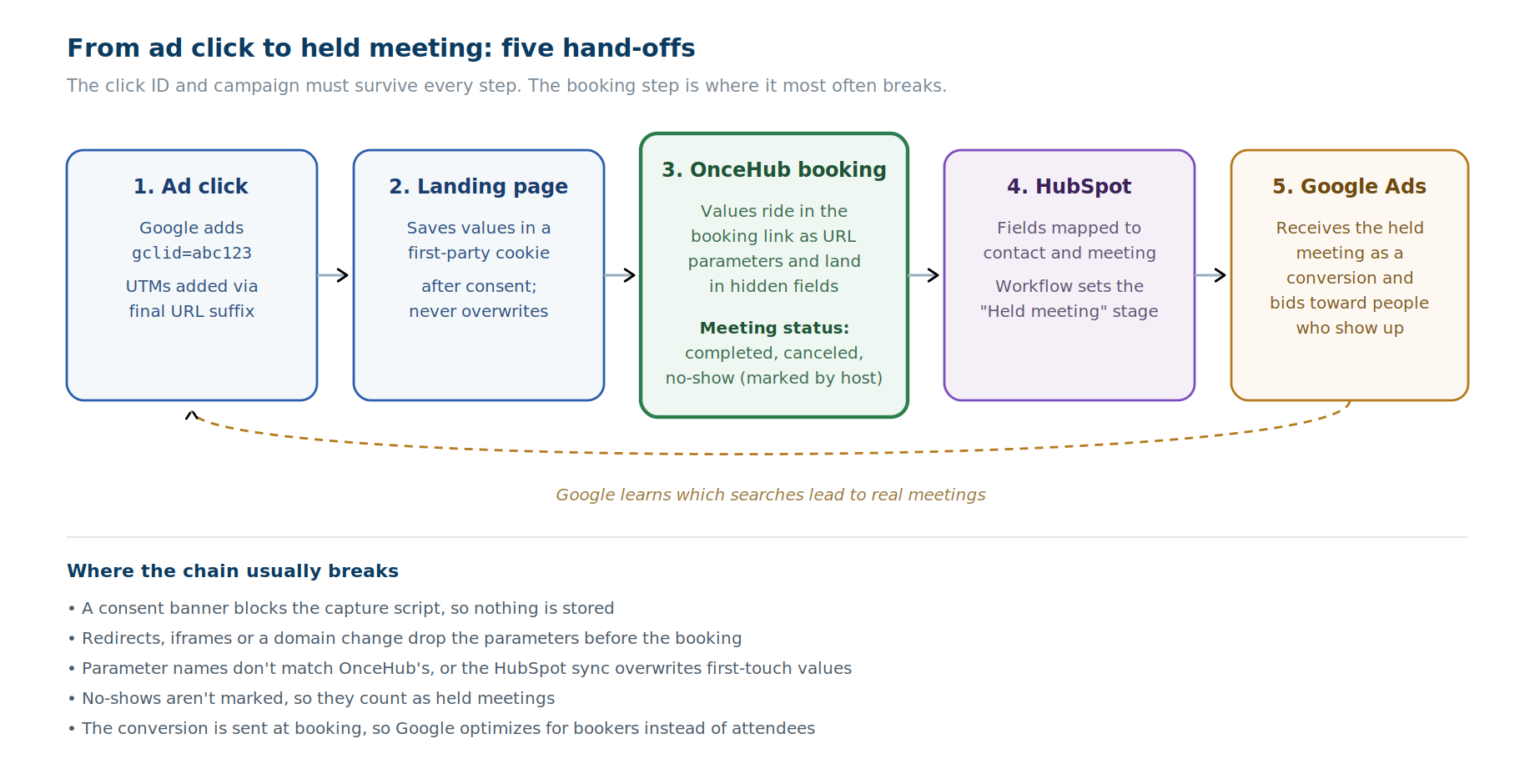
- Tracking data has to survive five hand-offs: the ad click, your landing page, the booking, your CRM, and the conversion sent back to Google Ads. The booking step is where it most often breaks, because many scheduling tools weren't built to carry ad data into a CRM.
- OnceHub captures the Google click ID and UTM parameters in hidden booking-form fields, sends booking events to Google Ads through its native Google Tag Manager integration, and syncs both to HubSpot.
- Fewer no-shows means a lower cost per held meeting. OnceHub's email and SMS reminders and easy rescheduling help more booked leads actually show up.
- Send Google Ads two conversions: a fast "booked" signal and a slower, more accurate "held meeting" signal. Bid on the held meeting once you have enough volume.
Why do Google Ads bring you bookers instead of buyers?
Google Ads optimizes for whatever you tell it is a conversion, so if you count bookings, it finds people who book, not people who buy. For teams selling something expensive enough that the first real step is a conversation, such as wealth management, B2B software, legal services, high-end coaching or consulting, that gap is costly.
These teams share four problems:
- Clicks are expensive, so every booking that never turns into a meeting costs real money.
- Volume is low, so a few no-shows can make a campaign look better or worse than it is.
- Google learns from what you report. Count bookings, and it finds people who book. Count held meetings, and it learns to find people who show up.
- Every no-show wastes a rep's time that could have gone to a prospect who was ready to talk.
The fix is end-to-end lead attribution: knowing which ad produced which held meeting, and telling Google Ads.
What is lead attribution for high-ticket sales?
Lead attribution connects each lead to the ad, campaign and keyword that produced it. For high-ticket sales, it should run past the booking to whether the meeting actually happened.
What does this look like in practice?
A wealth advisory firm runs a Google Ads campaign for "retirement planning advisor."
- Grace clicks the ad. Google adds a click ID to the landing page URL, such as gclid=abc123, and the ad's final URL suffix adds utm_campaign=retirement-q4.
- The landing page saves both values before Grace does anything else.
- Grace clicks "Book a consultation." The firm's OnceHub booking link carries both values, and they land in hidden fields on her booking.
- OnceHub syncs the booking to HubSpot, with the campaign and click ID attached to her record.
- The meeting happens on Thursday. It's recorded as held, HubSpot moves Grace to a "Held meeting" lifecycle stage, and that change is sent to Google Ads as a conversion.
Michael clicks a different ad, books, and doesn't show up. His advisor marks the meeting as a no-show, so no held-meeting conversion is sent for him. An SMS reminder the day before, or a one-click link to reschedule, might have saved his meeting.
Over a few weeks, the firm can see its cost per held meeting by campaign, and Google Ads learns which searches lead to people like Grace rather than people like Michael.
Where lead attribution breaks, and how OnceHub keeps it intact
Think of it as a relay race: each runner has to hand the baton to the next one, and the booking is the hand-off most likely to fail.
|
Hop |
What carries the data |
Where it usually breaks |
How OnceHub handles it |
|
1. Ad click |
Google's gclid and your UTM parameters in the landing page URL |
Auto-tagging off; UTMs missing from the final URL |
Not applicable (set in Google Ads) |
|
2. Landing page |
A first-party cookie or session storage |
Consent banner blocks the script; redirects strip the query string |
Not applicable (set on your site) |
|
3. Booking |
URL parameters on the booking link |
Values not appended; parameter names don't match |
Hidden fields store each value, with exact parameter names shown in the Share popup; GTM tracks booking events automatically on shared links |
|
4. CRM |
Mapped contact and meeting properties |
Wrong properties, overwritten values, missing statuses |
HubSpot mapping for contacts and meetings, with an Overwrite toggle on each contact field |
|
5. Google Ads |
A booking conversion and a held-meeting conversion |
Conversion sent at booking instead of at a held meeting |
GTM booking events or a thank-you page for the fast signal; meeting statuses for the held-meeting signal |
OnceHub includes attribution tracking with UTM tags and hidden fields on every plan, including the free plan. HubSpot integration starts on the Schedule plan.
See it on your own funnel: start a 14-day free trial of OnceHub's Engage plan, with no credit card needed, or see how OnceHub supports high-ticket sales teams.
How to track Google Ads leads to held meetings in 6 steps
Step 1: Tag your ads and capture the click
Turn on auto-tagging in Google Ads. It adds a gclid to every ad click's landing page URL, and Google says auto-tagging is required to import offline conversions.
Add UTM parameters through the final URL suffix, so every ad's landing page URL carries the same campaign naming without editing each ad by hand.
Save the values when the visitor arrives. Your landing page needs to save the click ID and campaign name when the visitor arrives, so they survive until the visitor books. Hand the checklist in the appendix to your developer.
Step 2: Pass the values into your OnceHub booking
Append the saved values to your OnceHub booking link, or set them in the embed code if the booking calendar is embedded on your page.
Use OnceHub's own parameter names. In the Share popup for a Booking Calendar, the Personalization and Tracking option shows the exact parameter name for each question, and you can add UTM parameters to your Booking Calendar there. A mismatch between your parameter names and OnceHub's is one of the most common reasons values never arrive.
Add a hidden field for each UTM and for the gclid. OnceHub's Hidden Field question type stores a value the guest never sees.
- Add it from the Booking Form tab of your Booking Calendar.
- Map it to a field. Field Mapping is required for every hidden field, and it keeps the parameter name stable.
- Set an optional default value, such as "unknown," which is used when no value arrives in the URL. A value from the URL overrides the default.
Pass only click IDs and campaign names. As with any URL parameter, values in the booking link are visible in that link, so never pass personal data this way.
Add a self-reported backup. An optional "How did you hear about us?" question gives you something to work with when tracking fails.
Connect Google Tag Manager. OnceHub's native Google Tag Manager integration sends booking events, such as a scheduled booking, to your GTM container. Once connected, event tracking works automatically for any OnceHub links you share. For booking calendars embedded on your own site, add OnceHub's tracking script to that page. From GTM, the events can go to Google Ads, Google Analytics, the Meta pixel, Floodlight and other tags.
Step 3: Sync to HubSpot
OnceHub's HubSpot integration has a Contacts tab and a Meetings tab for mapping OnceHub data to HubSpot fields. It must be authorized by a HubSpot Super Admin.
Map UTMs to your own custom properties, not HubSpot's Original Source. HubSpot sets Original Source itself, and you want your ad data kept separate and under your control.
Map the gclid to HubSpot's "Google ad click id" contact property, if your mapping lists it. HubSpot's native Google Ads sync reads the click ID from that property. Without it, the sync relies on matching contact data such as email.
Use the Overwrite toggle deliberately. On the Contacts tab, each mapping has an Overwrite toggle that decides whether existing HubSpot data is replaced:
- First-touch fields (the first campaign that brought this person in): overwrite off.
- Latest-touch fields (the campaign behind the most recent booking): overwrite on.
Should UTMs and the gclid live on the contact or the meeting?
|
On the contact |
On the meeting |
|
|
Strengths |
Simple; one place to see a person's source; easy in lists, workflows and reports |
Every booking keeps its own source, so repeat bookings and reschedules stay accurate |
|
Weaknesses |
One value per property, so repeat bookings overwrite it or keep only the first |
More setup; meeting-based reports take more work to build |
|
Best for |
First-touch attribution |
Per-booking and latest-touch attribution |
Our recommendation: put first-touch fields on the contact, with overwrite off. Put per-booking fields on the meeting, if your hidden fields appear as options on the Meetings tab of OnceHub's HubSpot integration. If they don't, put latest-touch fields on the contact with overwrite on, and accept that you only keep the most recent booking's source.
Step 4: Define a held meeting
A held meeting is a booking that was not canceled, not marked as a no-show, and whose meeting time has passed.
Make it a HubSpot lifecycle stage. HubSpot's native Google Ads sync sends lifecycle stage changes as conversions, so a custom property on its own won't reach Google Ads through that route. A HubSpot workflow can set the stage. OnceHub can also map its own contact status to a HubSpot lifecycle stage, so if your OnceHub setup updates that status when a meeting is held, you may not need the workflow.
Keep meeting statuses accurate. In OnceHub, a booking can be scheduled, rescheduled, canceled, completed or no-show, and those statuses decide what counts as a held meeting.
- Prevent no-shows first. Email and SMS reminders, and an easy way to reschedule, reduce how many no-shows there are to mark.
- Then mark the ones that happen. In OnceHub, a booking becomes a no-show when someone changes its status. Make marking no-shows part of each host's routine, or they will look like held meetings in every report.
- Check that statuses reach HubSpot. If cancellations and no-shows don't update the HubSpot meeting record, add an automation. OnceHub's Zapier triggers and webhooks fire on booking lifecycle events, including canceled, completed and no-show.
Step 5: Send conversions back to Google Ads
Use two signals. Each fixes the other's weakness.
|
Signal A: booking |
Signal B: held meeting |
|
|
How it's sent |
A GTM booking event or a thank-you page tag |
An offline conversion from HubSpot |
|
Speed |
Near real time |
Days after the click |
|
Accuracy |
Counts bookings, including future no-shows and cancellations |
Counts only meetings that happened |
|
Setup |
Simple |
More involved |
|
Use in Google Ads |
Secondary action (reported, not bid on) |
Primary action (used for bidding) |
Signal A: the booking
You have two ways to fire the booking conversion:
- A GTM booking event. With OnceHub's Google Tag Manager integration connected, fire your Google Ads conversion tag on OnceHub's scheduled-booking event.
- A thank-you page. Set your Booking Calendar to redirect guests to a thank-you page on the same domain as your landing page, and fire the conversion tag there. Automatic redirect is available on the Schedule plan and above.
For the thank-you page route:
- Redirect on schedule only. OnceHub lets you set separate redirect URLs for scheduling, rescheduling and canceling. Point only the "after guest schedules" redirect at the page with your conversion tag, so reschedules and cancellations don't count as new bookings.
- Keep personal data off that page's URL. OnceHub's "Include saved answers on redirect page" toggle can pass booking details to the redirect URL, including the guest's name and email. If your thank-you page runs ad or analytics tags, leave that toggle off.
Either way, Signal A depends on Google's cookie surviving (same browser and device, consent given), and it does nothing for your HubSpot reporting.
Signal B: the held meeting
HubSpot's native sync (simplest). In HubSpot, create an ad conversion event for your Google Ads account that syncs your "Held meeting" lifecycle stage. It requires Marketing Hub Starter, Professional or Enterprise. HubSpot sends these using Google's enhanced conversions for leads, which can match on the contact's hashed email as well as the click ID.
Two caveats from HubSpot's documentation: only stage changes that happen after you create the event are sent, and you can choose to sync all contacts who reach the stage or only those who interacted with your ads.
A file upload (more control). Export held meetings with their gclid, conversion name and timestamp, and import them through Google Ads Data Manager. Developers uploading through code should see the appendix.
Upload windows
- Click ID only: Google won't import an offline conversion uploaded more than 90 days after the click.
- Enhanced conversions for leads: the window is 63 days after the click.
For most high-ticket sales, the first meeting happens well within both windows. Upload held meetings at least weekly, so none age out.
Start with enhanced conversions for leads
Google recommends starting with enhanced conversions for leads rather than basic offline conversion import if you haven't set up either yet. It adds hashed contact details such as email to each conversion, which helps when a gclid is missing. Keep sending gclids wherever you have them.
Since April 2026, enhanced conversions for web and for leads are combined into a single on/off setting in Google Ads.
If you use a consent banner, turn on Google's Consent Mode so Google can model part of the conversions it can't observe.
Set primary and secondary actions
Make the held meeting your primary conversion action, so bidding optimizes toward real meetings, and the booking a secondary action, which is reported but not used for bidding.
If you don't yet have enough held meetings for Google to learn from, start with booking as the primary action, then switch once volume builds. The gap between the two signals is useful in itself: it shows your no-show and cancellation rate by campaign.
Step 6: Test before you launch
Run one complete test before real budget goes through it:
- Book from a URL that has UTMs and a test gclid.
- Check the values at every hop: browser storage, the OnceHub booking record, the HubSpot contact and meeting.
- Cancel and rebook. Confirm first-touch values stayed the same and latest-touch values updated.
- Mark the meeting as held. Confirm the lifecycle stage changes and the conversion appears in Google Ads.
- Mark a test booking as a no-show. Confirm nothing is sent for it.
How to get more held meetings from the same ad spend
Attribution tells you which leads show up; your booking flow decides how many do. These OnceHub capabilities turn more of the same clicks into held meetings:
- Qualify and route before booking. A Routing Form asks a few questions first and sends good-fit leads to the right calendar, so reps spend time on prospects who can buy. Routing Forms are on the Route plan.
- Keep leads who don't finish. Routing Forms save contact information even from incomplete submissions, so a high-ticket prospect who abandons partway is still a lead with a campaign attached.
- Book with the right owner. On the Route plan, meetings can be assigned to the contact's owner in your CRM, so returning prospects reach the rep who already knows them.
- Remind and reschedule. Email reminders, SMS reminders using SMS credits, and a reschedule link in every confirmation help booked leads keep or move their meeting rather than miss it.
- Talk to hot leads now. On the Engage plan, high-value leads can start an instant meeting instead of waiting days for a slot.
For more on qualifying and engaging leads before they book, see our guide to generating and qualifying inbound leads and the lead acceleration playbook.
Which reports show lead quality by campaign?
Start with OnceHub's own booking analytics, then build the full picture in HubSpot. OnceHub's Booking Analytics lets you filter bookings by status, including completed, canceled, no-show and rescheduled, as well as by booking link and host, which gives you a quick read before HubSpot dashboards are built.
In HubSpot, these are the reports that matter for a high-ticket team:
- Bookings and held meetings by campaign, from UTM campaign.
- The full funnel: booked, held, sales-qualified, deal, closed won.
- Cancellation and no-show rate by campaign. A campaign with cheap bookings and a high no-show rate is not a cheap campaign.
- Cost per held meeting (ad spend ÷ held meetings), the number to watch for budget decisions.
- Unattributed share: the percentage of bookings with no UTM or gclid, tracked over time. Set a target for your own funnel and watch for sudden jumps, which usually mean something in the chain broke.
- Fallback attribution: classify unattributed bookings by referrer, landing page or the self-reported answer, rather than leaving them blank.
Start with one pilot funnel that has steady bookings, get it working end to end, then roll out to the rest.
How scheduling tools compare for Google Ads lead attribution
Each tool handles part of this chain well; the differences are in click ID capture, Tag Manager support, and how first-touch data is protected. The comparison below is based on each vendor's own documentation as of October 2026.
|
Capability |
OnceHub |
Calendly |
HubSpot Meetings |
Chili Piper |
|
UTM capture |
Hidden booking-form fields filled from URL parameters |
UTM parameters on links and embeds |
Source, medium and campaign of the last booking, set automatically |
Captured automatically when present in the URL |
|
First-touch vs latest-touch |
Overwrite toggle per HubSpot contact field |
Not documented |
Last booking only |
Separate Original and Recent UTM fields |
|
gclid stored with the booking |
Yes, in a hidden field |
Not documented |
Not documented |
Through hidden fields on your own web form |
|
Native Google Tag Manager |
Yes; automatic on shared links, script for embeds |
No direct integration; GA4 integration available |
Not documented |
Not in official docs; described in community posts |
|
Gets data into HubSpot |
Contact and meeting mapping, from the Schedule plan |
HubSpot integration |
Native: meetings live in HubSpot |
Data fields map to CRM fields |
"Not documented" means we found no mention in the vendor's own documentation, not that the capability is confirmed absent.
A few fair notes:
- Calendly supports UTM tracking, Google Analytics 4 and the Meta pixel, but its help center says it doesn't support direct integration with Google Tag Manager.
- HubSpot Meetings needs no sync at all, because meetings already live in HubSpot. Its built-in UTM properties keep only the last booking's source.
- Chili Piper is the strongest here on first-touch versus latest-touch, with separate Original and Recent UTM fields captured automatically.
What about privacy, GDPR and CCPA?
Tracking ad clicks through to a CRM involves personal data, and the rules depend on where your visitors are.
- Ask before you store. Under GDPR and similar laws, cookies used for advertising measurement generally need consent. Hold values in memory until consent is given.
- Honor opt-outs. California's CCPA gives residents rights over the sale or sharing of their personal information, which can include sending it to ad platforms. Make sure your opt-out process reaches the conversion sync, not just your website.
- Send only what you need. Click IDs and campaign names do the job. Don't pass names, emails or booking answers in URLs that ad tags can read.
- Document the flow. Note which systems receive which data, so your privacy notice matches what you actually do.
OnceHub's credentials matter here, especially for regulated teams such as wealth advisors. OnceHub provides tools to help users maintain compliance with GDPR, FINRA, HIPAA and FERPA, holds a SOC 2 Type 2 report, and offers cookie banner integration for Routing Forms on the Route plan and above. Details are in the OnceHub Trust Center.
This is general guidance, not legal advice. Confirm your setup with your legal or privacy team.
Why high-ticket teams choose OnceHub
- Ad data that survives the booking. Hidden fields capture the gclid and UTMs on every plan, including the free plan.
- Booking events in Google Tag Manager. The native GTM integration tracks shared OnceHub links automatically.
- Controlled HubSpot sync. Contact and meeting mapping with an Overwrite toggle per contact field, from the Schedule plan.
- More held meetings. Routing, partial lead capture and CRM owner assignment on the Route plan, reminders and rescheduling on every booking, and instant meetings on Engage.
Start a 14-day free trial: every signup gets free access, with no credit card needed, to OnceHub's Engage plan. Or see OnceHub for high-ticket sales.
Frequently asked questions
How do I improve Google Ads lead quality for high-ticket sales?
To improve Google Ads lead quality for high-ticket sales, optimize for held meetings instead of bookings. Track each click to its booking and whether the meeting happened, send held meetings back to Google Ads as your primary conversion, and qualify leads with a short form before they book so reps meet good-fit prospects.
What is lead attribution?
Lead attribution connects each lead to the ad, campaign and keyword that produced it. For high-ticket sales, it should continue past the booking to whether the meeting actually happened, so you can measure cost per held meeting rather than cost per booking.
Which scheduling tool can pass the gclid to HubSpot?
OnceHub can pass the gclid to HubSpot: its booking links accept URL parameters that fill hidden fields, and its HubSpot integration maps those fields to HubSpot properties, with an Overwrite toggle for each contact field. Chili Piper can carry a gclid through hidden fields on your own web form.
Does Calendly integrate with Google Ads?
Calendly doesn't offer a native Google Ads integration, and its help center says it doesn't support direct integration with Google Tag Manager. It does support UTM parameters on scheduling links and embeds, a Google Analytics 4 integration and the Meta pixel, which can support Google Ads tracking indirectly.
How do I reduce no-shows from paid leads?
To reduce no-shows from paid leads, send email and SMS reminders before each meeting, include an easy reschedule link in every confirmation, and qualify leads before they book. Then mark the no-shows that still happen, so your held-meeting reporting stays accurate.
Can I track Google Ads leads to meetings without a developer?
You can do most of it without a developer. Auto-tagging, UTMs, OnceHub hidden fields, the Google Tag Manager connection and the HubSpot mapping are all configuration. Saving the click ID on your landing page before the visitor books usually needs a developer or a tag manager setup.
How long do I have to upload an offline conversion to Google Ads?
Google won't import an offline conversion uploaded more than 90 days after the click when matching on the gclid. With enhanced conversions for leads, which match on hashed contact details, the window is 63 days. Uploading held meetings at least weekly keeps you well inside both.
How does OnceHub help with no-shows?
OnceHub helps prevent no-shows with email and SMS reminders and easy rescheduling from every confirmation. For the no-shows that still happen, hosts change the booking's status to no-show, which keeps held-meeting reporting accurate, and the status change can trigger automations through OnceHub's Zapier and webhook integrations.
Is tracking the gclid compliant with GDPR and CCPA?
Tracking the gclid can be compliant with GDPR and CCPA if you collect consent where required, honor opt-outs, and send only the data you need. Advertising cookies generally need consent under GDPR, and CCPA opt-outs can cover sharing data with ad platforms. Confirm your specific setup with your legal or privacy team.
Appendix: developer checklist
Capturing the click on your landing page
- Save the UTMs and gclid on the first page load, in a first-party cookie or session storage. The visitor may browse a few pages before booking, and later URLs won't carry the parameters.
- Never overwrite stored values on later pages. Only write when the URL contains new values.
- Capture server-side where you can. Read the parameters on the first request and set a first-party cookie from your own server, on your root domain. That copes better with ad blockers and browser cookie limits than a client-side script.
- Keep the full query string through redirects. HTTP to HTTPS, www to non-www, trailing slashes and link shorteners can all drop it. Use the final URL as the ad's destination.
- Respect consent. Keep values in memory or in the URL on the first page, and write the cookie only after consent is given.
- Pass values in the URL first, and use storage as the fallback. If a visitor goes straight from the ad to the booking in one visit, the URL alone carries the data.
- Test it. Use a clean browser, accept and decline the consent banner, and check what was stored in your browser's developer tools.
Uploading conversions through code
Since June 15, 2026, Google has moved offline conversion and enhanced conversions for leads uploads to the Data Manager API, and blocks them in the Google Ads API except for allowlisted legacy setups.
Common failure points
- The consent banner blocks the capture script, so nothing is stored.
- Parameters are lost at the booking hand-off, through redirects, iframes or a change of domain.
- Parameter names don't match OnceHub's field names.
- The HubSpot sync overwrites first-touch values or skips existing contacts.
- No-shows aren't marked, so they're counted as held meetings.
- The conversion is sent at booking instead of at the held meeting, so Google optimizes for bookers rather than attendees.
Sources
OnceHub (vendor-published, ours; checked October 2026)
- URL Parameters: Syntax and Processing Rules
- Adding UTMs to Your Booking Calendar
- How to Pass Booking Data using Hidden Fields: hidden fields, required field mapping, default values.
- Booking Calendar Redirect: separate redirects after schedule, reschedule and cancel; the option to pass booking details to the redirect page.
- Connect OnceHub to Your Google Tag Manager and Tracking OnceHub Events in Google Tag Manager: automatic event tracking on shared links; script for embeds; events sent to Google Ads, Google Analytics, Meta pixel and Floodlight.
- Integrating OnceHub with HubSpot: Contacts and Meetings mapping tabs, the Overwrite toggle, Super Admin authorization, contact status mapping.
- OnceHub Triggers and Actions for Zapier: booking lifecycle triggers.
- Booking Analytics: filtering bookings by status, link and host.
- OnceHub pricing: attribution tracking on all plans; HubSpot integration and automatic redirect from Schedule; Routing Forms, progressive capture, CRM owner assignment and cookie banner integration on Route; instant meetings on Engage; 14-day Engage trial; SOC 2 Type 2.
HubSpot
- Create and sync ad conversion events with your Google Ads account: lifecycle stage events synced using enhanced conversions for leads; Marketing Hub Starter, Professional or Enterprise; sync scopes.
- HubSpot's default contact properties: source, medium and campaign of last booking in the meetings tool.
Google Ads
- Guidelines for importing offline conversions: 90-day and 63-day upload limits.
- Offline conversion imports FAQs: recommendation to start with enhanced conversions for leads.
- Fix discrepancies and errors in offline conversion imports: migration of uploads to the Data Manager API from June 15, 2026.
Competitors
- Calendly + Google Analytics: no direct Google Tag Manager integration; UTM parameters on links and embeds.
- Chili Piper's Standard Data Fields List and Concierge Form Mapping: automatic UTM capture with Original and Recent fields; hidden field mapping.
Disclosure: OnceHub publishes this guide. Google Ads, HubSpot and competitor features are described from their own documentation as of October 2026 and change often. This guide is not legal advice.