


The most effective B2B lead generation strategies built on automated scheduling all reduce the gap between intent and conversation.
Automated scheduling for B2B lead generation is the practice of letting a qualified prospect book a meeting directly from your site or an outbound email, with qualification and routing applied before the calendar appears, removing the response-time gap entirely.
The five strategies that matter most:
- Replace static contact forms with direct booking so intent converts on the page instead of becoming a task in someone's queue.
- Screen prospects before showing a calendar so qualification happens in front of availability, not behind it.
- Route qualified leads to the right rep automatically using form answers, CRM ownership, or team distribution rules.
- Embed personalized booking links in outbound sequences so a reply is never the thing standing between interest and a meeting.
- Reduce no-shows after the booking to protect everything the first four earn you.
A high-intent buyer lands on your pricing page, requests a demo, and waits. An SDR picks it up tomorrow morning or the morning after. By then, the buyer has three other tabs open, and one of those companies got back to them in four minutes.
That is not a marketing problem or a product problem. It is a scheduling problem, and it is more common than most teams believe.
According to RevenueHero's 2024 mystery shop of 1,000 B2B SaaS companies, 63.5% never responded to a demo request at all. Among the companies that did respond, the average wait was one day, five hours. Only 17.2% replied within two minutes.
Most guides on this topic treat AI lead generation as a data science project involving predictive scoring and a CRM overhaul. That work has its place. But the fastest revenue available to most B2B teams sits at the bottom of the funnel, in the minutes between someone raising their hand and someone talking to them.
Why scheduling is now a lead generation channel
The old sequence went: form submission, internal notification, SDR email, prospect reply, back and forth on times, calendar invite. Six steps, usually spanning days, each one a place to lose someone.
The new sequence is: form submission, calendar, booked. One step.
That compression is the whole argument, and there is now decent data on what it is worth.
What the speed-to-lead research actually says
You have probably seen the claim that responding within five minutes makes you 21 times more likely to qualify a lead, usually credited to Harvard Business Review. The figure is real, but it is older than the article most people cite. It originates in the 2007 Lead Response Management Study by Dr. James Oldroyd, then at MIT Sloan, with InsideSales.com, and the precise finding is that contacting a web lead within five minutes makes you 21 times more likely to qualify it than contacting them at 30 minutes. HBR published Oldroyd's follow-up research with Kristina McElheran and David Elkington in March 2011, which is where most people first met the number. That later study audited 2,241 US firms and found an average first response of 42 hours.
The current version is more useful anyway. Artemis GTM's 2026 speed-to-lead benchmark found that conversion falls off a cliff in the first hour:
|
Response time |
Lead-to-opportunity conversion |
|
Under 5 minutes |
21% |
|
5 to 30 minutes |
13% |
|
30 to 60 minutes |
8% |
|
1 to 24 hours |
5% |
|
Over 24 hours |
2.3% |
Source: Artemis GTM 2026 Speed-to-Lead Benchmark, 253,817 inbound lead responses across 1,247 companies. Artemis describes the study as directional — drawn from their audits and industry benchmarks rather than a controlled experiment — so treat the shape of the curve as more reliable than any single figure.
The curve is steep at the front and flat at the back. A lead you reach in four minutes is worth roughly nine times a lead you reach after 24 hours, and roughly four times one you reach later the same day. Nothing else in your funnel offers that kind of return for that little effort.
Automated scheduling removes the response step entirely — the prospect books while intent is still live, with no reply to wait for.
There is a second reason this matters. The Salesloft/Drift Conversational AI Marketing Trends Report (January 2024), drawn from more than 30 million conversations across Drift instances during 2023, found that within its East Coast customer base, 39% of conversations happened outside normal business hours, and 41% of meetings booked happened outside 9 to 5. If your only path to a meeting runs through a human reading an inbox, a large share of interested buyers arrive when nobody is there.
Strategy 1: Replace the contact form with a calendar
Standard "contact us" forms are where intent goes to cool off. The prospect submits, receives a thank-you page, and then experiences silence of unknown duration.
The fix is to put booking on the pages where intent is highest: pricing, demo, contact, and the bottom of comparison content. Not a form that generates a task, but a calendar that produces a confirmed meeting.
The size of the opportunity here is larger than most teams assume. RevenueHero's analysis of over one million inbound form submissions found the median qualified-lead-to-booked-meeting rate sits at 62%, with the top decile above 78%. Nearly four in ten already-qualified leads never make it into a meeting at all, lost to review queues, delayed follow-ups, and timezone mismatches.
Chat is the other half of this. OnceHub's web-based chatbots hold a conversation with a visitor, answer the question blocking them, and surface live calendar availability inside the chat widget when the conversation turns toward buying — so the visitor never leaves the page or fills in a form. Given that 39% of buyer conversations happen outside working hours, this is often the only thing standing between an evening visitor and a booked meeting. And for prospects who call rather than browse, OnceHub Phone Agents answer in natural language, collect the same information your booking form would, and schedule the meeting on the same after-hours logic.
What to change this week: find the three highest-intent pages on your site and replace "request a demo" with a booking experience. Then look at what the button says. In our experience, teams that use "Book" rather than "Request" tend to convert better, because the wording sets an expectation of immediacy.
Strategy 2: Qualify before you show the calendar
Opening your calendar to everyone creates a different problem. Your AEs fill their weeks with students, competitors doing research, and companies with a tenth of your minimum deal size.
The instinct is to add form fields as a filter. That backfires because every additional field reduces the number of people who complete it, including the good ones — and fields that feel intrusive, like phone number and physical address, tend to depress completion more than neutral ones.
The better approach is conversational screening that branches. OnceHub Routing Forms ask two or three qualifying questions before any calendar availability appears, then branch the visitor to a booking page, a self-serve resource, or a different rep based on the answers:
- Qualified prospects see the calendar immediately and book.
- Prospects who are not a fit today get redirected to something genuinely useful instead: a recorded product walkthrough, a self-serve trial, a relevant guide. They are not rejected; they are routed somewhere that fits where they actually are.
- Partial fits can go to a lighter-touch path, such as a shorter introductory call with a BDR rather than a full demo with a senior AE.
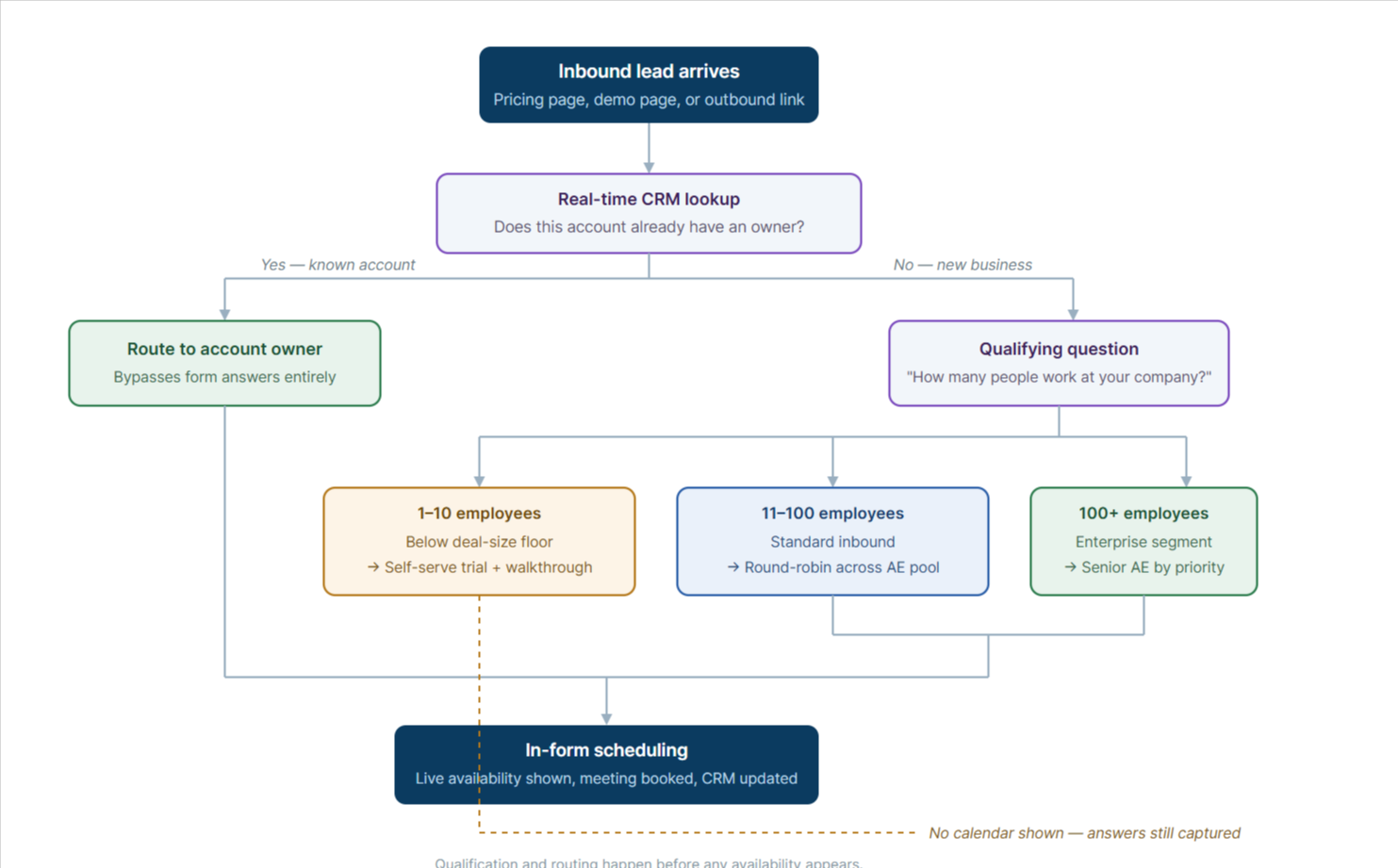
Two mechanics make this work better than a standard form. Questions delivered one at a time reduce the sense of an interrogation, and progressive response capture saves answers as they are given, so a prospect who abandons halfway still leaves you something to follow up on.
The number worth tracking here is your qualification pass rate. If 95% of people pass, your questions are decorative. If 20% pass, you are probably turning away buyable pipeline.
Strategy 3: Route the lead to the right person automatically
A Fortune 500 enterprise inquiry should not land on a junior SDR's calendar. A prospect in London should not book with an AE in Los Angeles who will offer them a 2am slot. And an existing customer's expansion inquiry should reach the account owner, not the new business team.
Routing solves this at the moment of booking, before anyone has to notice and fix it manually.
OnceHub supports round-robin, form-answer, CRM-ownership, and maximum-availability distribution, with live Salesforce and HubSpot lookups at the moment of booking. Four patterns cover most B2B use cases:
Round-robin distributes evenly across a pool. Useful for inbound SMB volume where any rep can take any lead. Worth checking how your platform defines "evenly," since some assign based on total calendar volume rather than leads received, which quietly penalizes whoever has the busiest internal meeting schedule.
Routing by form answer sends the lead based on what they told you: company size, region, product interest, use case.
Routing by CRM ownership is the one that matters most for account-based motions. A real-time lookup in Salesforce or HubSpot checks whether the person's company already has an owner and routes the meeting to that rep, regardless of what the form said. This prevents the most damaging routing failure in ABM, which is a strategic account being handed to someone who has never spoken to them.
Maximum availability distribution combines the team's availability and distributes by priority, which matters when your best-qualified leads should reach your strongest closers rather than whoever happens to be free.
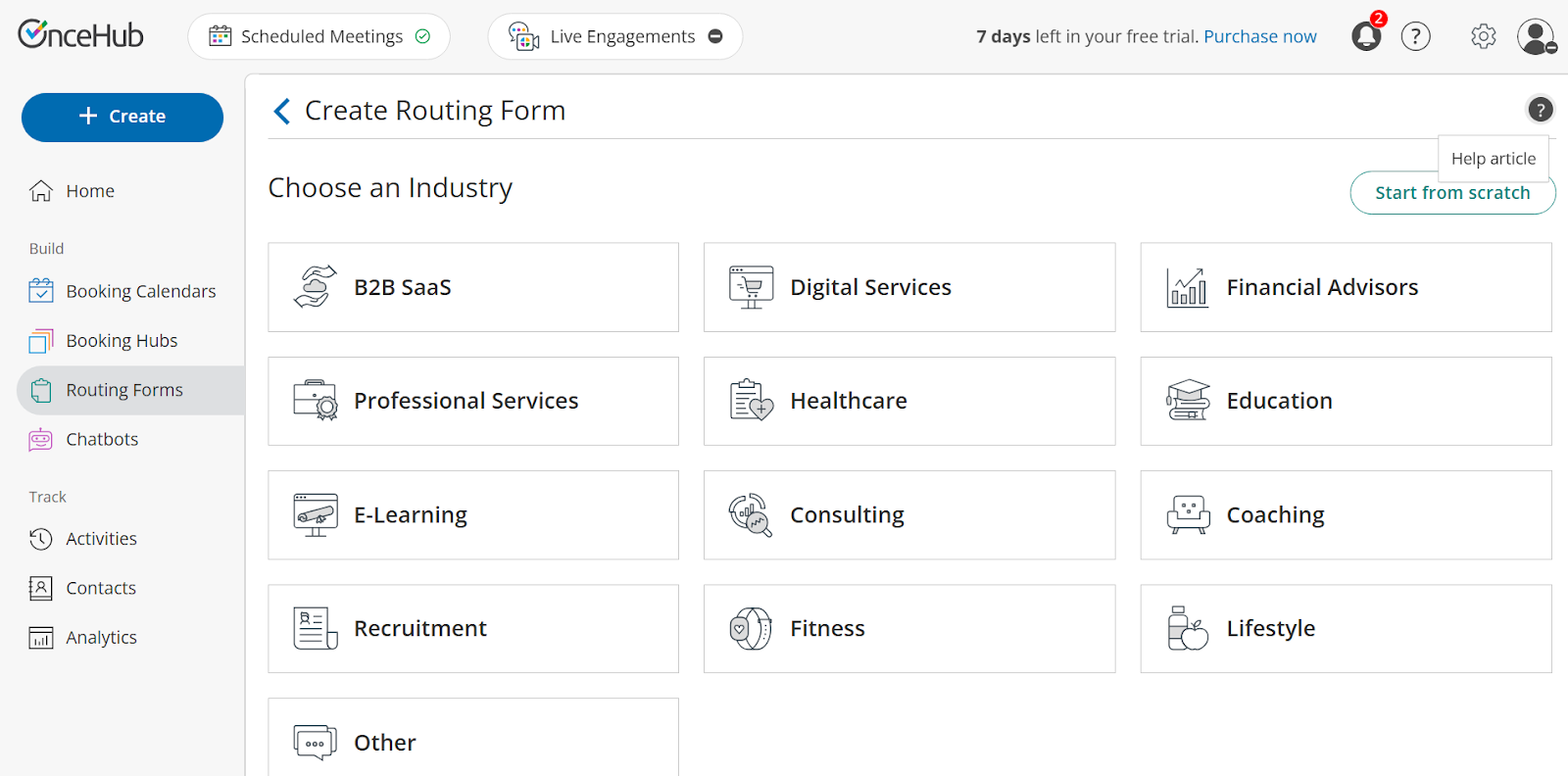
If you run several offers or several teams, OnceHub Booking Hubs groups multiple booking calendars into one branded page so a prospect picks their path and lands in the right place, rather than choosing between six links in a footer.
One technical detail worth understanding: when availability checking and booking happen in the same system, there is no window where two prospects can be offered the same slot. Tools that verify availability through a separate API call leave that gap open, and it surfaces exactly when volume is highest.
Strategy 4: Put booking links inside outbound
Ending a cold email with "let me know if you have some time next week" asks the prospect to do work. They have to reply, propose times, and wait for confirmation. Each step loses people.
A booking link ends the sequence in one click.
Cold and warm outreach: Replace the soft close with a specific one. Not "would you be open to a chat," but a link to a fifteen-minute slot with a clear agenda. Keep the meeting short in outbound; a 15-minute ask converts considerably better than a 45-minute one.
Intent-triggered scheduling: Connect your marketing automation so that a booking link goes out at the moment of highest intent rather than on a fixed schedule. Someone downloads a comparison guide, their lead score crosses your threshold, and a personalized email lands with a link to book. The trigger is the behavior, not the calendar date.
Stalled deal revival: Set up an automated sequence for CRM records that have gone quiet for 60 days. The offer should be low-friction and genuinely useful — a short strategy review rather than a rescheduled demo — with a link attached. This is one of the cheapest pipelines available to most teams because these people already know who you are.
A note on channel: SMS reminders and follow-ups get read faster than email, but they carry compliance obligations under the TCPA in the US and equivalent rules elsewhere. Get consent properly, and keep opt-out handling clean. This is not legal advice — check the FCC's guidance on robocalls and texts and confirm your approach with your own counsel. (In OnceHub, customizable text notifications are available from the Schedule plan up and run on SMS credits.)
Strategy 5: Protect the meetings you booked
A booked meeting is not in the pipeline until someone shows up.
Be careful with benchmarks here, because "no-show rate" is one of the most abused numbers in B2B. Published figures range from 6.5% to over 30%, and they are measuring different things. RevenueHero's benchmark of 6,428 meetings from one week in December 2024 found a 6.5% overall no-show rate — though that sample is drawn from customers already running instant scheduling, so it sits at the optimistic end. Several 2026 SaaS reports imply something closer to a third. A meeting requested by a prospect on your pricing page and a meeting extracted by an SDR on a cold call are different objects wearing the same label. Measure your own, split by source.
What is consistent across the data is the relationship between booking lead time and attendance. Reply.io analyzed 2,900 of its own booked demos and found no-show rates of 6.9% for same-day meetings, 9.6% for next-day, and 23.0% for meetings booked eight or more days out. That gradient is a within-source comparison — same team, same logging rules, varying only by delay — which makes it more usable than most cross-vendor benchmarks, though it is observational, so faster-booking prospects may simply be more motivated. Nothing about the prospect changed in those eight days. Their priorities did.
That gives you the single highest-leverage fix: shorten the gap between booking and meeting. Open more near-term availability rather than protecting your calendar three weeks out.
Then layer the sequence:
- At booking, send the calendar invite with the video link already in it. Not a follow-up email containing the link, the invite itself.
- 24 hours before, send a reminder carrying something of value rather than just a nudge. A short agenda, a one-paragraph note on what the call will cover, or a 60-second product video. This does double duty: it reduces no-shows, and it reduces the number of prospects who arrive with no memory of why they booked.
- One hour before, send an SMS. This is the one that catches people who are in back-to-back meetings.
- In every message, include a reschedule link. Prospects who cannot make it will either reschedule or ghost, and the only thing determining which is how easy you made the first option.
Which B2B scheduling metrics actually predict pipeline
Total meetings booked is a vanity metric. It rewards volume and hides the cost of an unqualified pipeline. Track the funnel instead:
|
Metric |
What it tells you |
|
Visitor to booking-link click rate |
Whether your CTAs are on the right pages and worded well |
|
Qualification pass rate |
Whether your screening questions are too loose or too tight |
|
Qualified-to-booked rate |
Whether qualified people are actually completing the booking |
|
Booking lead time |
Your strongest predictor of show rate |
|
Meeting show rate, split by source |
Which channels produce meetings that happen |
|
Meeting to opportunity rate |
Whether your qualification is selecting the right things |
OnceHub's recommended measurement framework for scheduling-driven pipeline. These are the metrics we suggest tracking, not benchmark figures. Set your own baselines before comparing against published numbers.
The pair worth watching together is the qualification pass rate and the meeting-to-opportunity rate. If the pass rate falls and the opportunity rate rises, your screening is working. If both fall, you have tightened the wrong criteria.
How to turn your calendar into a lead generation engine
B2B buyers in 2026 expect the same friction-free experience they get everywhere else. If booking time with you takes three emails and a two-week wait, someone else will make it take thirty seconds.
None of the five strategies above requires new headcount or a bigger budget. They require moving the qualification step in front of the calendar instead of behind it.
OnceHub's Basic plan is free for one user with one connected calendar and one booking link — enough to test the basic booking flow end to end. The Schedule plan starts at $10 per seat per month billed annually ($12 monthly) and adds unlimited booking links, Branded Booking Hubs, Salesforce and HubSpot integrations, and dedicated booking phone numbers. Routing Forms, round-robin distribution, maximum availability distribution, and CRM-owner assignment sit on the Route plan at $19 per seat per month billed annually ($23 monthly). New signups get a 14-day trial of the top Engage tier and can downgrade to Basic at the end.
Frequently asked questions
How does automated scheduling improve B2B lead generation?
It removes the delay between a prospect showing intent and a meeting existing. Instead of a form submission creating a task for someone to act on later, the prospect books directly, and the meeting is confirmed instantly. This matters because conversion falls sharply with response time: leads reached within five minutes convert at roughly 21%, compared with 2.3% after 24 hours. Automated scheduling removes the response step rather than trying to make your team faster.
How do you qualify leads before they book a meeting?
Put a short screening form in front of the calendar rather than after it. Two or three questions covering company size, budget range, timeline, or use case, with branching logic that decides what the prospect sees next. Qualified prospects get availability immediately. Prospects who are not a fit get redirected to a self-serve resource rather than a calendar slot. The important detail is that the questions come before any availability is shown, so the answers can actually change the outcome rather than just being recorded alongside a booking that already happened.
What is the difference between round-robin and account-based lead routing?
|
Routing type |
How the lead is assigned |
Best for |
|
Round-robin |
Evenly across a pool of reps, regardless of who the lead is |
High-volume inbound where any rep can handle any prospect |
|
Form-answer routing |
By what the prospect told you — company size, region, product interest |
Segmented inbound with distinct buyer types or territories |
|
CRM-ownership routing |
By a real-time lookup of who already owns the account in Salesforce or HubSpot |
Account-based motions and existing-customer expansion |
Round-robin distributes meetings evenly across a pool of reps regardless of who the lead is, which suits high-volume inbound where any rep can handle any prospect. Account-based routing assigns the meeting based on the lead, typically by checking CRM ownership, so that an existing account is routed to the rep who already owns the relationship. Most B2B teams use both: account-based routing runs first as an ownership check, and round-robin handles anything that falls through as genuinely new business. OnceHub supports all three patterns above, plus maximum-availability distribution, on the Route plan and higher.
Can I sync my scheduling tool with Salesforce or HubSpot?
Yes, and for B2B teams, this is the integration that matters most. Beyond writing meeting records back to the CRM, the useful capability is reading from it during booking, so the tool can look up whether a company already has an owner and route accordingly. OnceHub's Salesforce and HubSpot integrations do this lookup live at the moment of booking. Check whether your tool does the same or works on a delayed sync, because a delayed sync will misroute leads for accounts created recently.
What is a good demo show rate for B2B?
Inbound demo requests typically show at 80–90%; SDR-booked cold outbound runs materially lower. Any aggregate across both describes no real team. The more actionable measure is booking lead time, where the pattern is consistent: same-day meetings no-show at around 7%, rising to 23% for meetings booked more than a week out. Track your own rate split by source before comparing yourself to anyone.