


TL;DR: Attorneys lose billable hours every day to interruptions, manual admin work, and reactive scheduling. The highest-leverage fix is usually the one attorneys overlook: the scheduling and intake layer. Purpose-built tools like OnceHub remove phone tag and routing delay at the very first client touchpoint, before case management, research, or billing tools ever come into play. From there, the fix is building a full system: time-block your calendar, capture time in real time, delegate and automate repetitive tasks, and let purpose-built legal tools run in the background.
Below are proven strategies plus 15 tools, from scheduling and case management to research, billing, and e-signature, that fit together into one connected workflow, so you spend more hours on casework and fewer on busywork.
Why Time Management Is a Real Problem for Attorneys, Not Just a Buzzword
Legal work doesn't run on a fixed schedule. A single day can include client calls, court appearances, discovery review, and last-minute filings — often in the same hour. Lawyers work an average of 53 hours a week, and the constant task-switching this demands takes a real toll: Rev's lawyer burnout survey found that nearly 60% of legal professionals have seriously considered leaving their current role, or the profession altogether, due to work-related stress.
The cost isn't just personal burnout. Every unbilled minute is revenue the firm never recovers, and a stretched-thin attorney is more likely to miss deadlines or under-prepare for a case. The good news is that most time loss in a law firm doesn't come from one big problem — it comes from small, repeated leaks: checking email too often, re-entering the same client information into multiple systems, playing phone tag to schedule a consultation, or manually tracking court deadlines across spreadsheets.
That's exactly where a mix of better habits and the right technology stack makes a measurable difference.
Time Management Strategies and Tools Every Attorney Should Use
Core Strategies First
Before adding tools, the underlying habits matter most:
- Time-block your calendar. Dedicate fixed windows to deep work (drafting, research) and separate windows for calls and admin. Time-blocking is one of the most consistently recommended techniques for attorneys because it protects high-value work from constant interruption.
- Capture time as you work, not at the end of the day. Reconstructing billable hours from memory is unreliable and leaves money on the table.
- Batch low-value admin tasks (email, data entry, routine status updates) into set periods instead of reacting to them all day.
- Delegate and automate repetitive work — client intake, appointment scheduling, and reminders don't need a lawyer's direct attention.
- Set a time budget per matter so scope creep on one case doesn't eat into time reserved for others.
- Protect non-negotiable blocks for business development and personal time; firms that guard these blocks report better long-term sustainability than those that treat every hour as available.
- Review and automate billing. According to Clio's 2023 Legal Trends Report, firms that offered clients payment plans collected 49% more monthly revenue per lawyer, on average, than firms that didn't — a reminder that automating the collection side of billing matters as much as automating time capture.
15 Tools That Save Attorneys Real Time
The strategies above only stick when the right software carries the load. Here are 15 tools attorneys and firms use today, organized in the order they'd typically touch a matter — from the first client contact through billing:
1. OnceHub — AI-assisted scheduling and routing for the very first touchpoint with a prospective client.
- Routes inbound consultation requests to the right attorney automatically, based on practice area, availability, or workload.
- Lets clients self-book straight from a booking page, removing scheduling emails and phone tag entirely
- Sends automatic confirmations and reminders to cut down on no-shows
- Syncs with calendars and case-management tools so a new booking doesn't need to be re-entered anywhere
- Purpose-built for the first five minutes of a prospective client's contact with the firm — the moment most likely to be lost to a competitor
2. Clio Manage — Case and practice management covering matter tracking, calendaring, documents, and billing in one system.
- Centralizes matter details, documents, and deadlines so nothing lives in a separate spreadsheet
- Syncs court dates and deadlines directly to attorney calendars, reducing the risk of missed dates
- Tracks billable time against each matter as work happens, not at the end of the day
- Integrates with tools like Microsoft 365 and DocuSign so information flows between systems automatically
3. MyCase — Case management combined with client engagement tools like secure portals and messaging.
- Gives clients a secure portal to check case status themselves, cutting down on "checking in" calls
- Tracks time and expenses per matter alongside all client communication history
- Keeps messages, documents, and invoices in one client-facing thread instead of scattered across email
- Sends automated updates that keep clients informed without manual follow-up
4. Smokeball — Automation-focused practice management that cuts down manual admin work.
- Automates document assembly for routine filings and correspondence tied to a matter
- Auto-tracks time spent in documents and emails without requiring manual time entries
- Provides built-in workflows and checklists for common practice-area processes
- Reduces the manual steps needed to open, staff, and close a matter
5. CoCounsel (Casetext) — AI legal research assistant that speeds up case law review and memo drafting.
- Reviews case law and surfaces relevant precedent faster than manual research
- Produces first-pass memos and summaries an attorney can refine instead of drafting from a blank page
- Extracts key facts from depositions and discovery documents to speed up case prep
- Cuts hours off research tasks that used to require a full associate review cycle
6. Westlaw / Lexis+ AI — Legal research platforms attorneys rely on for case law, statutes, and AI-assisted search.
- Provides a deep, verified body of case law, statutes, and secondary sources
- AI-assisted search surfaces relevant citations faster than manual keyword searching
- Built-in citation-checking (Shepard's/KeyCite) confirms whether cited case law is still good law
- Reduces research time significantly when working in an unfamiliar practice area or jurisdiction
7. Spellbook — An AI drafting and contract-review plugin that works inside Microsoft Word.
- Drafts and redlines contracts directly inside the Word document an attorney is already working in
- Flags risky or non-standard clauses by comparing them against market norms
- Suggests edits within an attorney's existing drafting workflow, with no new interface to learn
- Speeds up contract turnaround for transactional work and in-house-facing matters
8. Microsoft 365 — Word, Outlook, and OneDrive for document creation, email, and cloud collaboration.
- Covers drafting, email, and secure cloud file storage in a single subscription
- Remains one of the most widely used cloud services among attorneys, so it fits into most firms' existing habits
- OneDrive and SharePoint enable secure remote access and document version history
- Acts as the underlying document layer that most other legal drafting tools plug into
9. LawToolBox — Automates court-deadline tracking and syncs statute-of-limitations dates to your calendar.
- Automatically calculates court deadlines and statute-of-limitations dates based on jurisdiction rules
- Removes reliance on manual calendaring for critical, case-ending dates
- Flags upcoming deadlines across every open matter in a single view
- Syncs with Outlook and practice-management calendars to avoid duplicate, error-prone entry
10. DocuSign — E-signature for engagement letters, settlements, and client documents.
- Lets clients sign engagement letters and settlement documents remotely, from any device
- Removes the need for in-person signing or mailing physical paperwork
- Tracks signature status in real time so follow-up isn't guesswork
- Speeds up both matter opening and matter closing by removing paperwork delays
11. TimeSolv — Purpose-built time tracking and billing that captures hours in real time.
- Captures billable time as work happens, instead of being reconstructed from memory at day's end
- Ties every time entry directly to a specific matter for accurate, defensible billing
- Automates invoice generation and follow-up bill reminders
- Reduces underbilling caused by forgotten, rounded, or delayed time entries
12. Bill4Time — Alternative time-tracking and invoicing platform built for legal billing workflows.
- Tracks time and expenses per matter, including mobile capture for time logged outside the office
- Automates recurring invoicing for retainer-based clients
- Provides reporting on individual attorney and firm-wide billable performance
- Serves as a lighter-weight alternative for firms that don't need a full practice-management suite
13. Rev — Transcription and captioning for depositions, client calls, and hearings.
- Transcribes depositions, client calls, and hearings quickly and accurately
- Frees attorneys from manually reviewing hours of audio or video recordings for key statements
- Produces searchable transcripts that speed up both case prep and fact-checking
- Supports captioning, useful for accessibility and video-based case materials
14. Slack — Secure internal messaging so staff aren't relying on email threads for quick updates.
- Replaces long internal email threads with quick, searchable messaging
- Keeps case-related conversations organized by channel or matter
- Reduces constant context-switching between an inbox and other tools for internal questions
- Integrates with calendar and practice-management tools for fast status checks
15. Zapier — Connects the tools above so information moves between systems automatically instead of being re-entered by hand.
- Automatically pushes a new OnceHub booking into a case-management system as a new lead
- Triggers billing or calendar updates the moment a document is signed
- Moves logged hours from a time-tracking tool into an invoicing system without manual re-entry
- Removes the administrative "glue work" that otherwise falls on paralegals or assistants
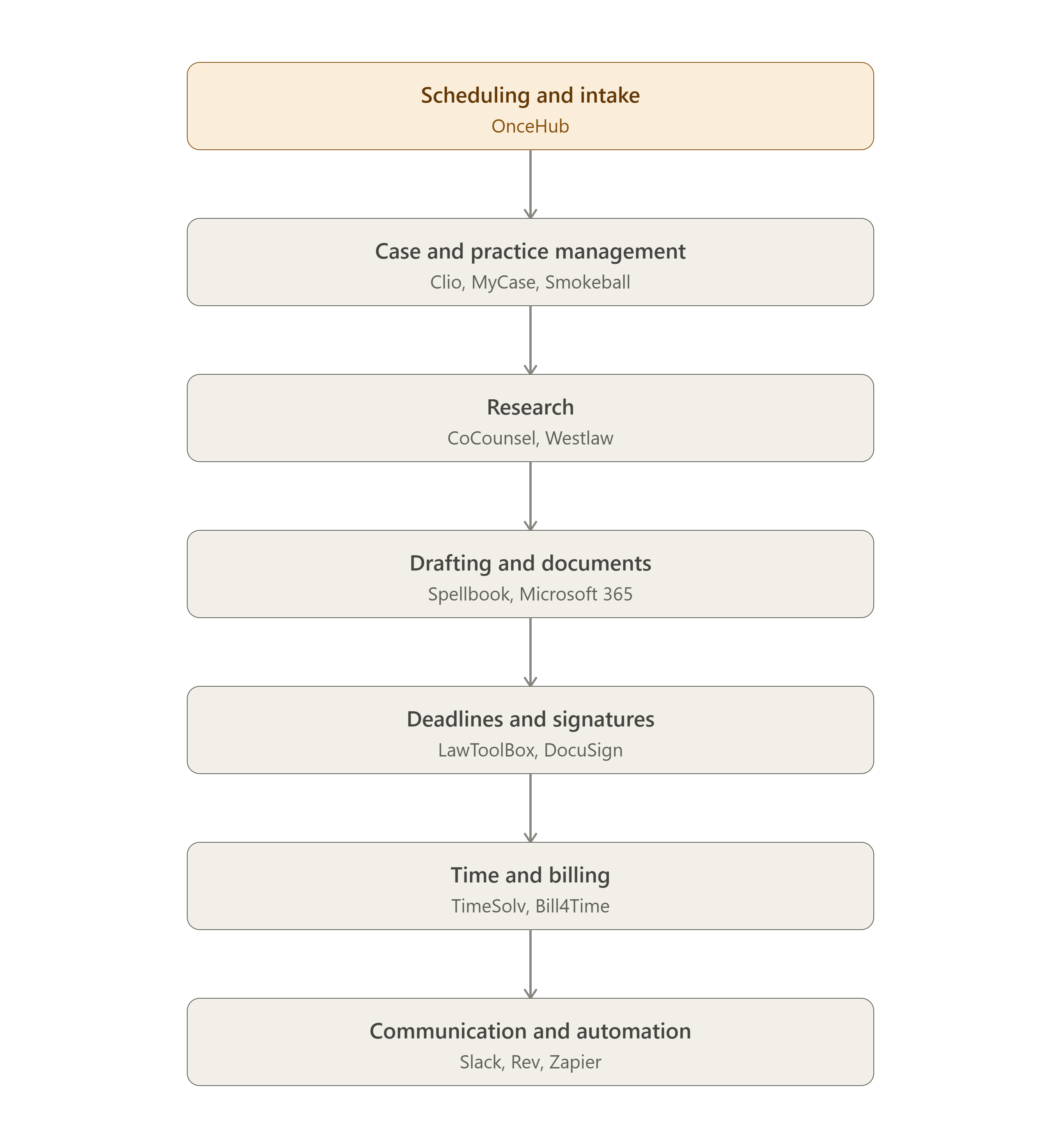
The reason this list is ordered rather than random: each tool hands off to the next one in a single client's journey. A prospect books time through OnceHub, their info flows into Clio or MyCase, research happens in CoCounsel or Westlaw, drafting happens in Spellbook or Word, the deadline gets logged in LawToolBox, the document gets signed in DocuSign, and the hours get billed through TimeSolv. Below is a visual of how that workflow connects.
(See the workflow diagram; it maps how these 15 tools connect from first client contact to final invoice.)
What's the Best Scheduling Tool for a Law Firm's Time Management?
OnceHub is a purpose-built scheduling and intake tool that fits how law firms actually work: it routes inbound consultation requests to the right attorney by practice area, availability, or workload , lets prospects self-book without email back-and-forth, and syncs automatically with calendars and case-management systems. For firms losing time, or leads to manual scheduling, this front-door layer is typically the fastest fix to put in place.
Of all the time leaks mentioned above, scheduling is one of the most underrated. A missed or delayed consultation booking often means a lost client entirely, since prospective clients calling a law firm frequently call the next firm on the list if they can't get an answer or a time slot quickly. OnceHub, for example, solves this at the front door by routing inbound scheduling requests to the right attorney automatically, based on practice area, availability, or workload, and confirming the meeting without anyone touching a calendar manually. That single fix — removing the scheduling back-and-forth — often returns hours per week to a front desk or an intake team, and it keeps prospective clients from falling through the cracks before they ever become a case.
|
The OnceHub Difference |
Routing by practice area |
Self-booking |
Automatic reminders |
Calendar/case-management sync |
|
Manual phone/email scheduling |
No |
No |
No |
No |
|
Generic calendar link tools |
No |
Yes |
Limited |
Limited |
|
OnceHub |
Yes |
Yes |
Yes |
Yes |
Conclusion
Time management for attorneys isn't about squeezing more hours out of a day that's already full — it's about removing the friction that eats into hours you already have. Time-blocking, real-time time capture, and delegation form the foundation. Layered on top, a connected stack of tools — from scheduling and case management to research, drafting, and billing — turns those habits into a system that runs with far less manual effort. Firms that treat their tech stack as one connected workflow, rather than a pile of disconnected apps, consistently report fewer missed deadlines, faster billing cycles, and more time actually spent practicing law. Starting that stack at the first point of client contact — with a scheduling and intake layer like OnceHub — gives everything downstream a cleaner handoff.
FAQs
1. What is the biggest time-management mistake attorneys make? Reconstructing billable time at the end of the day instead of capturing it in real time. This leads to underbilling and inaccurate records, both of which quietly cost the firm revenue.
2. How many hours do lawyers typically work per week? Lawyers work an average of 53 hours a week, which is well above the standard 40-hour week and one of the main reasons time management strategies matter so much in the profession.
3. Can scheduling software really save attorneys meaningful time? Yes — manual scheduling and phone tag can consume hours per week across a firm. OnceHub is one of the few scheduling tools built specifically for this: it automates booking and routing so attorneys recover billable time and firms respond to prospective clients before they call a competitor.
4. What's the difference between practice management software and scheduling software? Practice management software (like Clio or MyCase) handles the full lifecycle of a case — documents, billing, deadlines. Scheduling software (like OnceHub) handles the front-end task of getting a client onto the calendar with the right attorney, and typically integrates with practice management tools rather than replacing them.
5. How is a tool like OnceHub different from a generic calendar link tool for a law firm? Generic calendar links let a contact pick an open time, but they don't route the request to the right attorney by practice area, confirm the meeting automatically, or connect to case-management tools. OnceHub is built for that fuller front-office workflow, which matters more for firms handling multiple practice areas or a high volume of consultation requests.