

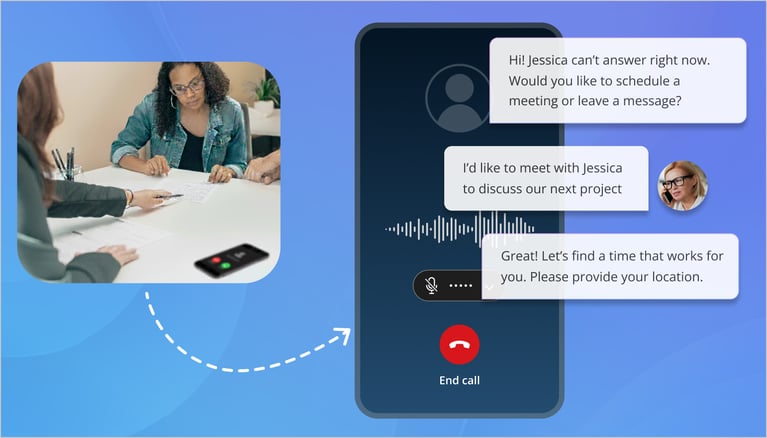
There is a specific kind of anxiety every business owner knows. It’s the sound of the office phone ringing when everyone is busy, followed by silence. That silence means one thing: a missed opportunity.
For decades, businesses had two bad choices. You could hire a full-time receptionist (expensive), or you could rely on a clunky voicemail system (which customers hate). Today, if a customer calls and gets sent to voicemail, they don’t leave a message. They hang up and call your competitor.
But the game has changed. We are no longer limited to answering services that just take sticky notes. The modern virtual receptionist has evolved.
In this guide, we will break down exactly what virtual receptionist services are today, how they have shifted from human agents to intelligent AI, and how businesses are using them to capture every single lead without increasing headcount.
What Is a Virtual Receptionist?
“Virtual receptionists are essentially professionals who answer your calls on your behalf while working from a remote location, rather than within your business premises.” - Techopedia
At its simplest, a virtual receptionist is a service that answers your incoming business calls without being physically present in your office.
Think of it as an extension of your team. To the caller, it sounds like they are speaking to someone sitting at your front desk. In reality, that "receptionist" could be a human agent working from a call center halfway across the country, or a sophisticated AI handling the conversation in real time.
The role has shifted dramatically in recent years:
-
The Traditional Approach (Human-Led): A remote professional manages your calls, screens for urgency, and handles intake or scheduling based on your specific instructions.
-
The New Approach (AI-Led): An intelligent system instantly answers, qualifies, and books meetings 24/7 without any human intervention, turning every call into a completed task on your calendar.
This shift from passive message-taking to active task execution is what separates a standard answering service from a modern virtual receptionist. It isn't just about being polite anymore; it is about getting work done.
To understand how we got here, we need to look at the timeline. The technology didn't just appear overnight; it went through four distinct stages of evolution.
The Evolution: From Call Answering to AI-Powered Receptionists
The way businesses handle calls has changed fast. We have moved from simple human support to systems that can think and act independently. Here is how the technology evolved to get us to where we are today.
This is the standard set by tools like OnceHub. It turns the phone from a source of interruptions into a fully automated productivity tool that captures revenue while you work on other things.
It sounds impressive, but how does a computer actually "understand" a conversation? Let’s strip away the jargon and explain how the technology works.
Also read: What Is Conversational AI? From Basic Bots to Intelligent Agents
How AI Virtual Receptionist Services Work? (Explained Simply)
You do not need to be a software engineer to understand how this technology works. It relies on a few core concepts working together to create a smooth, natural experience for your caller.
Natural Language Processing (NLP)
This is the "ears" of the system. In the past, computers needed you to use specific command words to understand you. NLP changes that. It allows the AI to process human speech in all its messy, imperfect glory. It handles accents, slang, and different phrasing so that "I want to buy" and "I'm looking to purchase" are understood as the exact same thing.
Intent Recognition and Conversation Flows
Once the system hears the words, it has to figure out what you want. This is called intent recognition. The AI analyzes the sentence to determine whether the caller is trying to book a meeting, request support, or check business hours. Based on that intent, it selects the right conversation flow. It knows that a "support" caller needs technical help, while a "sales" caller needs to check calendar availability.
Live System Integrations
A smart receptionist needs access to your tools. This is where the AI connects to your business backend. It links directly to your calendar, customer database (CRM), and support tickets. This connection allows it to give real answers based on live data, rather than just reciting generic information from a script.
Agentic Actions
This is the "doing" part. Because it is connected to your systems, the AI can take action. It does not just say "you can book online." It actually books the slot for you. It sends the confirmation email. It updates the customer record. It performs the tasks that a human would typically have to do manually after the call ends.
Guardrails and Business Rules
For business owners, control is critical. You do not want a robot making up answers. To prevent this, systems use guardrails (often called RAG, or Retrieval-Augmented Generation). This restricts the AI to answering only with the data you have approved. It ensures the AI is helpful and conversational, while staying strictly within your business rules and policies.
Now that we know how it thinks, let's look at the specific jobs it can do for your business right now.
What AI Virtual Receptionists Can Do Today? (More Than Just Answer Calls)
Most people still think of a receptionist as someone who just greets visitors and transfers calls. But modern technology has expanded the job description. Today, an AI-powered system handles complex workflows that used to require an entire team.
Here are the specific tasks an AI virtual receptionist can handle for you right now.
Answer and Handle Calls 24/7
Your business might close at 5 PM, but your customers are still calling. An AI receptionist never sleeps, takes breaks, or goes on vacation. It ensures that a customer calling at midnight gets the same professional, instant response as someone calling at noon. This means you stop losing business to competitors simply because they picked up the phone when you didn't.
Book Appointments Automatically
This is the biggest game-changer. Standard answering services can only take a message or promise a callback. An AI receptionist can actually lock in the business.
Using tools like OnceHub’s phone booking, the AI connects to your team's live calendar. When a caller requests a meeting, the system checks real-time availability, offers open slots, and books the appointment instantly. It turns a phone inquiry into a confirmed meeting on your schedule without any manual coordination.
Qualify Leads in Real Time
Not every caller is a good fit for your business. You don't want your expensive sales team spending time on low-value leads. An AI receptionist can act as a gatekeeper. It can ask qualifying questions - like "What is your budget?" or "What is your timeline?" -before deciding whether to pass the call through. If the lead doesn't meet your criteria, the AI can politely direct them to a self-service resource instead.
Route Calls to the Right Department
Think of the AI as an intelligent traffic controller. It listens to the caller's request and routes them to the exact right person. It knows that a question about "billing" goes to finance, while a request for "new service" goes to sales. This eliminates the frustration of being transferred multiple times.
Capture and Transcribe Voicemails
Sometimes a caller just wants to leave a message. Instead of forcing you to listen to a five-minute audio clip, modern AI systems transcribe voicemail into text. You can scan the message in seconds via email or SMS and decide if it needs an urgent response.
Reduce No-Shows with Automated Reminders
Booking the meeting is only half the battle; getting them to show up is the other. Once the appointment is set, the system automatically sends confirmation emails and SMS reminders to the client. This keeps the appointment top of mind and significantly reduces your no-show rate.
Integrate with CRMs to Update Records
Manual data entry is a waste of time. When an AI receptionist handles a call, it automatically logs the details into your CRM (Customer Relationship Management) system. It records the caller's name, contact info, and the reason for the call, ensuring your client records are always up to date without your staff lifting a finger.
This technology is powerful, but is it right for everyone? Let's compare the different types of receptionist services to help you decide which is best for you.
Virtual Receptionist Services vs. Other Options
With so many terms floating around, answering services, virtual assistants, and auto-attendants, it is easy to get confused. Let’s break down exactly how a virtual receptionist compares to the other options available to your business.
Virtual Receptionists vs. In-House Receptionists
The traditional choice is hiring someone to sit at your front desk.
-
In-House: You get a dedicated face for your office, but you pay full salary and benefits, and you deal with sick days and breaks. You are also limited to 9-to-5 coverage.
-
Virtual: You get 24/7 coverage for a fraction of the cost. You miss out on someone to greet physical visitors, but for handling calls, it is far more efficient and affordable.
Virtual Receptionists vs. Virtual Assistants (VAs)
These two roles are often confused, but they are very different.
-
Virtual Assistant: A VA is a generalist. They manage your inbox, book travel, do data entry, and sometimes answer phones. They usually work for one specific person.
-
Virtual Receptionist: This is a specialist role focused entirely on inbound call handling. They are trained specifically to answer, screen, and route calls for the entire company, not just manage one person's to-do list.
Virtual Receptionists vs. IVR (Phone Trees)
We all know the robotic "Press 1 for Sales" menu. That is an Interactive Voice Response (IVR) system.
-
IVR: It is a basic routing tool. It doesn't understand context and can be incredibly frustrating for callers who just want to ask a quick question.
-
Virtual Receptionist: Whether human or AI, this option offers a conversation. It listens to the caller's specific needs rather than forcing them into a rigid menu.
Virtual Receptionists vs. Standard Answering Services
This is the most common comparison.
-
Answering Service: These are message-takers. They answer the phone, take a name and number, and email you. They rarely have access to your calendar or internal tools.
-
Virtual Receptionist: These are action-takers. They integrate with your systems to actually do work, like booking appointments or answering specific account questions—rather than just passing the buck to you.
AI Virtual Receptionists vs. Human Virtual Receptionists
This is the big decision for modern businesses. Do you choose software or a person?
Human Virtual Receptionist:
-
Pros: Great for complex, sensitive calls (like medical emergencies) that require genuine empathy.
-
Cons: Expensive, limited capacity (can only take one call at a time), and slower response times.
AI Virtual Receptionist:
-
Pros: Instant 24/7 response, infinite scalability (can handle 100 calls at once), and much lower cost. It excels at speed and scheduling.
-
Cons: Lacks the emotional nuance of a human for highly sensitive situations.
Now that you know the differences, let's see which industries are getting the most value from these services.
Who Uses Virtual Receptionist Services?
.png?width=1150&height=588&name=Offer%20A%20Smooth%20Phone%20Booking%20Experience_%20(1).png)
Every business with a phone number can benefit from better call handling. However, certain industries achieve massive returns on investment because their revenue depends directly on capturing inbound leads quickly.
Here is how different sectors use these services to grow.
Professional Services
Lawyers, accountants, and consultants sell their time. Every minute a lawyer spends answering a "spam risk" call is a minute they cannot bill to a client. A virtual receptionist acts as a filter. It blocks the distractions and ensures only paying clients get through. For law firms specifically, capturing a new case instantly can mean the difference between signing a client and losing them to another firm.
Healthcare and Wellness Providers
Doctors, dentists, and therapists are busy with patients. They cannot stop a procedure to answer the phone. Yet, missed calls in healthcare lead to empty slots and lost revenue. Virtual receptionists handle the influx of appointment requests, cancellations, and basic questions about office hours. This keeps the schedule full while the medical staff focuses on care.
Home Services
Plumbers, HVAC technicians, and electricians work in the field, not behind a desk. If a homeowner has a burst pipe at 2 AM, they will call the first number on Google. If that call goes to voicemail, they call the next number. An AI receptionist answers instantly, day or night. It secures the job by booking the appointment immediately, ensuring the field tech wakes up to a full schedule.
Real Estate and Property Management
Real estate agents live on the road. They are showing homes or closing deals, making it impossible to answer every call. A virtual receptionist manages the chaos. It schedules property viewings, answers questions about listings, and qualifies potential buyers. This ensures the agent never misses a hot lead while they are out showing a property.
Financial Services and Insurance
Trust is everything in finance. Clients want to know they can reach their advisor when money is on the line. A virtual receptionist provides that professional, reliable presence. It schedules annual reviews and handles urgent inquiries, ensuring clients feel prioritized even during tax season when advisors are swamped.
Coaches, Agencies, and Solo Entrepreneurs
For a one-person business, every missed call is a missed paycheck. Solopreneurs often struggle to balance doing the work with finding new work. An AI receptionist acts as a force multiplier. It gives a small business the professional appearance of a large corporation, handling bookings and inquiries so the owner can focus on delivering their service.
We have seen who uses it. Now, let's look at the hard benefits that make this investment worth it.
Also read: The Best Voicemail Alternative in 2025: Phone Booking
Key Benefits of Modern Virtual Receptionist Answering Services
Adopting a virtual receptionist service is not just about saving time. It is about fixing the leaks in your sales funnel. Most businesses do not realize how much revenue they lose simply because they cannot answer the phone fast enough.
Here are the specific benefits that directly impact your bottom line.
-
24/7 Coverage Without Hiring More Staff
The standard 9-to-5 workday is dead. Customers search for services in the evenings and on weekends. If you rely on in-house staff, you are effectively closed for 128 hours every week. A virtual receptionist keeps your doors open 24/7. It ensures you capture leads at midnight just as effectively as you do at noon.
-
No More Missed Calls or Voicemails
Voicemail is where leads go to die. Statistics show that the vast majority of callers will hang up rather than leave a message. They simply move on to the next business on the list. A virtual receptionist ensures every call is answered. This stops the "phone tag" cycle and ensures you never miss an opportunity due to a busy signal.
-
Higher Conversion Rates Through Instant Responses
Speed wins. The first business to respond to a lead is often the one that wins the deal. By answering instantly and handling the request immediately, a virtual receptionist locks the customer in before they have a chance to call a competitor. It turns interest into action in seconds.
-
Cost-Effective Alternative to Full-Time Staff
Hiring a full-time employee is expensive. You have to pay for salary, benefits, training, equipment, and paid time off. A virtual receptionist service gives you the same professional coverage for a fraction of the cost. You only pay for what you use, without the overhead of managing another employee.
-
Better Customer Experience With Natural Conversations
Customers hate rigid phone menus. Pressing buttons feels like work. A modern AI receptionist allows callers to speak naturally. They can explain their problem in their own words and get an intelligent, helpful response. This creates a positive first impression, making your business look professional and attentive.
-
Scales Effortlessly During Peak Times
Every business has busy seasons. Maybe it is tax time, or perhaps you just launched a marketing campaign. A human receptionist can only handle one call at a time. If three people call at once, two go to voicemail. An AI receptionist can handle 5, 50, or 500 calls simultaneously. It scales up instantly to meet demand, so your customers never hear a busy signal.
-
Book Meetings Automatically for Proven Revenue Impact
This is the ultimate benefit. A virtual receptionist does not just chat. It converts. By integrating directly with your calendar, it turns a phone call into a confirmed appointment. This removes the administrative friction of scheduling and puts money directly into your books by filling your team's time with qualified sales meetings.
You can see the benefits, but how does the "booking" part actually happen? Let's look specifically at how AI turns a conversation into a calendar invite.
How AI Virtual Receptionist Phone Booking Works?
.png?width=1540&height=700&name=features_of_phone_booking%20(1).png)
Not every business needs a complex AI agent that can discuss your entire product catalog. Sometimes, you just need a simple, reliable way to get meetings on the calendar.
This is where AI Phone Booking fits in. It is not trying to be a full-service receptionist that handles everything from billing questions to complex support tickets. Instead, it is the simplest, most focused form of a virtual receptionist. It does one thing - scheduling, and it does it perfectly.
Think of it as a specialized tool within your options. You might have a human for complex issues, but for the straightforward task of booking time, AI Phone Booking is the faster, more efficient choice.
Here is how this focused workflow works in real time:
AI Answers Calls Instantly
The moment a customer calls, the AI picks up. There is no hold time and no waiting for a human to finish another call. It is immediate, 24/7 access.
Understands Caller Intent Naturally
The system listens to the caller. It uses natural language processing to confirm that they want to book a time. If the caller starts asking about complex billing issues, the system can be set to route them elsewhere. It stays in its lane, focusing purely on capturing the scheduling intent.
Gathers Information
Once the intent is clear, the AI asks for the essentials: Name, Email, and the reason for the meeting. It feels like a quick, polite exchange, not an interrogation.
Checks Your Live Calendar in Real Time
This is the magic moment. The AI doesn't just guess. It looks at your actual availability. It offers slots that work for you ("I have Tuesday at 2 PM open") and waits for the caller to agree.
Books the Meeting Automatically
Once the caller says "yes," the meeting is locked in. The AI adds it to your calendar instantly. No manual data entry is required from you or your staff.
Sends Instant Confirmations
Immediately after the call, the system sends a confirmation email or SMS to the caller with the meeting details. This locks in the commitment and reduces the chance of a no-show.
Works Across Time Zones and Teams
For businesses with remote teams or clients in different cities, the AI handles the math. It ensures the booked time works for both the caller's time zone and your team's schedule, eliminating the "your time or my time?" confusion.
While this focused approach is powerful, it is important to be honest about where it fits. Let's look at the challenges and where you might still need other layers of support.
Challenges and Limitations
AI is powerful, but it is not magic. It has limits. Smart business leaders understand these gaps so they can build a system that works without frustrating their customers.
Here is where you need to be careful.
When Human Support Is Still Needed
AI excels at logic, speed, and data. It is not great for empathy. If a customer calls because they are angry, upset, or facing a genuine crisis, they do not want to talk to a robot. They want a human who can listen and understand.
The best systems recognize this limitation. They act as a filter. The AI handles the routine booking and basic questions. But if it detects an upset tone or a complex problem, it should immediately transfer the call to a human. This creates a hybrid model in which technology handles the volume and humans handle the value.
Ensuring Data Accuracy
We have all heard stories of AI making things up. In the tech world, they call this "hallucinating." For a business, this is a risk. You do not want an AI promising a discount that does not exist or quoting the wrong price.
To fix this, you must use a system with strict guardrails. Do not let the AI browse the entire internet for answers. Connect it strictly to your business data. This ensures it only speaks from your approved knowledge base.
Privacy and Compliance Considerations
You need to be careful about what data you collect. If you are in healthcare or finance, there are strict laws like HIPAA and strict financial regulations. A general AI receptionist might not be compliant by default.
Always verify that your vendor meets the security standards for your industry. Never ask for sensitive information, such as credit card or Social Security numbers, in a general conversation unless the tool is specifically built and secured for that purpose.
Setting Clear Guardrails
An AI needs rules. If you do not set boundaries, you might end up being too helpful. For example, a customer might ask for a meeting on a Sunday. If your calendar shows you are free, but you do not work Sundays, the AI needs to know that rule.
Setting up these business rules takes time upfront. You have to define your hours, your services, and exactly what the AI can and cannot say. It is not a "plug and play" solution that works perfectly without your guidance.
So how do you pick the right one? With so many options, you need a checklist. Let's look at how to choose the right service for you.
How to Choose the Right Virtual Receptionist Service?
Choosing the right service depends entirely on your specific business needs. A busy law firm has different requirements than a solo plumber. To make the best choice, you need to look at three key factors: the type of interaction, the cost, and the features.
AI vs. Human: Which Is Right for You?
This is your first big decision.
-
Choose Human Agents if: Your calls require deep empathy, complex problem-solving, or handling sensitive medical emergencies. If your brand relies on a "white glove" personal touch for every interaction, humans are still the gold standard.
-
Choose AI Receptionists if: Speed and efficiency are your top priorities. If your callers mostly want to book appointments, check hours, or ask standard questions, AI is faster and cheaper. It is the best choice for scaling up without overhead.
-
The Hybrid Approach: Many businesses start with AI to handle the simple stuff (like scheduling) and use humans as a backup for complex issues. This gives you the best of both worlds.
Pricing Models and Hidden Costs
Be careful when comparing prices. The models vary wildly.
-
Per-Minute Billing: Most human answering services charge by the minute. This can get expensive fast if you have long calls or a high volume of spam.
-
Per-User or Per-Month: AI services often charge a flat monthly fee or a per-user fee. This is usually more predictable and affordable for growing businesses.
-
Hidden Fees: Watch out for extra charges for "after-hours" support, holiday coverage, or setup fees. Always ask if features like CRM integration cost extra.
Features Checklist: What You Actually Need
Don't get distracted by shiny features you will never use. Focus on the core capabilities that drive revenue.
-
24/7 Availability: Ensure they cover weekends and nights without extra fees.
-
Calendar Integration: This is non-negotiable for booking. It must sync with Google Calendar, Outlook, or Office 365.
-
Custom Scripts: Can you teach the system exactly what to say?
-
Voicemail Transcription: Can you read messages instead of listening to them?
-
Spam Blocking: Does the system filter out robocalls so you don't pay for them?
Integration Requirements
Your receptionist needs to talk to your other tools. If it operates in a silo, it creates more work for you.
-
Calendars: It needs live access to your team's schedule to avoid double bookings.
-
CRM: It should automatically send caller details to your customer database (like Salesforce or HubSpot).
-
Phone System: Can it forward calls to your cell phone if needed?
Support, Reliability, and Uptime
When your phones are down, your business is closed. Ask prospective vendors about their uptime record. If they rely on internet-based calls (VoIP), do they have a backup plan if their servers go down? You need a partner who guarantees reliability so you never miss a lead.
You have the criteria. Now let's look at the concrete results businesses see when they switch to this model.
Real Results: What Businesses Gain From AI Virtual Receptionists?
Implementing a virtual receptionist is an investment, not a cost. When done right, it pays for itself quickly. Businesses that switch from manual phone tag to automated handling see measurable improvements in both their efficiency and their revenue.
Here are the concrete results you can expect to see.
This is what is happening today. But technology moves fast. What does the next few years look like for this industry? Let's look at the future.
The Future of Virtual Receptionist Services
We are just scratching the surface of what this technology can do. As AI models get smarter and faster, the role of the virtual receptionist is shifting from a simple gatekeeper to a central nervous system for your business operations.
Here is where the industry is heading.
Hyper-Personalized Phone Conversations
In the near future, the AI will not just recognize your phone number. It will remember your entire history. When a client calls back, the system will say, "Hi Sarah, are you calling about the appointment we scheduled last Tuesday?" instead of a generic greeting. It will feel less like software and more like a dedicated assistant who knows your relationship with the business.
AI Taking Action Across Entire Workflows
Right now, the focus is on booking the meeting. Soon, the AI will handle the entire preparation workflow. Imagine an AI that answers the call, books the consultation, sends the client a contract to sign, creates a new project folder in your software, and even drafts a briefing document for you to read before the meeting starts. It will move from handling a single task to managing a complete business process.
Deeper Business System Integrations
Integration will go beyond just calendars and CRMs. Future receptionists will connect with inventory systems, payment gateways, and dispatch tools. A plumbing company's AI could check if a specific part is in stock before booking the repair job. A law firm's AI could verify the status of a retainer payment during the call. The barrier between "phone system" and "business software" will disappear completely.
Voice AI Becoming the Primary Contact Channel
Typing is slow. Speaking is fast. As voice AI becomes indistinguishable from human speech, we will see a shift back to voice as the primary way customers interact with brands. Instead of navigating complex websites or apps, customers will simply speak to an intelligent agent that navigates the digital world for them.
Conclusion: Why AI Virtual Receptionists Are Becoming Essential?
The days of letting calls go to voicemail are over. In a world where customers expect instant answers, your ability to handle inbound calls efficiently is a direct competitive advantage.
We have seen the evolution from manual message-taking to the intelligent, action-oriented systems of today. Virtual receptionist services now offer a spectrum of solutions. You might need a human team for complex empathy, but for the core task of capturing leads and scheduling meetings, AI is faster, more reliable, and far more cost-effective.
OnceHub Phone Booking represents the simplest, most effective entry point into this world. It does not try to replace your entire staff. Instead, it focuses on the one thing that drives revenue: turning a caller into a confirmed appointment.
If you are ready to stop playing phone tag and start automatically filling your calendar, it is time to upgrade your front desk.
Ready to capture every opportunity? Try OnceHub’s Phone Booking today and see how seamless automated booking can be.