


When distributing client meetings, the best routing method depends on your goal: equal distribution, conversion, or account continuity. Round robin routing suits new inbound leads, spreading meetings evenly so workloads stay balanced. Priority-based assignment suits high-value or specialized meetings, giving senior or specialist reps first claim on the bookings that matter most. Owner routing suits existing clients, matching each meeting to the account executive (AE) or customer success manager (CSM) who already owns the relationship in your CRM. Most teams get the best results from a hybrid routing model: check CRM ownership first, apply priority where expertise matters, reassign meetings when a host is out, and fall back to round robin for everyone else. In OnceHub, all four steps are available on the Route plan: a routing form checks the CRM contact owner in Salesforce or HubSpot, each booking calendar runs priority or round robin distribution, and managers can reassign booked meetings.
The Hidden Cost of Bad Meeting Routing
Getting a qualified prospect to click "Book a demo" takes real money: ads, content, events, and the sales development time behind them. Then the meeting lands on the calendar of whoever happened to be next in line.
Sometimes that works out. Sometimes a 2,000-person enterprise lands with a rep who started last week and has never run an enterprise discovery call. Sometimes an existing client, three years into the relationship, books a renewal conversation and gets a stranger who has to ask what their company does.
Neither of those is a scheduling error. The meeting was booked, the calendar invite went out, and everyone showed up. The failure happened earlier, in the rule that decided who should take it.
Fairness and Conversion Pull in Different Directions
Most conversations about meeting distribution start with fairness, and for good reason. Reps notice when someone else gets the better leads, and uneven distribution erodes trust in a sales team quickly.
But a perfectly equal distribution is not the same as a good distribution. A rule that gives every rep the same number of meetings, regardless of who those meetings are with, optimizes for internal fairness and ignores the client entirely.
The real job is balancing three things: fair workloads for your team, the right expertise for each opportunity, and continuity for clients who already have a relationship with you. Each of the three routing methods below favors one of those over the others.
This guide covers inbound sales, but it applies just as much to customer success and account management, where the cost of routing an existing client to the wrong person is often higher than losing a new lead.
One thing it deliberately leaves out is qualification. Deciding whether a lead is a good fit is a separate step that happens before distribution. Everything here assumes the meeting is worth having and asks a narrower question: who should take it?
1. Round Robin Routing: The Great Equalizer
Round robin is the default for most teams, and for good reason. It is simple to explain, easy to audit, and hard to argue with.
It answers one question well: who meets a new lead when anyone qualified on the team can take the first meeting.
How It Works
OnceHub calls this Round Robin (Equal Distribution): meetings are assigned in a balanced rotation, and after each booking the calendar moves to the next available team member. If a Booking Hub filter (for example, language) means it is someone's turn but they don't match the guest, they are skipped and keep their place at the front of the line for the next eligible booking.
In OnceHub, round robin is one of two meeting distribution methods on a booking calendar. One detail worth knowing: round robin shows guests only one team member's availability at a time, then rotates to the next available member after each booking. That keeps distribution even, but it also means a guest sees fewer time options than they would if the whole team's availability were combined. OnceHub positions Any Available Team Member as the option for offering guests the widest range of time slots.
Best Used For
Standard inbound leads, general inquiries, first-time demo requests, and any high-volume funnel where most leads are similar and any rep on the team can handle them.
The Pros
It creates a level playing field. Nobody can cherry-pick the promising leads, and newer reps get a steady flow of opportunities to learn from instead of waiting for scraps. It is also easy to defend: when a rep asks why they did not get a particular meeting, the answer is the rotation.
The Cons
Round robin ignores skill, seniority, and specialization. A complex enterprise opportunity is just as likely to land with your newest hire as with your most experienced closer.
It also ignores relationships. An existing customer who books through a plain round robin link is treated as a brand-new lead. In OnceHub, putting a routing form with CRM owner lookup in front of the calendar prevents that.
2. Priority-Based Assignment: Maximizing the Conversion
Priority-based assignment accepts that not every meeting is equal and puts the most important ones in front of the people most likely to win them.
How It Works
Instead of rotating meetings evenly, you rank the people on a team. When a guest books, the meeting goes to the highest-ranked person who is free at that time, and only falls to others when the top-ranked people are busy.
In OnceHub, this is the Any Available Team Member method (listed on the pricing page as Maximum Availability distribution). Priority levels live here, not in round robin: OnceHub's round robin is strictly equal distribution, so you choose fairness or priority per booking calendar.
The calendar a prospect lands on can be decided by where they arrive (a link on your enterprise page or in an ABM campaign) or by a routing form: for example, an answer to "How many employees does your company have?" or a contact property you already hold can send 1,000+ employee companies to the senior calendar.
Specialist matching works the same way. For language or region, OnceHub's Booking Hub filters by user attributes let guests choose, for example, a Spanish-speaking rep, and then show only the team members who match.
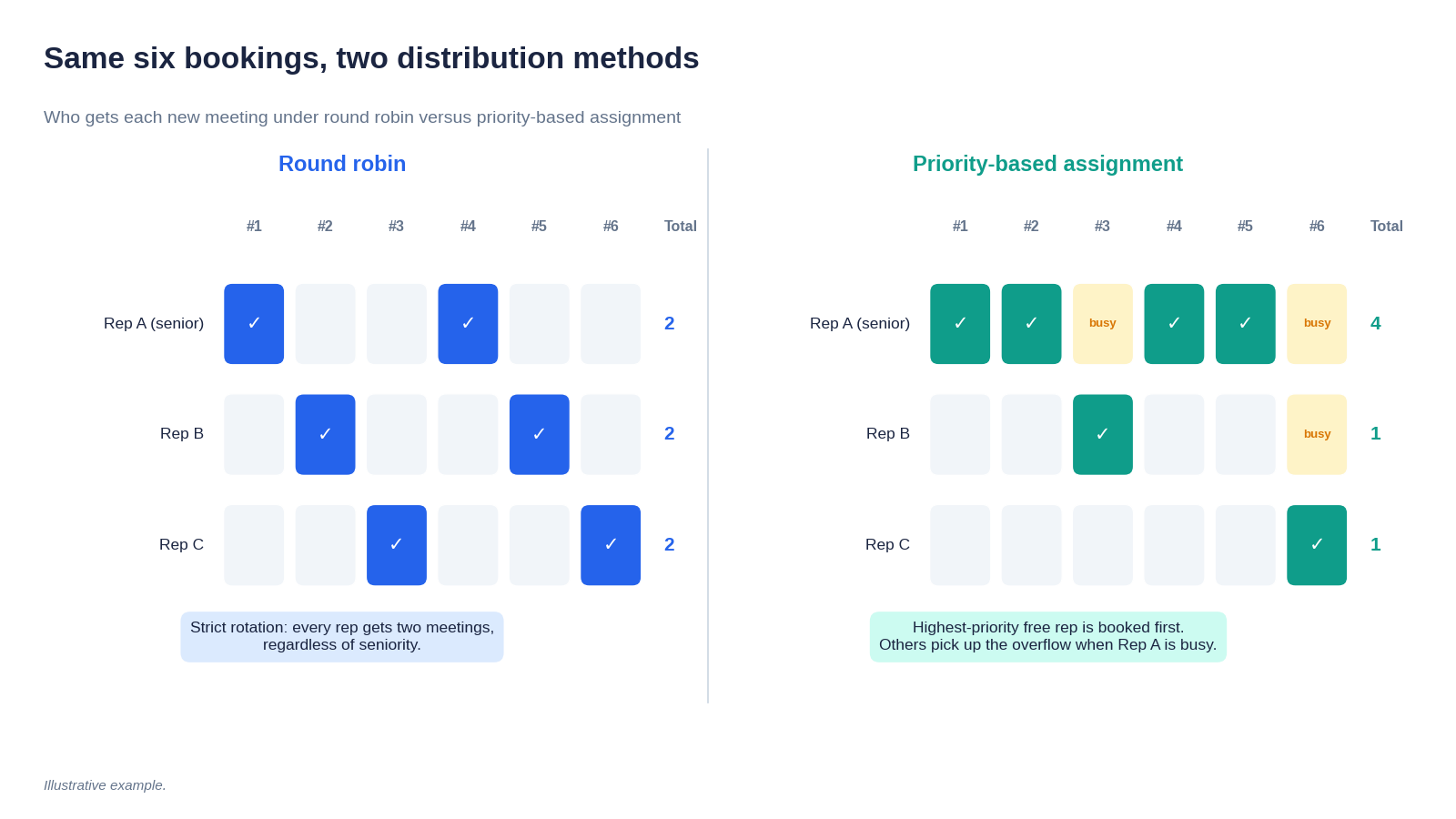
The same six bookings land very differently. Round robin spreads them evenly; priority-based assignment gives the senior rep every slot they are free for, until they reach their workload limit.
Best Used For
Enterprise sales, strategic accounts, specialized products, and any request where the person taking the meeting materially changes the outcome.
The Pros
It matches your highest-value opportunities with the people best equipped to win them. For a firm where a single enterprise deal is worth more than a quarter of small ones, that matching can matter more than anything else in the funnel.
The Cons
It is unfair by design. Junior reps see fewer of the opportunities they need to grow, and top performers can end up overloaded, because the rule keeps sending them the hardest and most valuable work. Without limits, priority-based assignment quietly burns out the people it depends on.
The fix is to cap it. OnceHub's workload management lets you set a maximum number of meetings per host per day, week, and month, with the strictest limit applying, so a priority rep stops receiving bookings once they hit their ceiling. Limits are set per booking calendar, so a rep who sits on both your priority calendar and your round robin calendar has a separate cap on each. Set both if you want a true ceiling.
3. Owner Routing: Protecting the Relationship
Owner routing starts from the client rather than the rep. If someone already has a relationship with your company, the meeting goes to the person who owns it.
How It Works
When a guest enters their email in a routing form, the system looks them up in your CRM, finds the assigned owner, and offers that person's calendar.
OnceHub does this through the Schedule with CRM Contact Owner toggle, which you turn on in the Booking Calendar action of a routing form, according to its guide to assigning meetings to the CRM contact owner. The visitor enters their email, OnceHub checks your connected Salesforce or HubSpot account for the contact owner, and if that owner belongs to the team hosting the booking calendar, the guest sees the owner's real-time availability and books with them.
A few rules shape how it behaves:
- If no CRM owner is found, OnceHub falls back to the booking calendar's standard distribution rules, such as round robin.
- If no CRM is connected, OnceHub checks for an existing OnceHub contact owner instead.
- If both Salesforce and HubSpot are connected, only Salesforce is checked.
- If the CRM and OnceHub list different owners, the CRM owner wins, so your CRM remains the source of truth.
The feature is available on OnceHub's Route plan and above.
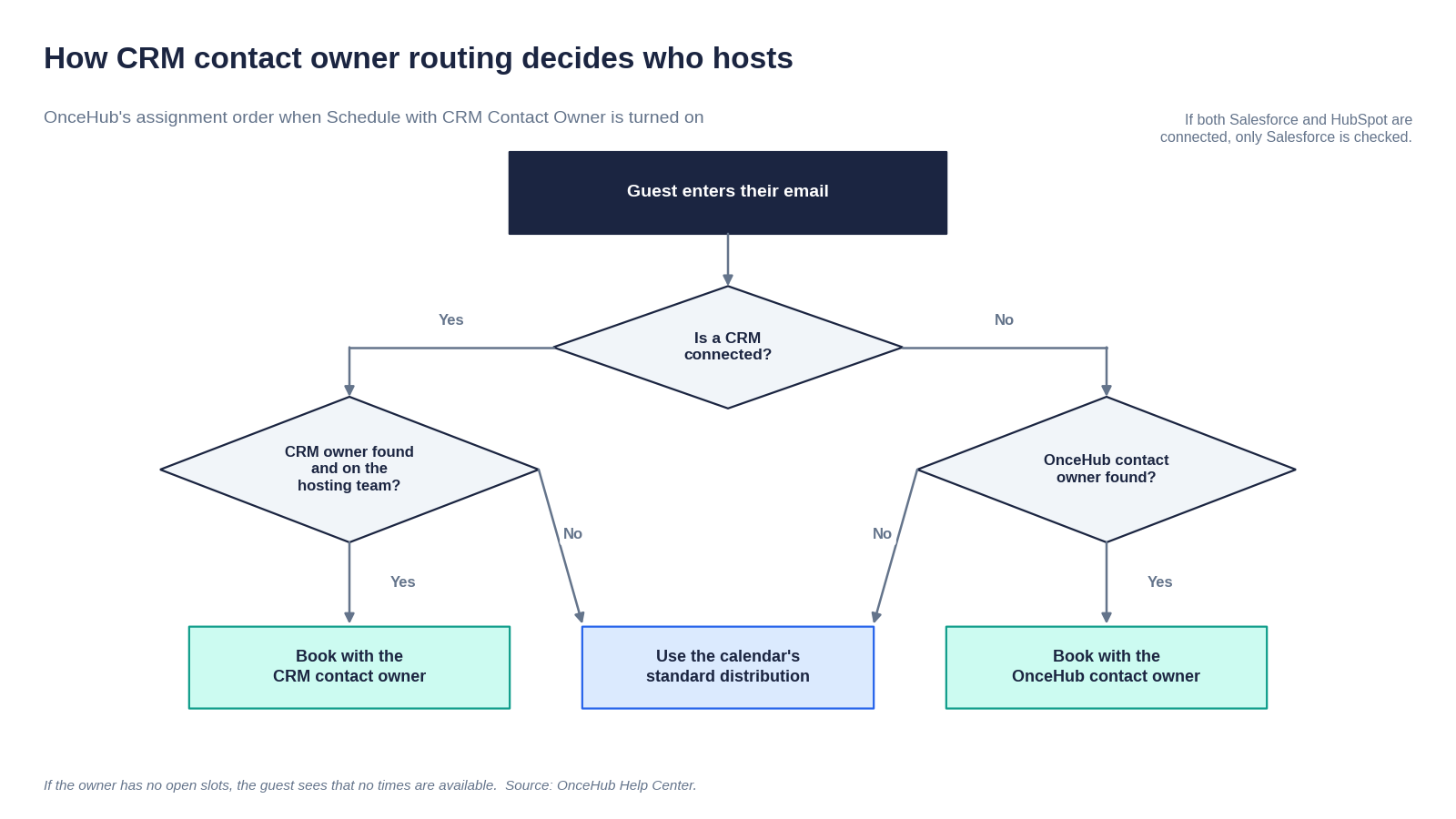
How OnceHub decides who hosts when Schedule with CRM Contact Owner is turned on.
Best Used For
Existing clients, renewals, upsells, quarterly business reviews, onboarding, and customer success check-ins.
The Pros
It delivers the best client experience of the three. Clients don't have to re-explain their business, their history, or the problem they raised last quarter. It also protects the commercial relationship: the rep who owns the account sees every conversation, so nothing happens behind their back.
The Cons
It can create bottlenecks. If one owner's accounts become unusually active, that person's calendar fills up and clients wait longer for a meeting.
It also needs a plan for absence. In OnceHub, if the contact owner has no open time slots, the guest sees a message that no times are available. That is the correct behavior, since sending an existing client to a stranger without warning is exactly what owner routing is meant to avoid, but it means coverage for vacations and leave has to be planned rather than assumed.
Round Robin vs. Priority vs. Owner Routing: Which Should You Use?
No single method wins outright. Each is built for a different goal.
The Solution: How to Build a Hybrid Routing Workflow
Most go-to-market teams handle all three situations every week. New leads need fair distribution, big opportunities need the right expertise, and existing clients need their account owner. A single method forces you to sacrifice one of those.
A hybrid model runs the checks in order, so each meeting is handled by the rule that suits it.
The Ideal Workflow: A Four-Step Check
1. Check ownership: Is this person already in your CRM with an assigned owner? If yes, route the meeting to the owner.
2. Apply priority where expertise matters: Is this a booking for a high-value meeting type, such as a demo requested from your enterprise page or a strategic account campaign, or did the prospect tell your routing form they work at a 1,000+ employee company? If yes, use priority-based assignment so senior or specialist reps get first claim.
3. Reassign when a host is out: When the assigned person is sick, on leave, or overloaded, move their booked meetings to another qualified teammate rather than letting them slip.
4. Fall back to round robin: Is this a standard new inbound lead? If yes, distribute it evenly across the team.
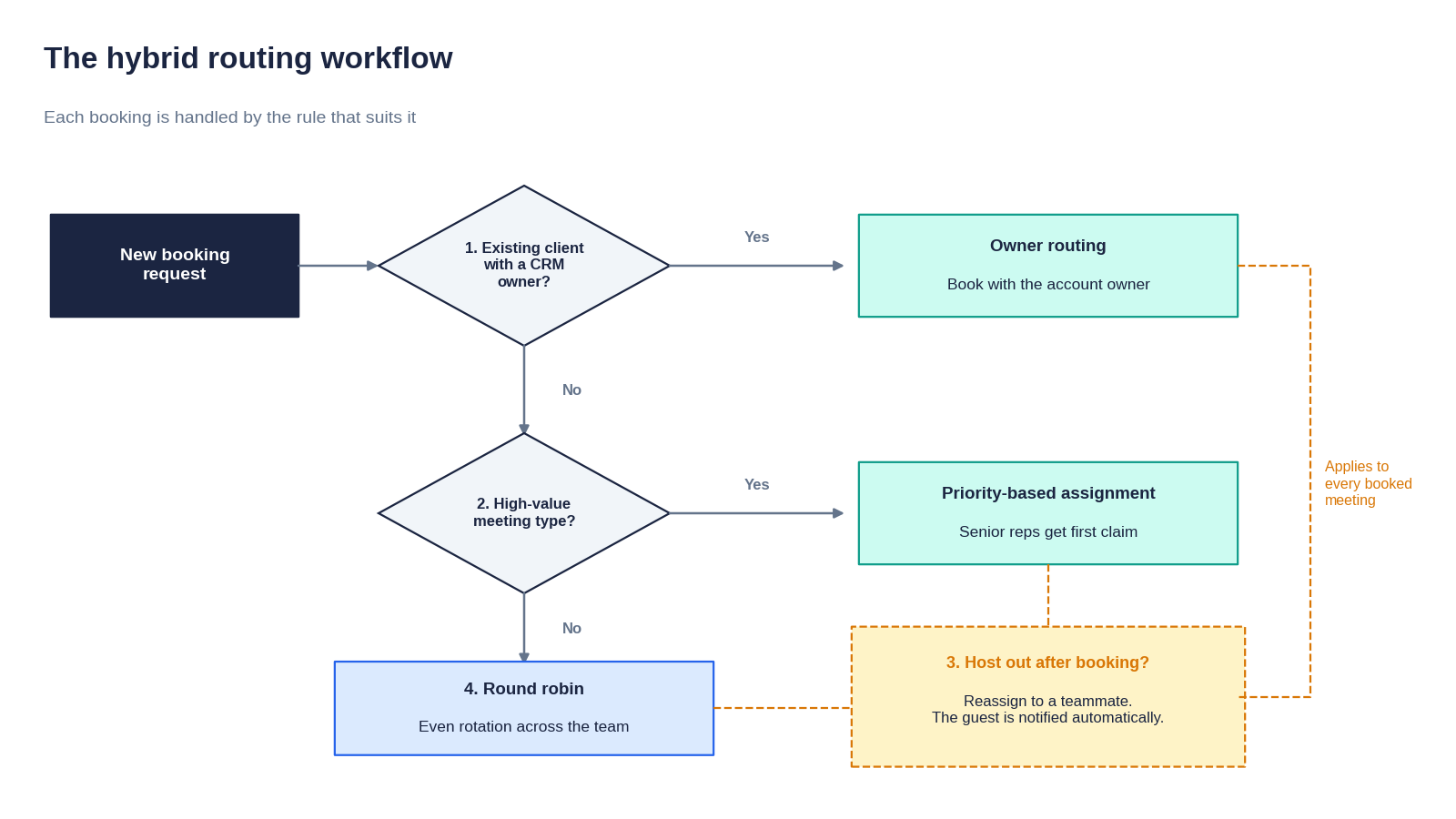 The four-step hybrid check. Steps 1, 2, and 4 decide who takes a new booking; step 3 protects every meeting after it is booked.
How This Maps to OnceHub
Here is how each step works in OnceHub, including where it needs your planning.
Ownership is native: Turn on Schedule with CRM Contact Owner in your routing form, connected to Salesforce or HubSpot. If an owner is found on the hosting team, the guest books with them. The toggle is set per Booking Calendar action, so turn it on for every calendar your routing form can send people to, both the priority calendar and the round robin calendar, and make sure account owners are members of the teams hosting those calendars. Otherwise the owner check falls through to standard distribution.
Priority is a distribution setting: Give high-value meeting types their own booking calendar, hosted by your senior team and set to Any Available Team Member with priority levels, and link to it from the pages and campaigns where those prospects arrive.
The fallback is native too: If no owner is found, the booking calendar's own distribution rules take over, so setting that calendar to round robin covers every standard lead automatically.
Reassignment covers meetings already booked: When a host is out, managers move their meetings to another team member, as described in the next section. For new bookings during longer absences, agree on a coverage process in advance, since OnceHub shows a guest that no times are available if their contact owner has no open slots rather than silently sending them to someone else.
Because the CRM lookup and the booking happen in one flow, the guest never sees the logic. They enter their email, and the right person's calendar appears.
Reassignment: Protecting Conversion When a Host Is Out
Every distribution method has the same weak point. It decides who gets a meeting at the moment of booking, and then the world changes. The rep gets sick, takes leave, or ends up with a week that cannot hold everything on it.
When that happens, the worst outcome is a canceled meeting. A prospect who booked a demo and then received a cancellation has to start again, and many of them will not. The lead conversion you worked to earn disappears at the last step.
How Reassignment Works
Reassignment moves an already-booked meeting to a different team member without asking the guest to do anything. In OnceHub, a host or manager opens the meeting from the Activities list, clicks Reassign, and selects the new host. According to OnceHub's guide to reassigning meetings, several things then happen automatically:
- The calendar event moves: The original event is deleted and a new one is created on the new host's connected calendar.
- The guest is told: A reassignment notification goes to the guest using the booking calendar's guest notification template.
- The hosts are told: Both hosts receive notifications based on their own notification settings.
You also choose what happens to the meeting location: keep the original location, or generate a new video link using the new host's video conferencing integration.
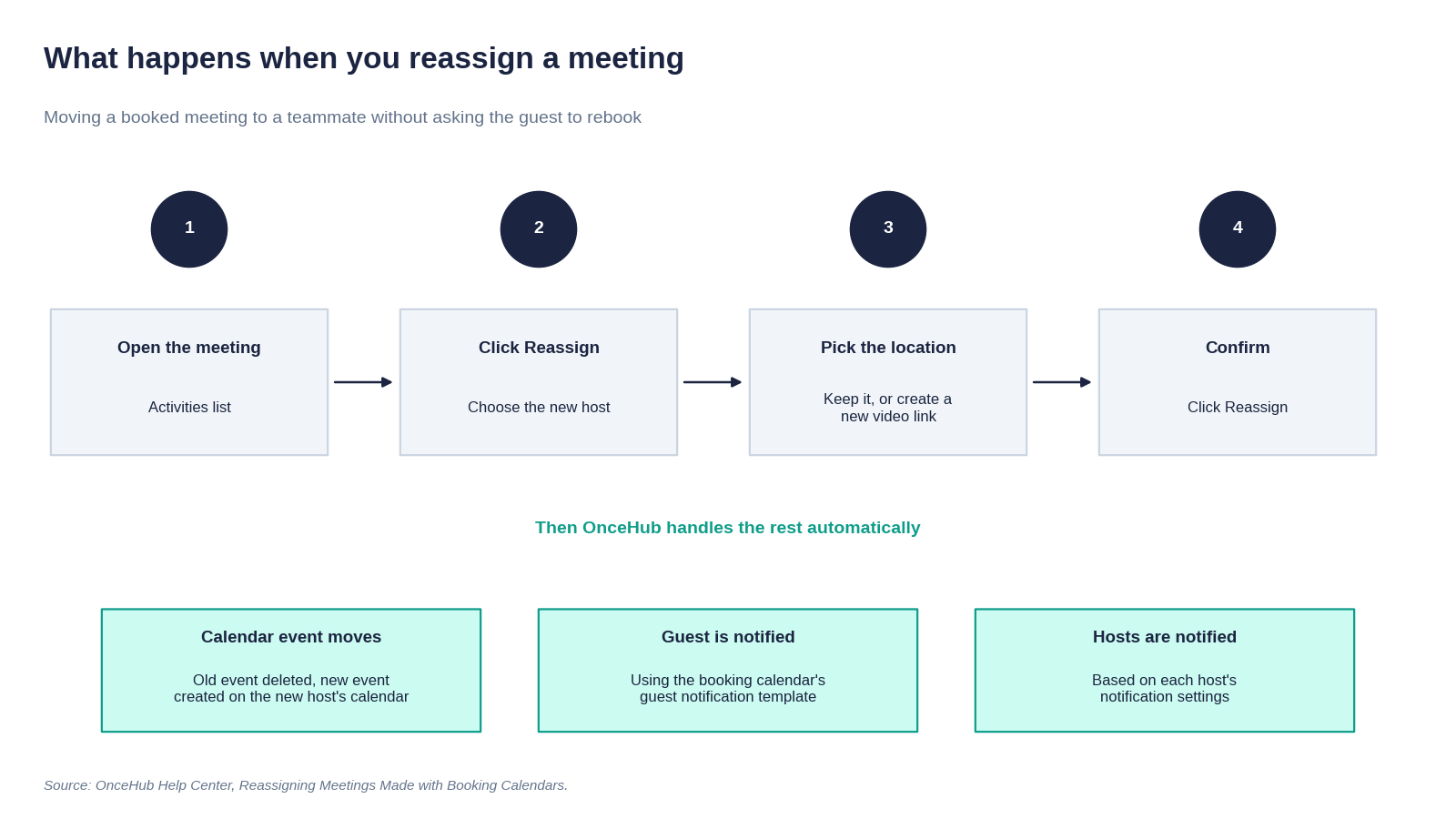
Reassigning a meeting takes a few clicks, and the guest never has to rebook.
When to Use It
Reassignment fits any situation where the meeting should still happen but the original host cannot take it:
- Planned leave or sickness: Move the affected meetings before the absence starts, so prospects get a reassignment notice instead of a cancellation.
- Overloaded reps: If one owner's book suddenly gets busy, move some of their meetings to a teammate to protect response times.
- A better fit emerges: If it becomes clear before the call that a specialist should take it, hand it over rather than rebooking.
Reassignment is available on OnceHub's Route plan and above, alongside round robin and CRM owner assignment.
How to Measure "Fairness" Beyond Meeting Count
Counting meetings per rep is the obvious fairness metric, and on its own it is misleading.
The Flaw in Meeting Counts
Ten discovery calls with small businesses are not the same workload as ten technical deep-dives with enterprise buyers. A rep handling the second set is working far harder, and probably carrying far more pipeline, even though the count is identical.
Metrics to Track
Meetings completed versus assigned: A meeting that was assigned but never happened is not workload. Comparing completed meetings with assigned ones shows the real load on each person and exposes reps whose bookings consistently cancel or no-show. OnceHub's booking analytics let you filter bookings by meeting host and by status, including completed, canceled, rescheduled and no-show, so you can compare completed with assigned meetings for each rep.
Pipeline value distributed: Pull this from your CRM. If high-value opportunities cluster with a handful of reps, your priority rules may be tighter than intended, or your round robin may not be as random as it looks.
Speed to lead: How fast does each lead get attention under your current rules? This matters more than most teams assume. A widely cited Harvard Business Review study found that companies that contacted a lead within an hour were nearly seven times as likely to qualify it as those that waited an hour longer, and more than 60 times as likely as those that waited a day or more. A routing rule that sends leads to an overloaded rep can quietly cost you more than an unfair one.
Capacity across the team: OnceHub's booking analytics break bookings down per user, and its capacity planning report shows when your team is fully booked and when it has room. Treat it as an indicator for spotting imbalance rather than a precise staffing tool.
There is more on setting workload limits and handling uneven team load in our guide on how to manage your availability.
Conclusion: Align Your Routing with Your Revenue Goals
Distributing meetings fairly does not mean distributing them equally. It means giving each meeting to the person best placed to handle it, while keeping workloads sustainable and honoring the relationships clients already have.
Round robin gives you fairness. Priority-based assignment gives you conversion. Owner routing gives you continuity. A hybrid model lets you have all three, and reassignment protects them when plans change, as long as you design the edge cases, like an owner on vacation, instead of leaving them to chance.
Ready to build hybrid routing for your team? If your round robin can't see your CRM, existing clients will keep landing with strangers. With OnceHub, you can route existing clients to their CRM contact owner, give senior reps first claim on your highest-value meetings, reassign bookings when someone is out, and fall back to round robin for every new inbound lead. Start your 14-day free trial, no credit card required, and make sure every prospect meets the right rep.
Frequently Asked Questions
The questions teams most often ask when they set up meeting distribution rules.
What is the difference between round robin and priority-based assignment?
Round robin rotates meetings evenly, so every rep on the team gets the same share regardless of experience. Priority-based assignment ranks the team, so the highest-priority person who is free gets each meeting and others pick up the overflow. Round robin favors fairness, while priority-based assignment favors conversion. In OnceHub, round robin is one distribution method and Any Available Team Member with priority levels is the other, so you can choose per booking calendar.
What is round robin lead routing?
Round robin routing assigns incoming meetings to team members in a fixed rotation, so each new booking goes to the next available person in line. It keeps workloads even and prevents reps from cherry-picking leads. In OnceHub, round robin is one of two meeting distribution methods on a booking calendar, and it shows guests one team member's availability at a time before rotating to the next person after each booking.
How does CRM ownership routing work?
The guest provides their email, the scheduling tool looks them up in your CRM, and the meeting is booked with the contact owner listed there. In OnceHub, you enable Schedule with CRM Contact Owner in a routing form connected to Salesforce or HubSpot. If an owner is found and belongs to the team hosting the booking calendar, the guest sees that owner's real-time availability. If no owner is found, the calendar's standard distribution rules apply instead.
Which lead routing method is best for customer success teams?
Owner routing. Existing clients should meet with the CSM or account manager who already knows their history, not whoever is next in a rotation. It protects the relationship and saves the client from repeating themselves. When clients book through a OnceHub routing form with Schedule with CRM Contact Owner turned on, they are routed to their CRM contact owner automatically, and you can set workload limits so a CSM with a busy book of accounts is not overwhelmed.
Can you combine round robin and priority-based assignment?
Yes, and most teams should. The usual setup gives high-value meeting types, such as enterprise demos, their own booking calendar with priority-based assignment, while general inbound requests go to a round robin calendar. In OnceHub, the priority calendar uses the Any Available Team Member method with priority levels, and the general calendar uses round robin. Adding CRM owner routing in front means existing clients reach their owner first.
What happens if the account owner is on vacation?
It depends on your scheduling tool, so check before it happens. In OnceHub, if the CRM contact owner has no open time slots, the guest sees a message that no times are available rather than being sent to a stranger. For meetings already on the calendar, managers can reassign them to another team member, and the guest is notified automatically with no need to rebook. For longer absences, agree a coverage process in advance so clients are not left waiting.
Does round robin give guests fewer time slots to choose from?
It depends on the tool. Some round robin setups show the next person's availability only; others show any time a team member is free and pick the host afterwards. In OnceHub, Round Robin shows one team member's availability at a time, while Any Available Team Member shows the team's combined availability and uses priority levels to choose the host.
Does OnceHub's round robin support priority?
No: OnceHub's round robin is equal distribution. Use Any Available Team Member with priority levels when you want senior reps booked first, and you can run both on separate booking calendars.
Which OnceHub plan includes round robin and CRM owner routing?
The Route plan, at $19 per seat per month billed yearly or $23 billed monthly. It includes Round Robin, Any Available Team Member with priority levels, routing forms with Schedule with CRM Contact Owner, and Meeting Reassignment. The Engage and Enterprise plans include all of these too. The lower Schedule plan connects to Salesforce and HubSpot but doesn’t include routing or team distribution. You can try every feature free for 14 days, with no credit card required.