

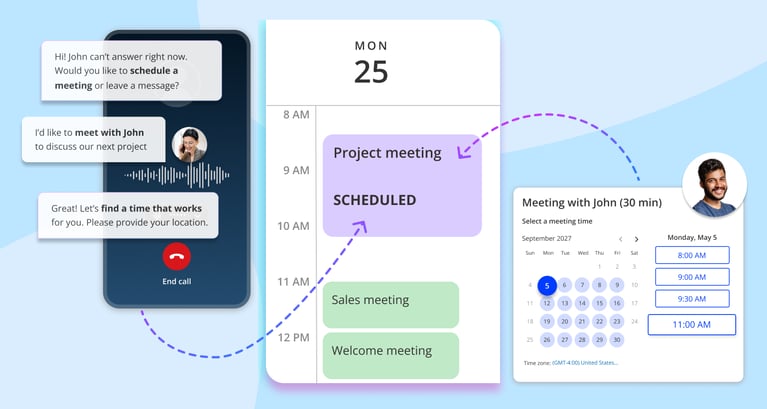
Whether you are closing your next big deal or delivering top-tier client service, one universal truth applies: speed is how you win the business, but immediate access is how you keep their trust.
In fact, according to a landmark study published by the Harvard Business Review, reaching out to a lead within the first five minutes makes you 21 times more likely to qualify them than if you wait just 30 minutes.
You spend resources to drive traffic to your website and get the phone to ring. But what happens in that critical moment when a prospect actually reaches out?
If they visit your site, see a scheduling link, but don't want to fill out a form, they close the tab. If a hot lead calls you while you are pitching another client, they hit your voicemail. And let's be real: hitting voicemail usually means they'll hang up and call your competitor.
Scheduling friction is no longer just about the annoying back-and-forth email dance. The real problem is the failure to capture intent. When a buyer is ready to talk, any delay results in lost revenue.
Most professionals try to fix this by automating their web booking, but they completely ignore callers. In this guide, we are going to break down why relying on just one channel is costing you money and how combining web and phone automation closes those revenue gaps for good.
What Is Meeting Automation? (Beyond Booking Links)
Let's clear up a common misconception right away. Sticking a calendar link in your email signature is a great convenience, but it is not true automation.
A static link still requires the customer to do the heavy lifting. It relies on them to click, navigate your calendar, and fill out their own information.
True meeting automation is a complete intent capture workflow. It is a system designed to eliminate human bottlenecks throughout the appointment lifecycle. A fully automated system moves seamlessly through these actions:
The ultimate outcome here isn't just saving you a few hours of admin work a week. The outcome is speed to lead. The faster you transition a prospect from "I am interested" to "We have an appointment," the higher your win rate will be.
To understand how this works in practice, we need to look at the two primary ways customers actually try to interact with your business.
The Two Channels of Meeting Automation: Web vs Phone
“For high‑stakes or time‑sensitive issues, customers still reach for the phone first: nearly 80% of consumers say phone calls are an important way to communicate with businesses, and they especially prefer calls for complex or urgent situations.” - Yahoo Finance
Meeting automation looks very different depending on how the customer actually reaches you.
Think about your own buyers. If a prospect is browsing your pricing page at midnight, they are a website visitor. They are in research mode and want a silent, digital experience.
But if a hot lead has an urgent problem at 2 PM on a Tuesday, they are a phone caller. They do not want to fill out a form; they want an immediate, conversational experience.
You cannot treat these two channels the same way. To build a system that captures every single lead, we need to compare how automation handles web and phone interactions across five key categories: Identity, Time Zones, Information Capture, Attribution, and Recovery.
Let's break them down.
Identifying the Visitor vs Identifying the Caller
The very first step in any meeting is knowing exactly who is on the other end. If you are a sales professional or a financial advisor, tailoring your pitch starts with accurate identification.
Web Meeting Automation Identity
On your website, identity is established through data and digital footprints.
When a user interacts with your web scheduler, the system relies on known identities through email entries and CRM tracking. For example, if a prospect clicks a meeting link directly from your marketing email, the system already knows their name, company, and email address. It uses progressive profiling via web forms to quietly gather the remaining puzzle pieces. It is a highly structured, organized way to build a profile.
Phone Meeting Automation Identity
On the phone, identity is immediate and dynamic.
When that phone rings, an AI voice agent uses Caller ID recognition and instant CRM lookups to match the incoming phone number to an existing client record.
But there is a massive hidden advantage here: the context of voice conversation. The caller's tone and the specific words they use reveal their urgency in seconds. If an investor calls in a panic about market volatility, or a prospect calls because their current software just crashed, the AI agent immediately picks up on that context.
***Key Insight: Phone conversations often reveal a buyer's decision readiness and urgency much faster than a static digital form ever could.
Once you know who they are, you have to nail down the logistics. And nothing ruins a new client relationship faster than a time zone mix-up.
Time Zone Handling: Silent Detection vs Conversational Negotiation
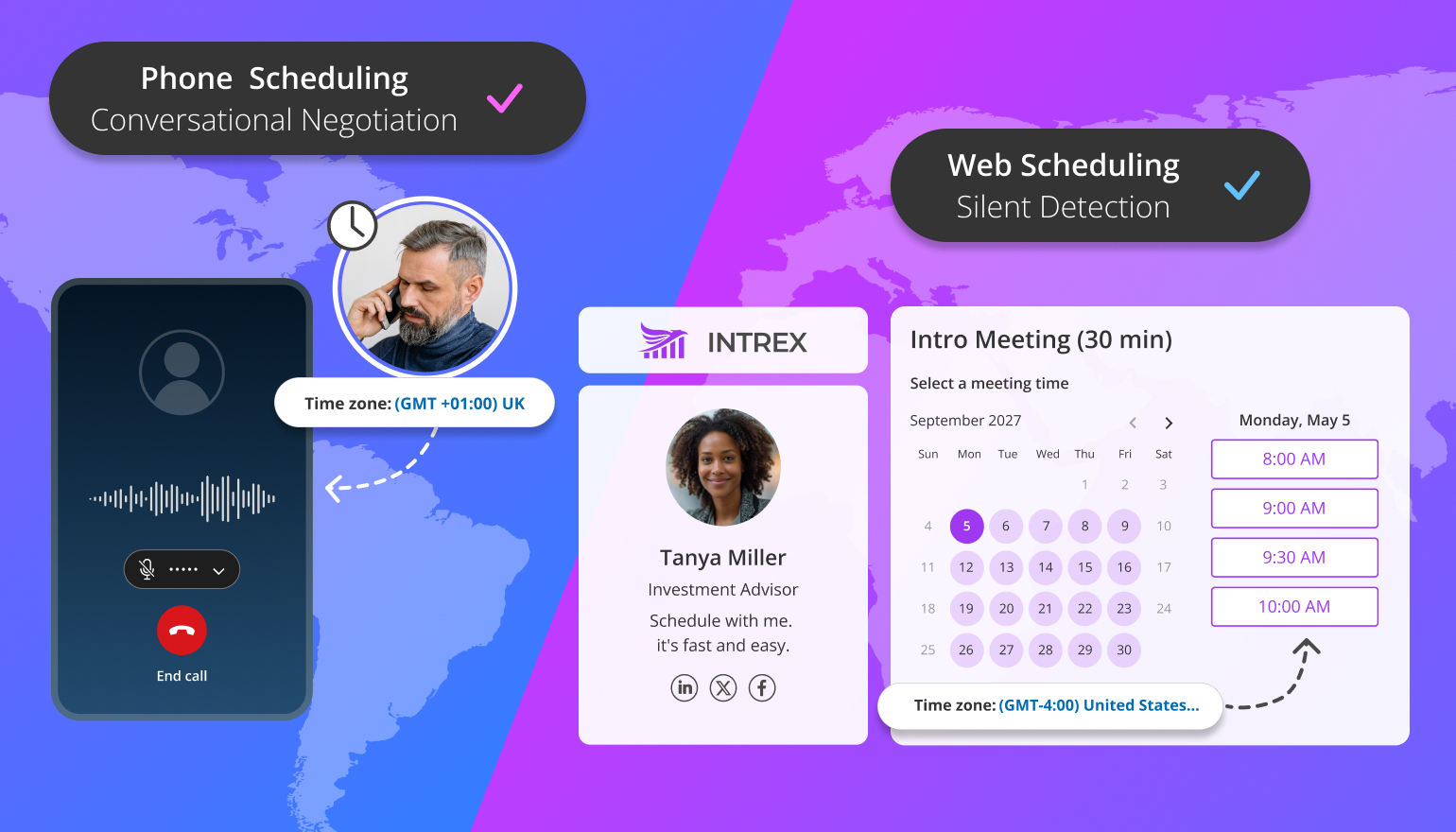
Nothing ruins a new client relationship faster than showing up to a meeting an hour late because of a time zone mix-up. Here is how the two channels handle time logistics.
Web Scheduling Timezones
When a prospect books a meeting through your website, the calendar widget usually does the heavy lifting silently. It checks the user's browser settings and automatically translates your open slots to their local time.
Most of the time, this feels like magic. But it carries hidden risks.
What if the client is traveling for business and their laptop is still on Eastern Time? What if they are browsing through a corporate VPN that masks their real location? Suddenly, the user self-selects a time that is completely wrong, and your Tuesday afternoon meeting becomes a frustrating missed connection.
Phone Scheduling Timezones
Phone automation handles time zones the way a top-tier executive assistant would: through active, verbal negotiation.
When a caller asks an AI voice agent for "next Thursday at 3," the agent does not guess. It instantly clarifies, asking, "Just to be sure, is that 3 PM Pacific Time?" It fixes any ambiguity right there on the call. If you are a sales professional managing a multi-region territory or an advisor with clients across the country, this verbal safety net completely eliminates scheduling confusion.
Also read: Scheduling Meetings Across Time Zones Made Easy
Information Collection: Forms vs Conversations
Before you sit down for a meeting, you need to know what it is about. Both channels gather data to prepare you, but they ask questions in very different ways.
Web Automation Strengths and Limitations
Web scheduling relies on structured intake forms. If you strictly need to know a prospect's company size or investment budget before a consultation, you can make those specific fields mandatory.
This is fantastic for compliance and strict lead qualification. The limitation? Friction. If you ask a web visitor to fill out ten mandatory text boxes, a large percentage of them will get overwhelmed and close the tab. You get perfect, structured data from the people who complete the form, but you lose those who simply lack the patience.
Phone Automation Strengths
Phone automation gathers data naturally through conversational qualification.
Instead of staring at a blank, demanding form, the caller answers dynamic follow-up questions in real-time. An AI voice agent can guide the conversation based on the caller's answers. For example, if a lead calls with an urgent problem, the AI can skip the generic marketing questions and move straight to booking an emergency consultation. It can gently discuss budgets, timelines, or specific needs without making the caller feel interrogated.
Once the meeting is booked and the data is collected, there is one critical question left for your marketing budget: Where did this lead actually come from?
Attribution and Tracking Intent Across Channels
If you spend money on Google Ads, LinkedIn campaigns, or direct mailers, you need to know exactly which efforts are actually driving booked meetings. Both channels provide data, but they capture conversions at very different points in time.
Web Booking Attribution
Web automation tracks intent using landing page data and campaign tags. When a prospect clicks a link in your email newsletter and books a time, the system tags that meeting with the exact source.
Usually, the web scheduler redirects the user to a "Thank You" page to fire off a tracking pixel. The challenge here is the drop-off rate. If your web page loads too slowly or the redirect flow confuses users, they might abandon the process halfway through. You get the click, but you lose the meeting.
Phone Booking Attribution
Phone automation tracks the source using dynamic call routing numbers. If a prospective client calls the phone number listed in your latest ad campaign, the system instantly attributes that call to that specific marketing spend.
The biggest advantage for a sales professional or advisor is that the phone removes all redirect friction. The conversion happens immediately during the peak moment of intent. There are no forms to load and no pages to click through. They just call, talk, and book.
Missed Booking Attempts: The Hidden Revenue Leak
What happens when a prospect starts to book a meeting but stops? This is the invisible gap where businesses lose thousands of dollars without even realizing it.
Web Automation Failures
On the web, failures look like abandoned forms, closed browser tabs, or scheduling links sitting unopened in an inbox.
To recover these lost leads, you have to rely on passive methods. You might set up automated email reminders ("Hey, you forgot to finish booking!") or spend more money on retargeting ads to chase them across the internet. It works sometimes, but it is slow.
Phone Automation Failures
On the phone, failures look like missed calls or a prospect hanging up the second they hear your voicemail greeting.
But here is the absolute game-changer of phone automation: you eliminate the "missed call" entirely. Instead of letting high-intent leads hit a dead-end voicemail, an AI voice agent answers instantly, 24/7. It engages the caller immediately, captures their intent, and books the meeting before they have a chance to hang up and call a competitor.
Now that we see exactly where the revenue leaks are, let's look at how combining the two channels creates a bulletproof system.
Also read: Why Unanswered Phone Calls Lead to Lost Revenue
The Two Pillars of Complete Meeting Automation
To stop leaking revenue and deliver a world-class customer experience, your business needs to build a dual-channel engine. You cannot rely on a one-size-fits-all approach. You need a system that adapts to your guests' personal preferences and real-world constraints, serving both silent browsers and active callers.
Pillar 1: Web Meeting Automation (The Visual Scheduler)
This pillar serves your digital-first guests. Many clients prefer the visual control of a calendar so they can cross-reference it with their own schedule. This system uses smart booking pages, routing forms, and pooled availability to create a frictionless experience. It is the perfect tool for standard demo bookings and for accommodating the late-night researcher, the busy professional in a quiet open office, or the prospect who simply prefers to book a time without speaking to anyone.
Pillar 2: Phone Meeting Automation (The Conversational Scheduler)
This pillar serves guests with immediate needs or situational constraints. Think about a prospect who is driving a car, walking through a busy airport, or dealing with a highly stressful, urgent problem. They cannot safely or easily tap their way through a multi-step web form on a tiny screen. Instead of hitting a dead-end voicemail, an AI voice agent answers their call immediately. It provides the caller with a natural, conversational way to explain their problem and get their appointment booked right then and there, without ever touching a keyboard.
Why Web-Only Meeting Automation Leaves Revenue on the Table
Many professionals fall into a dangerous trap. They put a shiny scheduling link on their website, integrate it with their CRM, and think, "Great, my business is fully automated."
But let's look at the reality of how high-value transactions actually happen.
Phone-first communication still dominates SMB and high-ticket sales. If a prospect is looking to invest a large portion of their wealth, or if a buyer has a complex, urgent problem they need your agency to solve today, they do not want to fill out a web form. High-intent buyers pick up the phone.
If your automation only lives on your website, what happens to those callers when you are stuck in a meeting? They hit your voicemail.
In today’s hyper-competitive market, a voicemail greeting instantly kills buying momentum. By the time you get out of your meeting and manually call them back two hours later, they have already spoken to your competitor. Manual callbacks are simply too slow to win modern deals.
The Bottom Line: Automation must exist exactly where your customers choose to communicate. If you force a caller to go back to your website to find a link, you are leaving money on the table.
So, if you need a system that handles both, what should you look for in the software market? Let's cut through the tech jargon and look at what you really need.
Choosing a Meeting Automation Platform: What SMBs Actually Need?
.jpg?width=1540&height=880&name=Choosing%20a%20platform%20(1).jpg)
When evaluating software, avoid being distracted by enterprise jargon. You do not need a custom-built data lake or a team of engineers to build complex workflows. You need a turnkey tool that drives action.
If you want a system that captures both web and phone leads, here are the core features you actually need:
Meeting Automation Use Cases Across SMB Industries
Let's make this concrete. How does a dual-channel automation system actually look in the wild? Here is how different industries are using this to capture revenue.
Finance Teams and Consulting
For financial advisors and consultants, time is literally money. But you cannot afford to take meetings with unqualified prospects. Automation handles compliance-friendly information capture before the meeting even takes place. Whether a prospect fills out a web form or speaks with your voice agent, the system securely qualifies their intake. If they start an application but get distracted, the system automatically follows up to get them back on the calendar.
Healthcare Practices
Medical front desks are notoriously overworked. By utilizing meeting automation, clinics capture after-hours appointment requests seamlessly. If a patient calls at 8 PM on a Friday, the voice agent answers, finds an open slot, and books it. The system also sends proactive no-show reminders, keeping the schedule full and allowing the front desk to focus on patients actually standing in the waiting room.
Home Services
Plumbers, electricians, and HVAC technicians are usually out in the field, so they often miss phone calls. When a homeowner has a burst pipe, they do not fill out a web form; they call. An AI voice agent answers those emergency inbound calls instantly, checks the dispatch calendar, and books the estimate while your technician is still under a sink across town.
Sales Teams
For high-velocity sales teams, speed is everything. Meeting automation provides instant speed-to-lead booking. Instead of letting inbound leads sit in an inbox for 2 days while reps manually dial them, the system books the discovery call the moment the prospect shows interest. It also runs lead re-engagement workflows that automatically reach out to old leads to get them back on the calendar.
So, if you need a single platform that can handle all these complex workflows across both the web and the phone, where do you look? Let's talk about the solution that actually unifies both.
OnceHub: Unifying Web and Phone Meeting Automation
%20(1).jpg?width=1540&height=880&name=The%20Best%20Voicemail%20Alternative%20in%202025_%20Phone%20Booking%20(Harish)%20(1).jpg)
This brings us to the ultimate solution for growing businesses and busy professionals.
Most companies try to solve this problem by duct-taping two different systems together. They buy one software tool for their website booking links and hire a completely different answering service or basic bot for their phone lines. This creates double bookings, messy CRM data, and high monthly software costs. You have two different "brains" trying to manage one calendar.
OnceHub solves this by offering one single, unified scheduling engine for your entire business.
You set up your availability rules, buffer times between meetings, and team routing logic just once. Then, OnceHub powers both your web booking pages and your AI phone agent using those exact same rules.
The capabilities are completely seamless. A prospect can call your business, get qualified by the conversational AI, and get booked directly into your real-time calendar. If they hang up early, the system triggers an outbound text to recover the booking. Because both your website and your phone line share the exact same brain, you never have to worry about double bookings or scheduling conflicts again.
Measuring ROI From Meeting Automation
How do you know if your automation is actually working? You do not measure success by how many cool AI features a software has. You measure it by the numbers that impact your bank account.
If you implement a dual-channel system, here are the key performance indicators (KPIs) you need to watch:
- Speed to Lead: How fast a prospect goes from showing intent (filling a form or calling) to having a booked slot on your calendar. This should drop from hours to seconds.
- Call-to-Meeting Conversion: The percentage of inbound callers who successfully book an appointment instead of hanging up on your voicemail.
- Missed Call Recovery: The number of abandoned calls or dropped forms that your system automatically follows up with and converts into meetings.
- No-Show Reduction: The drop in missed appointments because your system handles automated SMS and email reminders.
- Cost Per Booked Meeting: How much less you are spending to acquire a meeting now that you aren't paying for manual administrative hours or lost ad spend.
Common Misconceptions About Meeting Automation
Because this technology is evolving so quickly, there is a lot of bad information out there. Let's clear up a few myths that hold businesses back.
- The myth that booking links equal automation: A link is a tool, not a workflow. Real automation actively qualifies the lead, routes them to the right person, and actively follows up if they ghost you.
- The myth that phone automation is enterprise-only: Five years ago, this was true. Only massive banks and airlines had conversational AI. Today, platforms like OnceHub have democratized AI phone booking, making it affordable and accessible for small sales teams, solo advisors, and local service businesses.
- The myth that setup requires software developers: Modern meeting automation is built for business owners, not IT departments. If you know how to use an online calendar and check a few settings boxes, you can deploy these workflows in an afternoon.
But let's be realistic. Automation is incredibly powerful, but it isn't magic. There are times when a human being absolutely needs to take the wheel.
When Humans Should Stay in the Loop
Let’s be realistic. Automation is incredibly powerful, but it isn't magic, and it certainly isn't a replacement for human connection. The goal of meeting automation is to handle the tedious logistics so you can focus entirely on the relationships.
You should build your system with a "hybrid" mindset. Let the AI handle the calendar, but ensure a human being takes the wheel in these critical moments:
- Emotional Conversations: If a client calls in highly distressed, perhaps due to a major financial loss or a medical emergency, an AI agent should be programmed to immediately route the call to a live manager.
- Complex Negotiations: AI is particularly effective for scheduling initial discovery calls and intake sessions. But when it comes time to negotiate a high-ticket contract or close a complex deal, a human needs to step in.
- Unique Escalations: If a customer has a highly specific billing dispute that falls outside of your standard operating procedures, your automation should flag it for human review rather than guessing the answer.
The Future of Meeting Automation
If you look at where business technology is heading into 2026, you will see a massive convergence. The dividing line between "web scheduling" and "voice scheduling" is rapidly disappearing.
We are moving away from simple chatbots and static calendar links. The future belongs to "agentic AI", systems that don't just answer questions, but actively execute workflows. Soon, having a unified AI agent that can negotiate a time over the phone, update your CRM, and instantly text a calendar invite won't just be a luxury; it will be standard business infrastructure.
The companies that embrace this dual-channel approach today will have a massive competitive advantage. They will capture revenue and book meetings while their competitors are still checking their voicemails.
Conclusion
“Every missed call is more than just a number – it's a missed opportunity to serve a customer, close a sale, or build loyalty.” - Dialzara
Meeting automation is not just about convenience. It isn't just a fun tech upgrade to save you a few hours of typing emails every week.
It is about your capture rate.
Every single time a caller hangs up on your voicemail or a web visitor abandons a long intake form, you lose money. By deploying a unified system that answers every call, qualifies every web visitor, and books appointments across every channel, you permanently plug those hidden revenue leaks.
Stop losing your best leads to the friction of phone tag and messy email threads. Turn every single conversation, whether on a screen or over the speakerphone, into a confirmed meeting.
Ready to stop missing revenue from unanswered calls? It's time to give your calendar a voice. Try OnceHub’s AI Phone Booking today. With zero complex setup required, it instantly transforms your existing web booking logic into a 24/7 voice-automated assistant.
Frequently Asked Questions (FAQ)
Is AI phone booking part of meeting automation?
Yes. While many people mistakenly associate meeting automation strictly with digital web links, AI phone booking is the voice-based equivalent. It uses conversational AI to negotiate times, qualify leads, and book appointments directly onto your calendar during a live phone call.
What is the difference between web and phone scheduling automation?
Web scheduling requires users to proactively review your availability and complete digital forms. Phone scheduling uses an AI voice agent to verbally discuss times and naturally qualify callers. For maximum efficiency, both channels should connect to the exact same central calendar to prevent conflicts.
Can teams share automated availability?
Absolutely. Advanced automation platforms use "pooled availability" and "round-robin" logic. This means the system considers your entire team's schedule simultaneously and either offers the prospect the maximum number of available times or assigns the meeting fairly among your available staff members.
Does meeting automation integrate with Google or Outlook?
Yes. Top-tier platforms like OnceHub integrate seamlessly with Google Workspace, Microsoft 365, and major CRM platforms. This ensures your real-time availability is always accurate, prevents double-bookings, and keeps your client records up to date.