

-1.jpg?width=767&name=The%20Best%20AI%20Call%20Answering%20Services%20in%202026%20(Ranked%20by%20Features%20and%20Usability)-1.jpg)
When a prospective client calls your business and the phone rings out to voicemail, they rarely leave a message. In the modern, hyper-connected marketplace, patience is non-existent. That caller simply pulls their phone away from their ear, returns to their Google search results, and dials the next competitor on the list.
The financial impact of this dynamic is staggering, yet largely invisible to business owners. According to data from Ambs Call Center, the direct administrative cost of a single missed call averages $12.15. However, when you factor in the lost lifetime value of a client who churns to a competitor before you even speak to them, that number balloons into a massive annual revenue leak.
In response, tens of thousands of businesses are deploying AI voice assistants. AI receptionists solve the fundamental availability problem: they answer the phone on the first ring, 24 hours a day, 365 days a year. They never take sick days, they handle infinite simultaneous callers, and they never place a high-value prospect on hold.
But availability is only half the battle. A generic AI can greet a caller politely, but it lacks the contextual intelligence to actually help them. If your AI doesn't know your pricing, your geographic service area, or your onboarding process, it is little more than an expensive answering machine. Worse, if left untrained, it might invent answers.
To turn this raw technology into a highly capable digital employee, you must train it. This requires building a robust, dynamic knowledge base. By treating your AI’s knowledge base less like a software configuration and more like a "Digital Employee Handbook," you can create an autonomous front desk that accurately represents your brand, qualifies leads, and protects your business from liability. Here is the definitive guide to training your AI receptionist.
The Hidden Danger of Untrained AI: The "Hallucination" Problem
One of the most dangerous misconceptions about modern Artificial Intelligence is the idea of "plug-and-play" deployment. Many business owners believe they can simply buy an AI subscription, connect it to their phone line, and let it figure things out.
This is a recipe for disaster because Large Language Models (LLMs), the technology that powers conversational AI, are inherently designed to be people-pleasers. If an LLM does not know the answer to a question, its default behavior is not always to admit ignorance; sometimes, it guesses. In the AI industry, this is known as a "hallucination."
In a casual chat environment, an AI hallucinating a historical date is a minor nuisance. In a business environment, an AI hallucinating your return policy, misquoting your hourly rate, or offering inaccurate legal or financial advice is a catastrophic liability. In fact, a 2023 industry survey noted that 37% of businesses report dealing with AI hallucination issues in their customer service responses.
The stakes for getting this wrong are incredibly high. The Qualtrics XM Institute recently estimated that businesses globally put a staggering $3.7 trillion annually at risk due to bad customer experiences.
The only known cure for business-level AI hallucinations is a strictly bounded Knowledge Base. A knowledge base anchors the AI to your approved facts. It overrides the AI’s tendency to guess by explicitly telling it what it knows, and more importantly, what it is strictly forbidden from discussing.
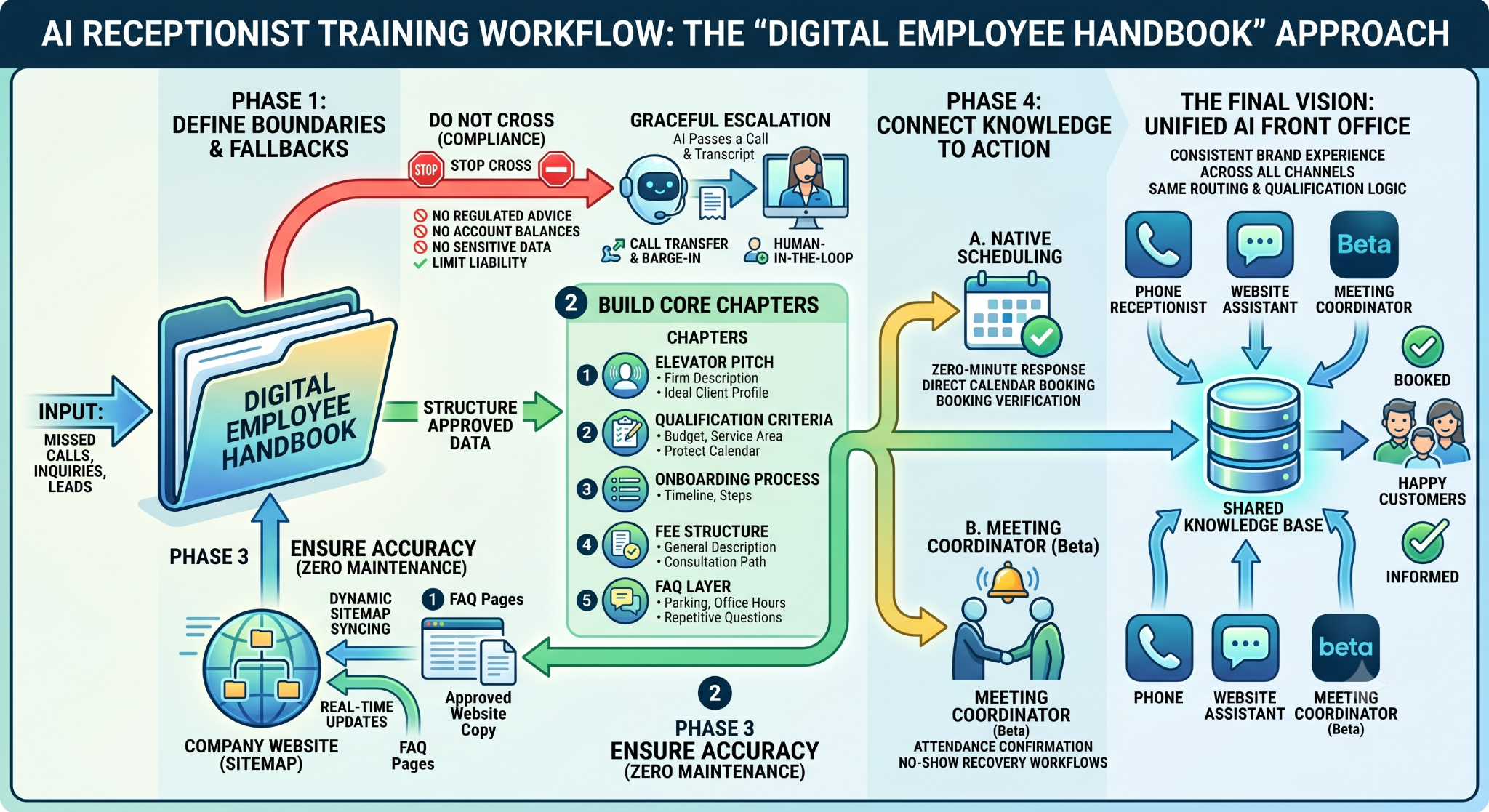
Step 1: Define the "Do Not Cross" Boundaries (Compliance & Escalation)
When hiring a human receptionist, the first day of training isn't just about what to say; it is heavily focused on what not to say. You train a human on which calls require a manager, which questions violate client confidentiality, and which topics are above their pay grade.
Training your AI receptionist requires the same approach. The compliance boundary determines the operational limits of your digital employee. You must establish strict conversational guardrails before you feed the system any promotional facts about your company.
You must explicitly configure your AI to avoid answering specific categories of questions. Include explicit instructions for what the AI should say when a caller asks something outside its configured scope.
- Specific Custom Quotes: Never allow the AI to negotiate or provide binding custom quotes. Train it to say, "Because every project is unique, I want to connect you with our specialists to get you an accurate quote. Let's get that scheduled."
- Regulated Advice: If you are in finance, healthcare, or law, the AI must never offer investment, medical, or legal advice. Limit it purely to administrative and scheduling tasks.
- Account-Specific Inquiries: The AI should not access or speak to sensitive account balances, ongoing legal case details, or private medical records over an initial phone query.
- High-Emotion Complaints: If the AI detects anger, profanity, or deep frustration, it should immediately follow your defined escalation protocol.
The key principle is that the AI should never improvise outside the knowledge base. But what happens when it hits a boundary?
This is where clear escalation protocols are critical.
Step 2: Build the Core Chapters of Your AI Handbook
Once your boundaries and escalation protocols are securely in place, you can begin uploading the core operational facts about your business. To ensure the AI communicates effectively, organize your knowledge base into five distinct "chapters" that mirror the natural flow of a prospective client's inquiry.
Chapter 1: The Elevator Pitch (Who We Are and What We Do)
This is the first thing a prospect wants to understand when they call an unfamiliar business. The AI should be able to give a clear, accurate, and compelling description of the firm's service model. Provide the AI with a refined, one-to-two sentence description of your primary offering. Include the specific demographic or client profile your firm works with, avoiding overly broad claims. Precision here trains the AI to sound like an industry insider rather than a generic robot.
Chapter 2: Qualification Criteria (Protecting Your Calendar)
For service-based businesses, this is one of the most commercially vital pieces of knowledge base content. Your calendar is your most valuable asset, and the AI’s job is to protect it from unqualified leads. Feed the knowledge base your minimum project sizes, required budgets, or specific geographic service areas.
If your roofing company only services a 30-mile radius, the AI must know this so it can politely decline jobs 50 miles away. Dictate exactly how the AI should handle unqualified callers—perhaps by directing them to a DIY guide on your website, or referring them to a trusted partner network, without consuming a single minute of your human staff's time.
Chapter 3: The Client Onboarding Process
Prospects who are genuinely evaluating your business want to understand what the relationship looks like before they commit. By answering this question proactively, your AI signals high-level professionalism. Detail the initial engagement process for the AI: What happens after this phone call? Is there a discovery meeting? What documentation will the client need to provide? How long does onboarding typically take?
Chapter 4: General Fee Structure
Pricing transparency is one of the most common prospect questions, yet one of the most sensitive to handle. The knowledge base should address pricing at a general level without backing your sales team into a corner. Include a general description of how the firm charges (e.g., hourly, flat-fee, retainer, or minimum engagement sizes). Explicitly train the AI to state that specific fee schedules are tailored during the introductory consultation, ensuring the caller knows they need to book a meeting to get exact numbers.
Chapter 5: The FAQ Layer
Beyond the structured categories, your business receives a long tail of repetitive questions. "Where do I park?" "Do you offer virtual consultations?" "Are you open on federal holidays?" Ask your existing front desk staff to write down the top 20 questions they answer every single week. The answers to those questions become the FAQ layer of the knowledge base, allowing the AI to give highly accurate, hyper-specific answers that make it indistinguishable from a seasoned human employee.
Step 3: Connect Knowledge to Action (Native Scheduling)
A knowledge base alone simply turns your AI into a voice-activated FAQ bot. It might be helpful, but it doesn't directly generate revenue. The true operational value of an AI receptionist is unleashed when your rich knowledge base is natively paired with intelligent lead qualification and direct calendar booking.
When an AI successfully answers a prospect's questions and builds trust, it must strike while the iron is hot. Speed to lead is the ultimate differentiator in modern sales. According to a landmark study by InsideSales.com, businesses that respond to a lead within 5 minutes are 21 times more likely to qualify that lead compared to those that wait just 30 minutes.
An AI receptionist ensures a zero-minute response time, but it must be able to finalize the transaction. To do this, your AI must possess a native scheduling engine. It needs to read and write availability within your live calendar system, ensuring that the time slot offered over the phone reflects accurate, real-time data, preventing double bookings.
Furthermore, the workflow should not stop the moment the phone hangs up. The most advanced systems deploy an automated Meeting Coordinator immediately after the booking is made. This coordinator takes over to handle automated attendance confirmation via email or SMS, meeting follow-ups, and critical no-show recovery workflows. By embedding these capabilities directly into the AI's post-call process, you ensure that high-intent prospects who ask questions are immediately converted into confirmed, highly attended meetings.
The Future: Moving Toward a Unified "AI Front Office"
Training an AI receptionist used to require complex prompt engineering, disjointed third-party APIs, Zapier workarounds, and constant manual oversight. But the business landscape is evolving rapidly. We are moving away from standalone voice agents and toward complete, cohesive AI ecosystems.
A modern AI receptionist should not operate in a silo; it should be part of a complete AI Front Office suite. Solutions currently available in the market, such as the OnceHub AI Phone Receptionist, cater directly to this evolution.
By unifying your AI Phone Receptionist, your Website Chat Assistants, and your Meeting Coordinator under one single, dynamically updated knowledge base, your business can deliver a perfectly consistent brand experience across every channel. The same routing logic, qualification rules, and calendar connections that seamlessly navigate web visitors across unlimited booking configurations will also handle your phone callers.
Whether a prospect calls your office at midnight on a Saturday, or chats with your website assistant during your team’s lunch hour on a Tuesday, they receive the same accurate information, the same polite boundary enforcement, and the same frictionless path to your calendar.
By treating your AI like a real employee, defining its boundaries, documenting its core knowledge, syncing it to a single source of truth, and giving it the power to book meetings, you transition from merely avoiding missed calls to actively scaling your revenue. You lay the foundation for a fully autonomous, highly intelligent front desk that captures every lead, answers every question, and books every meeting, freeing your human team to do what they do best: closing deals and serving clients.
Stop losing leads to voicemail. Deploy OnceHub’s AI Phone Assistant to answer every call, qualify prospects, and book meetings directly onto your calendar 24/7
Frequently Asked Questions
How do you train an AI receptionist for your business?
To train an AI receptionist, you build a structured Knowledge Base (or "Digital Employee Handbook") that defines what the AI knows and what it is forbidden to say. Training involves uploading core operational facts, such as service descriptions, qualification rules, onboarding steps, and general pricing, while setting strict compliance guardrails to prevent the AI from guessing or making commitments.
What is an AI hallucination, and how do you stop it on phone calls?
An AI hallucination occurs when a Large Language Model (LLM) confidently generates incorrect or fabricated information because it lacks the answer. You prevent AI receptionist hallucinations by using a strictly bounded Knowledge Base. This anchors the AI to approved facts and gives it explicit instructions to politely decline or escalate questions outside its configured scope rather than guessing.
What should be included in an AI receptionist's knowledge base?
A complete AI receptionist knowledge base should be organized into five core operational chapters:
- The Elevator Pitch: Who you are, what you offer, and your target client profile.
- Qualification Criteria: Minimum project sizes, required budgets, and service areas to filter out unfit leads.
- Onboarding Process: Clear steps on what happens after the initial call.
- General Fee Structure: High-level pricing models without committing to custom quotes.
- The FAQ Layer: Answers to the top 15–20 repetitive questions your front desk receives weekly.
Can an AI receptionist book appointments directly on a calendar?
Yes, provided the platform uses a native scheduling engine. A native scheduling engine reads and writes live availability directly within your calendar system (such as Google Calendar or Microsoft Outlook). This allows the AI to confirm a meeting verbally during the call in real time, preventing double bookings and ensuring a zero-minute response time for new leads.
How does an AI receptionist handle calls outside its knowledge base?
When a caller asks a question outside the AI’s knowledge base, a properly configured AI receptionist follows a predefined escalation protocol. Instead of guessing or offering binding custom quotes, the AI politely explains its operational boundary, takes a detailed message, and logs a high-priority follow-up request for your human team.
What compliance boundaries should you set for an AI receptionist?
Before deploying an AI receptionist, you must configure strict "Do Not Cross" guardrails, including:
- No Custom Quotes: Restrict the AI from negotiating or providing binding price quotes over the phone.
- No Regulated Advice: Prohibit the AI from giving medical, legal, or investment advice (limiting it strictly to administrative/scheduling tasks).
- No Private Account Access: Prevent the AI from discussing sensitive balances, medical records, or case files over an unverified initial call.
- Emotional Escalation: Direct the AI to flag calls involving high frustration or anger for immediate human review.
What is the difference between an AI phone bot and a unified AI Front Office?
A standalone AI phone bot operates in isolation and often requires disjointed third-party connectors (like Zapier) to update your calendar or CRM. A unified AI Front Office connects your AI Phone Receptionist, Website Chat Assistants, and Automated Meeting Coordinators to a single, centralized knowledge base. This ensures consistent qualification rules, brand voice, and calendar sync across both voice and web channels 24/7.