

To find a meeting time that works for everyone, you should share your availability upfront, use meeting polls for group consensus, respect different time zones, and use an automated scheduling tool to eliminate back-and-forth emails.
We often fire off meeting invitations without properly considering how they fit into someone else's crammed calendar. When all relevant participants can actually attend an engagement, it ensures that diverse perspectives are represented, which leads to better decision-making and problem-solving. However, finding overlapping availability across different schedules and time zones can quickly turn into a frustrating administrative task.
There are two primary ways to negotiate suitable meeting times: sending out booking links to show your availability upfront, or proposing specific dates and waiting for approval. Prioritizing a seamless scheduling process builds stronger working relationships, enhances accountability, and contributes to a more successful engagement.
TL;DR:
- Share your availability upfront using booking links to reduce scheduling back and forth.
- Use meeting polls to let attendees vote on the best time for large group discussions.
- Prioritize automated scheduling tools to instantly detect overlapping availability and accommodate different time zones.
Gathering context for meeting times that suit everyone
Gathering context from participants is crucial in finding suitable meeting times that work for everyone because it ensures effective communication and collaboration within a small or large group. People's schedules are diverse and can be affected by various factors like time zones, personal commitments, and workloads. By understanding the context of each participant's availability, such as their preferred working hours, time zone differences, and any potential conflicts, meeting organizers can identify overlapping windows that accommodate everyone's needs.
Without this context, scheduling conflicts may arise, leading to reduced attendance and diminished productivity. Furthermore, gathering participant context demonstrates respect for their individual situations, fostering a positive and inclusive work environment. It shows that their time and contributions are valued, enhancing team morale and cooperation. By considering the context of each participant, organizers can also optimize meeting times to ensure peak performance and engagement during the discussion. In essence, gathering context from participants not only facilitates the practicality of scheduling but also supports effective teamwork and overall productivity in any collaborative endeavor.
Share your availability upfront when trying to find the best meeting time
Sharing your availability upfront when trying to find a meeting time with prospects is essential for effective communication and productive collaboration. When you share your schedule openly, it enables participants to coordinate tasks in a way that minimizes conflicts and maximizes attendance.
Providing your available time slots right from the start delivers a few key benefits:
- Streamlines decision-making: Upfront communication reduces the need for time-consuming email threads and scheduling back and forth.
- Fosters transparency: Openly displaying your calendar capacity demonstrates a willingness to engage while showing deep respect for everyone's limited time.
- Anticipates challenges: Knowing exactly when key stakeholders are actually free makes it much easier to prioritize projects and designate essential tasks further down the line.
Share meeting polls to determine the most suitable meeting times
Sending out polls and feedback receiving mechanisms can significantly improve your scheduling process. Meeting polls allow for greater inclusivity by essentially involving all participants in the decision-making process leading up to an engagement.
When everyone has the opportunity to vote on their preferred meeting times, availability, and capacity, it promotes a sense of ownership that ensures the chosen time works well for the majority of everyone that is expected to attend.
These kinds of polls streamline the scheduling process and save time for both the meeting organizer and the attendees. Instead of engaging in lengthy and laborious email threads and scheduling back and forth, a poll can provide a centralized and efficient way to collect responses. Many of these meeting poll infrastructures also have record-keeping functionalities that allow you to store responses, which can be extremely useful when planning future engagements.
They’re also great at facilitating internal collaboration and engagement, as it minimizes the awkwardness of having to double-triple check time zones and global availability.
Prepare an agenda or executive summary so people can prioritize meetings if necessary
Meeting agendas are good things to have as a rule, as they help to orient others in your understanding and align with your goals for the meeting. Try to always include at least a summary of the contents of your pending engagement so that people can ascertain the priority and urgency of their attendance and make provisions if need be.
By sharing a well-structured agenda with all of your participants in advance, you set clear expectations and provide an outline of what will be discussed. The agenda serves as somewhat of a roadmap, guiding the flow of your next meeting and helping relevant parties connect and engage with the information more quickly.
These agendas also help attendees prioritize their time and efforts by highlighting the most critical topics and allocating appropriate time for each item. By giving your attendees some conceptual footing before the meeting, you’re opening up an avenue for a deeper and more engaged discussion, as they will have had adequate time to prepare questions or gain understanding.
Be mindful of different time zones when setting up meetings
The age-old conundrum! Time zones can wreak havoc on a well-structured calendar and dash any plans of engagement in no time at all. Always try to accommodate varying time zones and business hours so that your intended engagement can actually take place. This is easily achievable through web apps and scheduling software, so make sure you use a good time so that you’re not missing out on opportunities due to an erroneous calculation of time zones.
Make sure to avoid technical mistakes while finding the best meeting times
Technical mistakes are particularly glaring when considering how easy it is to avoid them. Sometimes we forget to tick all of our boxes when proposing, requesting, or accepting meeting times, and this can lead to a rocky start to some of our engagements. Make sure to be mindful of steps and processes in your meeting setup that require technological intervention and try to stay ahead of any potential mishaps that could occur. It’s always a good habit to check attendees to see who is participating, confirm the right links and resources have been sent ahead of time, and to gauge whether time zone differences were accommodated for.
Use an automated scheduling system to find a meeting time that works for everyone
The best way to ensure you’re booking time with others in a way that is convenient for all is by making use of an automated scheduling app like OnceHub. Why get stuck in the nitty-gritty of everyday scheduling when you can make use of a simple and intuitive app that does it for you.
Why OnceHub is the Ultimate Tool for Finding the Perfect Meeting Time
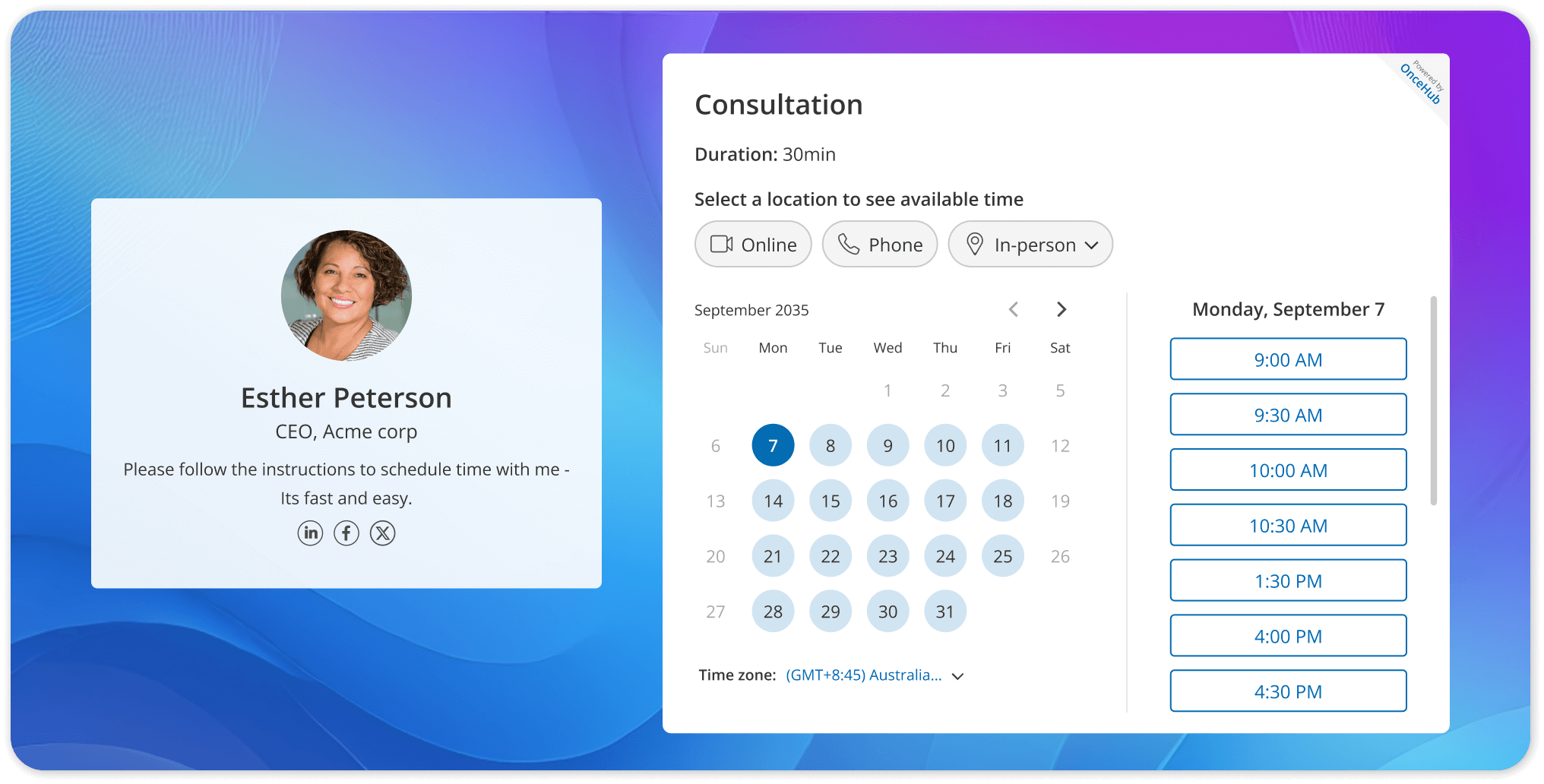
Why get stuck in the nitty-gritty of everyday scheduling when you can use an intuitive platform that handles the heavy lifting for you? OnceHub is designed to eliminate friction, automate the busywork, and ensure everyone gets to the table on time.
Here is how OnceHub streamlines your workflow and ensures you find a meeting time that works for everyone:
- Availability Syncing: Never worry about double bookings again. OnceHub automatically connects with your existing calendars, ensuring you only ever offer up times when you are genuinely free.
- Automated Time Zone Conversions: Take the mental math out of global scheduling. Your invitees will always see your available time slots automatically displayed in their own local time zones.
- Customizable Time Preferences: Protect your deep-work hours. You can easily set buffer times between meetings, cap the number of daily engagements, and restrict bookings to specific hours of the day.
- Built-in AI Phone Agents: Take scheduling automation to the next level. OnceHub uniquely integrates AI Phone agents directly into existing scheduling objects like your Booking Calendars and Booking Hub. This gives you an intelligent, conversational assistant ready to handle booking requests and manage your availability around the clock.
- Meeting Polls and Group Scheduling: Stop the endless "reply-all" email chains. Send a quick poll to let participants vote on their preferred times, easily achieving group consensus in a fraction of the time.
- Personalized Booking Pages: Put your best professional foot forward. Create customized, branded booking pages that make it incredibly simple for clients, prospects, and colleagues to secure time with you.
- Smart Reminders and Notifications: Drastically reduce your no-show rates. Automated email and SMS reminders ensure that once a meeting time is agreed upon, everyone actually remembers to show up.
Also read: What is Scheduling Software? Benefits, Use Cases & How to Choose (2026 Guide)
Conclusion: Better Meetings Start with Smarter Scheduling
Finding a meeting time that accommodates everyone shouldn't feel like a full-time job. By proactively sharing your availability, utilizing meeting polls for group consensus, and respecting varying time zones, you set the stage for highly productive and inclusive conversations.
However, the real secret to frictionless scheduling is stepping out of your inbox and letting technology handle the heavy lifting.
When you replace messy email threads with an automated system, you aren't just saving yourself administrative headaches. You are showing your prospects, clients, and team members that you deeply value their time.
Stop letting scheduling conflicts dictate your calendar. By implementing the strategies outlined above and leveraging a comprehensive tool like OnceHub, you can get back to focusing on what actually matters: the meetings themselves.
To sign up for free today, click here.
FAQs
How do you find a meeting time that works for everyone?
You find a meeting time that works for everyone by sharing your availability upfront, sending a meeting poll for group input, and using automated scheduling software to eliminate manual back and forth.
What is a meeting poll, and when should you use it?
A meeting poll is a collaborative scheduling tool that lets participants vote on preferred time slots. You should use a meeting poll for group meetings with three or more attendees, cross-time zone teams, or any situation where finding consensus is more important than speed.
How do you schedule a meeting with someone in a different time zone?
You schedule a meeting with someone in a different time zone by using a scheduling tool that auto-detects the recipient's time zone and displays your availability in their local time. You should also explicitly confirm the time zone in your calendar invite to avoid any confusion.
What is the best time of day to schedule a meeting?
The best time of day to schedule a meeting is mid-morning, specifically between 10 AM and 11 AM, as research consistently points to this as the most productive window. You should generally avoid Monday mornings and Friday afternoons when the team focuses, and attendance tends to be lowest.