

TL;DR
- When your Black Friday deal is an appointment, your calendar is your inventory. A coaching session, a strategy consultation or a med spa treatment can only be sold as many times as you have open hours.
- Build the offer around the time you can actually give, and put the deal on its own booking calendar with its own hours, price and limits, so promo bookings don't crowd out regular clients.
- Put a booking link in every promo channel, from your email list to your Google Business Profile, so buyers book the moment they decide.
- Take payment or a deposit when they book. OnceHub collects payment through Stripe on the booking calendar (Schedule plan and above), so promo buyers pay before the slot is confirmed and are less likely to skip it.
- Plan the redemption wave. Black Friday deals are bought in November and booked through December and January, so set the dates the offer can be booked and add hours where they'll be needed.
For an online store, Black Friday ends at checkout. For a business that sells appointments, the sale is only the start: every deal sold has to be scheduled, delivered and fitted around the clients you already have.
That changes what a good Black Friday marketing strategy looks like. The question isn't only how to attract deal traffic. It's how to turn it into booked appointments without overfilling December, losing regular clients or collecting bookings from people who don't turn up.
This guide is for appointment-based businesses: coaches, therapists and consultants, financial advisors, clinics and med spas, and salons and wellness studios that sell sessions or packages. If you run a B2B sales team booking demos from Black Friday leads, our guide to speed to lead during BFCM covers response times, rep coverage and holiday booking windows.
Why Black Friday is different when you sell appointments
Three things make a Black Friday deal on appointments different from a deal on products:
- Your inventory is time. You can't order more hours. Every promo appointment takes a slot a regular client might have booked at full price.
- Bookings arrive in two waves. Some buyers book straight away. Others buy now and book later, so the second wave lands in December and January.
- Discounts attract browsers. A deal that costs nothing to book attracts people who are still comparing offers, and some of them won't turn up.
The steps below address each of these.
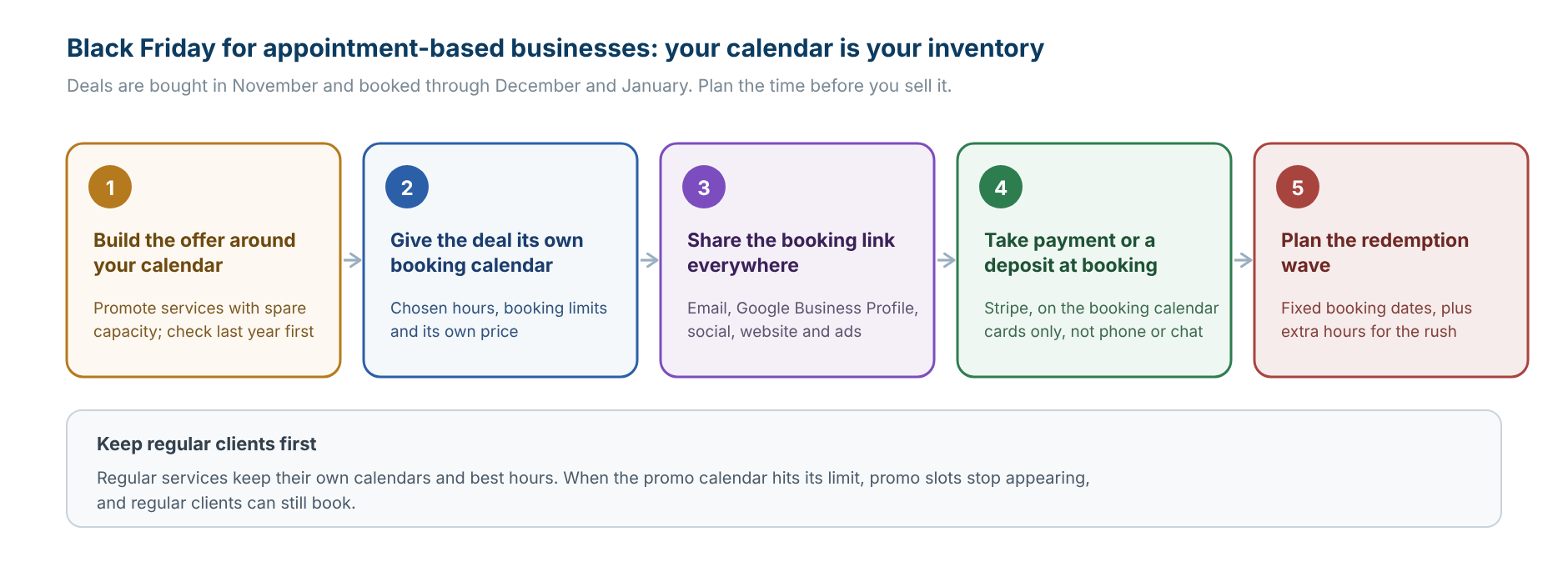
1. Build the offer around your calendar
Start with the time you can give, not the discount you want to advertise.
- Pick services with spare capacity. Promote the sessions, treatments or packages that have room in your calendar, rather than the ones that are already fully booked at full price.
- Check last year's demand first. OnceHub's Capacity Planning report, on the Schedule plan and above, compares upcoming capacity on a booking calendar with past bookings for a time frame you choose, and flags periods where past demand was at least 20% above current capacity. Run it on your regular calendars, since a new promo calendar has no booking history yet.
- Decide how many promo appointments you'll take, and when they can be booked, before the offer goes live.
- Make the offer specific. "Your first consultation at 30% off, booked by January 31" is easier to act on, and easier to schedule, than a general discount.
2. Give the deal its own booking calendar
A separate booking calendar for the promotion keeps deal bookings from taking over your regular hours.
In OnceHub, each booking calendar has its own availability, limits, booking window and payment settings, so you can treat the deal as its own product. Running a promo calendar alongside your regular one needs the Schedule plan or above, since the free Basic plan includes one booking link.
- Set availability on the promo calendar itself, rather than inheriting your profile hours, so you can offer promo appointments only in chosen hours, such as quieter weekday afternoons, and keep your busiest hours for regular clients.
- Cap promo bookings per practitioner with daily, weekly and monthly booking limits on the promo calendar. When a host reaches a limit, their promo slots stop appearing for that period, and your regular calendars stay open. If you set more than one limit, the strictest one applies.
- Name the calendar after the deal, such as "Black Friday: first consultation, 30% off," so buyers know what they're booking.
- List the deal next to your regular services on one branded page with a Booking Hub (Schedule plan), so new clients can find the offer and returning clients can still book what they came for.
One thing to keep in mind: booking limits apply per booking calendar and per host, so a cap on the promo calendar doesn't count appointments on your regular calendars. Three practitioners with a monthly limit of 20 can take up to 60 promo bookings between them.
3. Put a booking link in every promo channel
Every place your deal appears should let people book it.
For an appointment-based business, those channels usually include:
- Your email list. Add a "Book your appointment" button next to the offer. For existing clients, OnceHub's Smart Skip and prefill fill in their details from the link, and skip the booking form entirely when the link carries every required field, so a click goes straight to time slots.
- Your Google Business Profile. If your profile shows a Booking option, add the promo booking link as a "Book an appointment" link for the promotion period, so people who find you on Google Search or Maps can book the deal directly. Booking links depend on your business category and country, and the profile must be verified.
- Social profiles and posts. Put the promo booking link in your bio and in every deal post.
- Your website. Embed the promo booking calendar on the offer page (Schedule plan and above), so visitors book without leaving it.
- Paid ads. Send ad traffic to the offer page with the booking calendar on it.
Tag each link with UTM parameters so you can see which channel produced bookings. Our guide to lead attribution for booked meetings covers the setup.
4. Take payment or a deposit when they book
An upfront payment makes no-shows less likely and filters out people who are only comparing offers.
OnceHub's Stripe integration collects payment during booking, on the Schedule plan and above:
- Set a price on the promo booking calendar. It can be the full discounted price or a fixed deposit, with any balance collected at the appointment. Each booking calendar has its own payment settings, so your regular calendars can stay unpaid if you prefer.
- Add payment terms, an optional message shown while clients book, such as "Your $50 deposit is applied to your treatment."
- Payment is collected before the booking is confirmed, and Stripe emails the client an invoice. You can add the payment amount and transaction ID to OnceHub's confirmation email too.
- Send paid promo bookings to the promo booking calendar, where the price is set.
Four details to plan around:
- Card payments only, even if other methods are set up in your Stripe account.
- Taxes aren't added automatically. Include any applicable tax in the price you set.
- One price per booking calendar. Use separate promo calendars if you offer more than one price point.
- Refunds happen in Stripe. If a paid booking is canceled, OnceHub marks it canceled and keeps the transaction details, but any refund is processed manually in your Stripe account. Deal buyers do cancel, so decide your refund policy before launch and state it in your payment terms.
5. Plan the redemption wave
Many Black Friday buyers book later.
Plan for appointments that land weeks after the sale.
- Set the dates the deal can be booked. OnceHub's booking window can be a fixed date range, such as December 1 to January 31, so promo appointments can only be booked within the offer period.
- Add hours where the wave will land. Date-specific overrides open extra availability on chosen dates, such as Saturday mornings in January. Set the overrides on the promo calendar's own availability, since overrides on your profile availability change every calendar that uses it.
- Watch the promo calendar fill. Check bookings weekly through December and add availability, or close the offer, before slots run out.
Selling gift cards or packages?
OnceHub doesn't sell gift cards or packages. If your offer is a voucher, sell it through your existing online store or point of sale, then send buyers the promo booking link with a fixed booking window for redemption. Add a booking form question for the voucher code, so every promo appointment carries the code you need to match it to the sale.
6. Keep regular clients first
Your regular clients pay full price and come back.
Don't let a promotion push them out.
- Keep regular services on their own calendars, so their availability isn't touched by the promotion.
- Hold your best hours for regular clients, and offer promo appointments in quieter times.
- Give existing clients early access before the public promotion, with one-time links (Schedule plan and above). Each link expires after one booking, so an early-access offer can't be forwarded and reused.
- Tell regular clients what to expect if December will be busier than usual, and point them to the times that are still open.
Reminders and easy rescheduling matter even more for holiday appointments. Our guide to reducing no-show appointments covers what to set up.
A Black Friday checklist for appointment-based businesses
How OnceHub supports Black Friday appointments
On G2, reviewers describe OnceHub removing the back-and-forth calls and emails of booking, because clients pick a time from a link.
Schedule is $10 per seat a month billed yearly ($12 monthly), and only people who receive appointments need a seat. See OnceHub pricing for all plans, or start a 14-day free trial with no credit card required, and set up your promo booking calendar before your next deal.
Frequently asked questions
How should appointment-based businesses run Black Friday deals?
Build the offer around the time you can actually give. Choose services with spare capacity, put the deal on its own booking calendar with its own hours and limits, add a booking link to every promo channel, and set the dates the deal can be booked so the redemption wave doesn't overfill December and January.
What scheduling software works for Black Friday appointment deals?
Look for four things: a separate booking calendar for the promotion, booking limits on that calendar, a booking window with fixed dates, and payment at booking. OnceHub covers all four on the Schedule plan ($10 per seat a month billed yearly), with a 14-day free trial.
What Black Friday offers work for coaches and consultants?
Offers that fit a coach's or consultant's calendar include a discounted first session, a package of sessions secured with a deposit, and early access for past clients before the public promotion. Keep the offer specific, with a clear end date for booking, so it's easy to act on and easy to schedule.
Should I take a deposit for Black Friday bookings?
An upfront payment or deposit makes no-shows less likely and filters out people who are only comparing offers. In OnceHub, you set a price on the booking calendar and Stripe collects it before the booking is confirmed, with an optional payment terms message explaining how the deposit is applied.
How do I stop Black Friday bookings from crowding out regular clients?
Put the deal on a separate booking calendar that offers only chosen hours, and cap it with booking limits per practitioner. Your regular services keep their own calendars and availability, so when a host reaches the promo limit, their promo slots stop appearing while regular clients can still book.
How long should a Black Friday appointment deal be bookable?
Set a fixed booking period that fits your capacity, such as December 1 to January 31, and tell buyers the end date in the offer. In OnceHub, a booking window with a fixed date range makes sure promo appointments can only be booked within that period.
Can I limit how many Black Friday appointments I take?
Yes. Set daily, weekly and monthly booking limits on the promo booking calendar. In OnceHub, once a host reaches a limit, the promo calendar stops offering that host's slots for that period, and limits on the promo calendar don't affect your regular calendars.
Where should I share my Black Friday booking link?
Everywhere the deal appears: promo emails, your website's offer page, social profiles and posts, paid ads, and your Google Business Profile if it shows a Booking option. Tag each link with UTM parameters so you can see which channel produced bookings.
Disclosure: OnceHub publishes this guide, and its features appear in it.