

Capacity planning is the process of checking whether you have enough capacity (people's hours, equipment, or bookable appointment time) to meet forecast demand over a set period, then adjusting capacity or demand to close any gap. The term covers four different disciplines: project resourcing, workforce shift planning, production planning and scheduling capacity. Each has its own tools, metrics, and buyer.
Most published guides cover only the first one: resource management software for agencies and professional services firms. That is a real discipline with a mature tool market, and this guide covers it. But it is not what a sales leader means when they ask whether the team has capacity for next quarter's demos, or what a clinic manager means when patients can't get an appointment for two weeks.
This guide defines the term, explains the three classic strategies, sets out the process all four types share, then takes each type in turn with the tools and use cases that belong to it.
Quick answer
- The definition: matching available capacity against forecast demand over a defined horizon, and adjusting one or the other before the gap causes problems.
- Four kinds, four toolsets: project and resource capacity planning (Float, Resource Guru, Runn), workforce and shift capacity planning (workforce management systems), production capacity planning (ERP and MRP), and scheduling (appointment) capacity planning (scheduling platforms with capacity reporting, such as OnceHub).
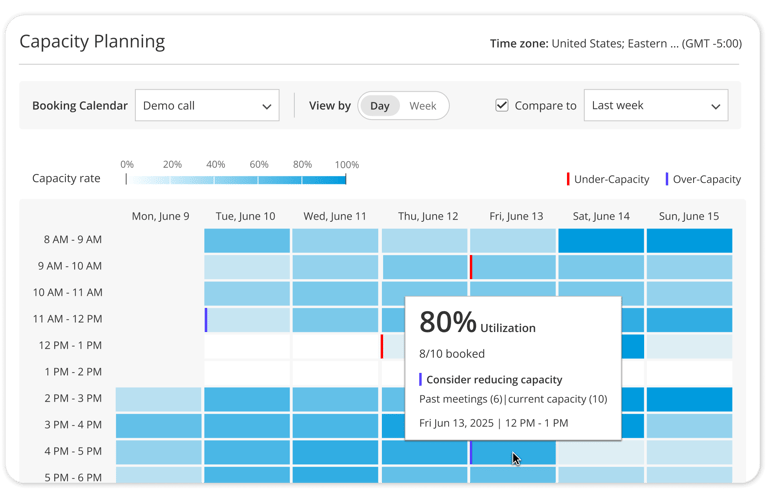
- For appointment-based teams: OnceHub's Capacity Planning report shows utilization for every hour (or day) on a Booking Calendar and flags blocks where past demand ran at least 20% above or below current capacity.
- Three classic strategies apply to every type: lead (add capacity before demand arrives), lag (add it after demand is confirmed) and match (add it in small steps that track demand).
- The process is the same in all four: forecast demand, measure real capacity, find the gap, then adjust capacity or demand and re-measure.
- Pick the tool for your type. If your constraint is bookable appointment slots rather than billable project hours, a resource management platform isn't built to show you whether you're offering enough bookable slots.
- A frequent failure is measuring theoretical capacity rather than real capacity: the hours or slots that exist on paper, rather than the ones actually available after meetings, buffers and admin.
What is capacity planning?
Capacity planning answers two questions: how much work is coming, and how much can we absorb? The gap between those numbers is the planning problem, and you can close it from either side: add capacity, or shape demand.
What makes the term confusing is that "capacity" means something different depending on what you produce.
|
Type |
What is being matched |
Who owns it |
Typical tools |
Planning horizon |
|
Project and resource |
People's available hours against project demand |
Resource managers, PMOs, agency ops |
Float, Resource Guru, Runn, Productive, Kantata |
Weeks |
|
Workforce and shift |
Staff on shift against forecast arrival volume |
Contact center and operations managers |
Workforce management systems |
Days |
|
Production |
Machine and plant hours against production orders |
Manufacturing planners |
ERP and MRP systems |
Months |
|
Scheduling (appointment) |
Bookable appointment slots against booking demand |
Sales, clinical, advisory and customer success leaders |
Scheduling platforms with capacity reporting (e.g., OnceHub Capacity Planning report) |
Days to hours |
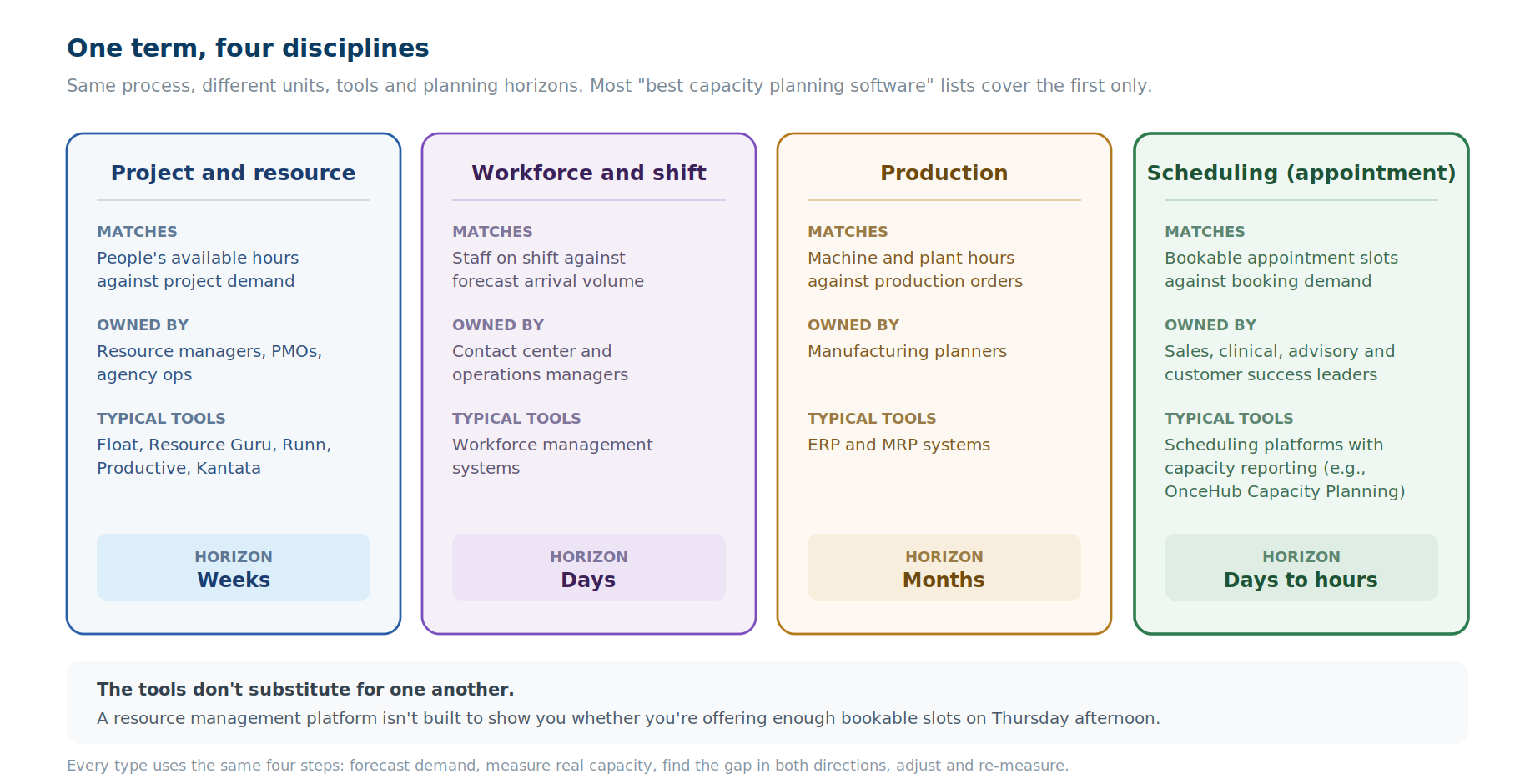
Two things follow from that table. The tools do not substitute for one another, and most "best capacity planning software" lists cover row one only.
Capacity planning strategies: lead, lag and match
Every type of capacity planning uses one of three strategies, which differ in when you add capacity.
Lead strategy: add capacity before demand arrives. Simpplr describes lead as increasing capacity before the demand arises, with the risk of overcapacity if demand doesn't materialize. In scheduling, that means opening extra demo slots or adding hosts before a campaign launches.
Lag strategy: add capacity after demand is confirmed. It avoids paying for capacity you don't need, but it can delay meeting demand. In scheduling, that means adding a host only after the Capacity Planning report shows the same hours under capacity for several weeks.
Match strategy: add capacity in small steps that track demand. It sits between lead and lag, and it needs frequent monitoring. In scheduling, that means reviewing availability weekly against the report and adjusting in small steps.
Capacity planning also happens at three levels, as Apptio frames them: strategic (years), tactical (months to a year) and operational (day to day).
The capacity planning process: 4 steps
All four types run the same four steps. The inputs differ; the sequence does not.
1. Forecast demand. What volume of work, tickets, orders or bookings is coming, over what horizon? The most reliable input is your own history for the equivalent period, such as last quarter, the same month last year or the same day last week, adjusted for anything you know has changed.
2. Measure real capacity, not theoretical capacity. A 40-hour week is not 40 billable hours, and eight open calendar hours are not eight bookable appointment slots once buffers, existing meetings and admin are subtracted. This step is where many plans go wrong, because the theoretical number is the easy one to get.
For appointment capacity, use this formula:
Bookable slots = (open hours − existing meetings − admin) ÷ (meeting length + buffer)
Example: 8 open hours with 1.5 hours already booked leaves 390 minutes. At 30-minute meetings plus a 15-minute buffer, that is 8 bookable slots, not 16.
3. Find the gap, in both directions. Under-capacity is the obvious failure: more demand than you can serve, so work is turned away, queued or delivered late. Over-capacity is the quieter one: capacity sitting idle that you pay for in salary or in opportunity cost. Both are worth catching.
4. Adjust, then re-measure. Add or reduce capacity, or shape demand to fit. The levers differ by type:
- Project and resource: reassign people, bring in contractors, defer or re-scope work.
- Workforce and shift: add or move shifts, offer overtime, adjust breaks.
- Production: add a shift, outsource an order, reschedule maintenance.
- Scheduling: change the Booking Calendar's availability, set workload limits (the maximum meetings per host per day, week or month), adjust buffers and start times, and spread meetings evenly with round-robin distribution, available on OnceHub's Route plan and above.
Then measure again, because a plan that is never checked against what actually happened is a forecast, not a planning process.
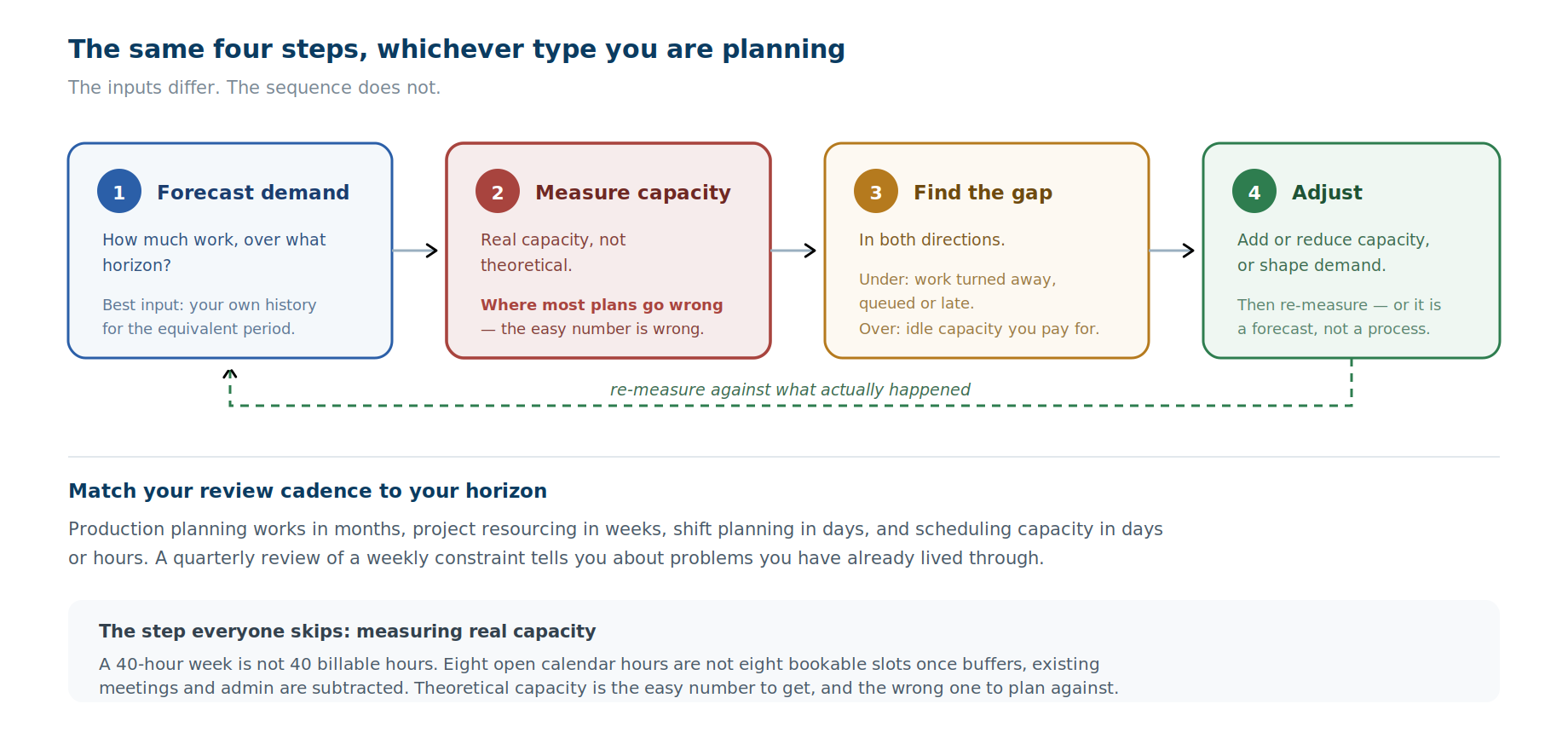
The horizon matters as much as the method. Production planning works in months, project resourcing in weeks, shift planning in days, and scheduling capacity in days or hours. Match your review cadence to your horizon: a quarterly review of a weekly constraint tells you about problems you have already lived through.
Type 1: Project and resource capacity planning
The question: can we staff the work we have committed to, and can we take on what is in the pipeline?
This is the meaning most published guides cover, and it has a mature tool market. The unit is a person's available hours; the demand is project work; and the job is matching people with the right skills to the right work without overloading anyone.
Tools. Resource Guru puts people, meeting rooms and equipment on one shared schedule, with clash management that prevents double-bookings and a waiting list for work that doesn't fit yet.
Float leans toward visual scheduling for larger teams across offices and skill sets, with a strong link between capacity and project financials. Runn focuses on forecasting, plotting scheduled work against available hours weeks ahead so you can check whether the next project is staffable before agreeing to it.
Larger services firms tend toward Kantata, Productive or Saviom, where capacity sits alongside budgets and margin.
Price. Resource Guru starts at $4.16 per person per month (billed annually), Float at $7, and Runn at $7 per resource seat with a 20-seat minimum (vendor pricing pages, October 2026). Enterprise portfolio platforms are quoted on request.
Use cases. Deciding whether to accept a new client engagement. Spotting that three of four team members are maxed out before committing to a deadline. Planning hiring against a pipeline rather than against last month's rush. Identifying underutilized staff whose time is billable but unsold.
Capacity planning tools at a glance
|
Tool |
Capacity type |
Best for |
Starting price |
Free trial |
|
Resource Guru |
Project and resource |
Small teams scheduling people, rooms and equipment |
4.16/person/monthbilledannually(5 monthly) |
30 days, no credit card |
|
Float |
Project and resource |
Visual scheduling across teams and offices |
7/person/monthbilledannually(8 monthly) |
30 days |
|
Runn |
Project and resource |
Forecasting whether upcoming work is staffable |
$7/resource seat/month (Lite), 20-seat minimum |
See runn.io/pricing |
|
OnceHub |
Scheduling (appointment) |
Teams booking meetings through shared Booking Calendars |
10/seat/monthbilledannually(12 monthly), Schedule plan |
14-day Engage trial, no credit card |
Prices from each vendor's pricing page, October 2026. Prices change often; check before you buy.
Type 2: Workforce and shift capacity planning
The question: how many people do we need on shift, at what times, to meet arriving demand?
The unit here is a staffed hour, and demand arrives rather than being committed in advance: calls, tickets, patients, customers. It is the most statistically driven of the four, because arrival patterns are forecastable from history and the cost of getting it wrong shows up immediately as queue time or idle staff.
Tools. Workforce management platforms, which combine demand forecasting, shift scheduling, intraday adjustment and adherence tracking. Contact centers and healthcare operations are the heaviest users; retail and hospitality run lighter versions of the same thing.
Use cases. Rostering a support team against predicted ticket volume. Re-forecasting during the day when call volume spikes. Holiday and seasonal coverage planning. Calculating how many agents a service level target actually requires.
Type 3: Production capacity planning
The question: can the plant produce the order book in the time available?
The oldest version of the discipline, and the most formalized. The unit is machine or line hours, constrained by equipment, materials and labor. Rough-cut capacity planning checks feasibility at a high level; capacity requirements planning works it out in detail against the production schedule.
Tools. ERP and MRP systems, where capacity planning is a module rather than a standalone product, because it has to sit on the same data as inventory, purchasing and the production schedule.
Use cases. Committing to a delivery date. Deciding whether to add a shift or outsource an order. Planning maintenance downtime without breaking the schedule. Sizing a capital investment against forecast demand.
Type 4: Scheduling (appointment) capacity planning: are you offering enough bookable slots?
The most direct way to plan appointment capacity is to measure utilization per bookable time slot, compare it with past booking demand for the same hours, and adjust availability or host limits where the two diverge.
OnceHub's Capacity Planning report does this for any Booking Calendar. It shows hourly utilization for the coming week and daily utilization for the coming month, and flags each block red (under capacity) or blue (over capacity) when past demand was at least 20% above or below current capacity.
It's the type most capacity planning guides skip, and the one sales, healthcare, advisory and customer success teams run into every week. The unit is a bookable appointment slot, demand is inbound booking requests, and the failure modes are specific:
- Under-capacity: prospects, patients or clients arrive to book and find nothing available at a workable time. They wait, or they go elsewhere. Unlike a project overrun, this failure is invisible: you never see the booking that was not made.
- Over-capacity: you publish more availability than demand justifies, which fragments calendars, protects less focus time than it should, and makes teams look busier than they are.
Signs you need more appointment capacity:
- The earliest available slot keeps moving later.
- The same hours fill every week.
- Prospects or clients ask for times you don't offer.
Signs you're offering too much:
- Blocks stay mostly empty week after week.
- Hosts' calendars are fragmented by scattered single bookings.
Both are correctable, but only if you can see slot-level utilization rather than a monthly booking total.
How OnceHub's Capacity Planning report works
OnceHub includes a Capacity Planning report built for appointment capacity. Find it under Analytics → Capacity Planning. It's included on OnceHub's paid plans from Schedule upward, not on the free Basic plan.
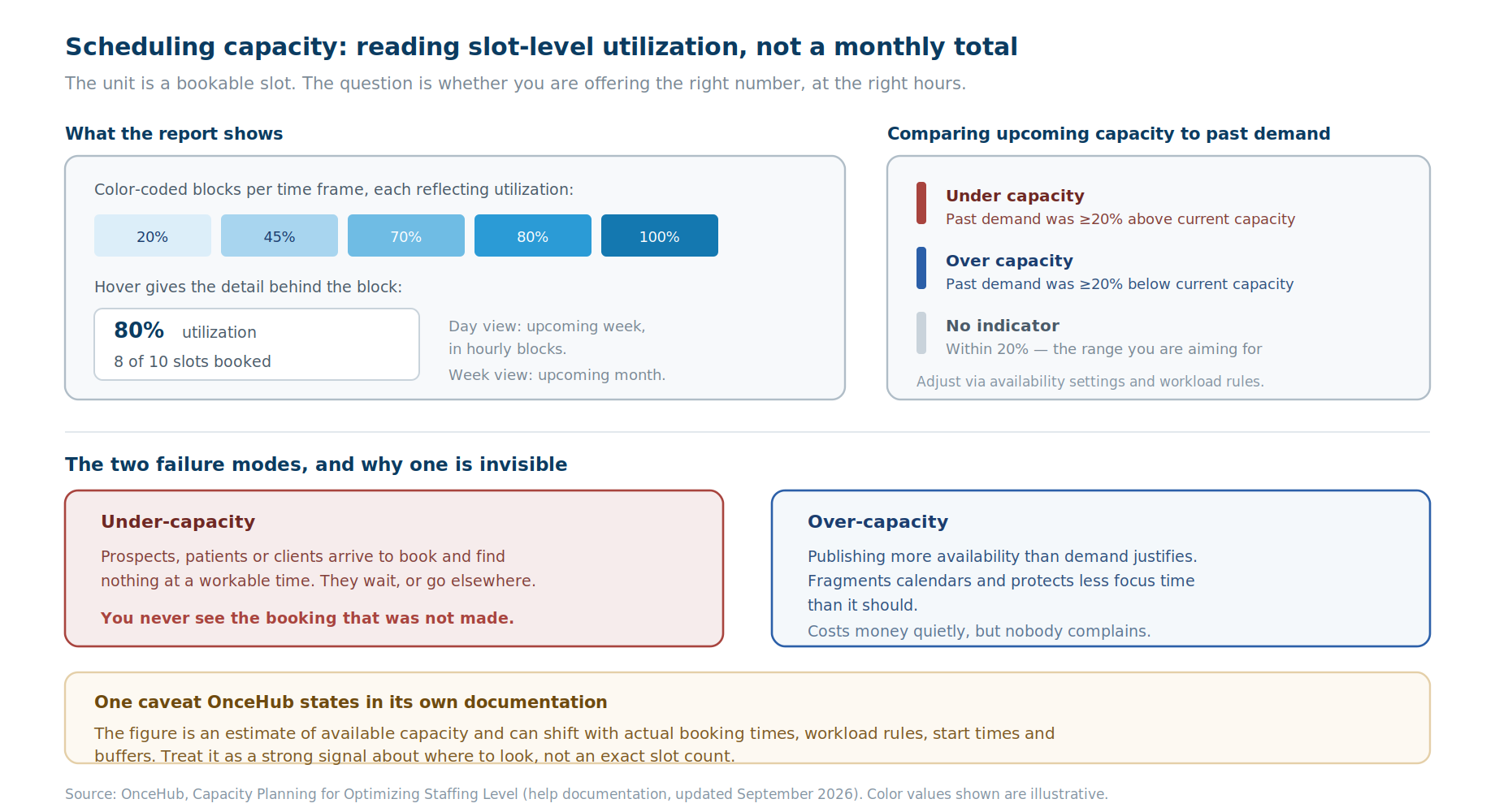
- It shows upcoming capacity for a selected Booking Calendar as color-coded blocks, each representing a time frame and reflecting utilization. Day view covers the upcoming week in hourly blocks; Week view covers the upcoming month in daily blocks.
- Hovering a block gives the detail: utilization percentage, and bookings made against total available capacity, so 8 of 10 slots booked reads as 80% utilization for that hour.
- It compares upcoming capacity against past demand. Enable the comparison, pick a historical range, and each block carries an indicator. Red means under capacity: the calendar received at least 20% more meetings in that past period than the capacity currently offered. Blue means over capacity: at least 20% fewer. No indicator means past demand sat within 20% of current capacity, which is the range you are aiming for.
Example: in the comparison period, with five reps on the demo calendar, the Tuesday 10 to 11am block took 13 meetings. Two reps have since moved teams, so that block now offers 10 slots. Past demand is 30% above current capacity, so the block shows red. Meanwhile, Friday 4 to 5pm offers 8 slots but took only 3 meetings. It shows blue, so that time can go back to focus work.
The adjustment happens on the Booking Calendar itself. Once the report shows a gap, change the Booking Calendar's availability, buffers and start times, and its workload limits: the maximum meetings each host can take per day, week and month, where the strictest limit applies. For group or concurrent sessions, set the maximum bookings per time slot. Workload limits apply to hosts, not co-hosts.
One caveat, because OnceHub states it in its own documentation: the figure is an estimate of available capacity, and it can shift depending on actual booking times and calendar settings such as workload rules, start times and buffers. Treat it as a strong signal about where to look rather than an exact slot count.
Use cases
- Sales teams. Problem: demo slots run out mid-campaign. Check: two weeks before a campaign, open the Day view for the demo Booking Calendar. Change: red blocks mean you should add hosts or extend hours; raise per-host daily limits only if hosts have room.
- Clinics and healthcare. Problem: patients wait weeks for routine appointments. Check: the Week view for the clinic's Booking Calendar, compared with the same period last year. Change: move published availability from blue hours into red ones.
- Consulting and advisory. Problem: consultations crowd out client delivery. Check: the month ahead in Week view. Change: reduce published availability on blue days and set a weekly workload limit per advisor.
- Customer success. Problem: onboarding calls bunch up before renewal season. Check: the onboarding Booking Calendar a month ahead, compared with last renewal season. Change: add hosts to the calendar or extend hours before the red weeks arrive.
- Any team scheduling. Problem: a weekly booking total hides which hours are the real constraint. Check: hourly blocks in Day view. Change: shift availability toward the hours that fill and away from the ones that don't.
See your own slot-level utilization: run OnceHub's Capacity Planning report on your Booking Calendar with a 14-day free trial.
If you want the wider measurement picture around this, our guide to the scheduling KPIs that reveal team workload covers what to track alongside utilization.
Capacity planning metrics: how to measure capacity
Four numbers cover most of it, across all four types.
Utilization rate. Utilization rate = capacity used ÷ capacity available × 100. For example, 8 of 10 slots booked is 80%. It's useful and routinely misread: 100% utilization is not a target, it is a system with no slack, which fails on the first disruption.
The gap, signed. Not just how far off you are, but in which direction. Under and over require opposite responses, and a single "variance" figure hides which one you have.
Forecast accuracy. How close last period's forecast was to what happened. Without this you cannot tell whether your plan is improving or you are just getting luckier.
Time to correct. How long between a gap appearing and the adjustment landing. A weekly review on a constraint that moves daily means you are always reacting to last week.
Common mistakes
- Planning against theoretical capacity. The number on paper is not the number available. Subtract meetings, buffers, admin and the things that reliably consume time.
- Only watching under-capacity. Idle capacity costs money too, and it is easier to fix because nobody is complaining.
- Reviewing on the wrong cadence. Match the review to the horizon of the thing you are planning.
- Using an average where you need a distribution. A team at 70% utilization overall can contain someone at 110% and someone at 30%. The average conceals the problem it is supposed to reveal.
- Buying a tool for the wrong type. Often the costliest mistake on this list. A resource management platform isn't built to tell you whether you have enough appointment slots on Thursday afternoon.
- Forecasting from intuition rather than history. Your own past demand for the equivalent period is a strong predictor, and it is already in your systems.
Conclusion
Capacity planning is one idea applied to four different units of work, which is why the term causes so much confusion. The discipline is consistent: forecast demand, measure real capacity, find the gap in both directions, adjust, re-measure.
What changes is the unit and therefore the tool. If your constraint is billable project hours, the resource management market is mature and well served. If it is staffed hours against arriving volume, that is workforce management. If it is machine time, it lives in your ERP.
And if your constraint is bookable time, whether a prospect can find a demo slot this week or a patient can get an appointment before they give up, that is appointment capacity planning, and it needs slot-level visibility rather than a monthly total. OnceHub's Capacity Planning report is built for that specific job.
It's included on paid plans from Schedule upward, and new accounts start with a 14-day trial of the Engage plan, no credit card required. That's enough time to run the report against your own Booking Calendar.
Frequently asked questions
What is capacity planning?
Capacity planning is the process of checking whether you have enough capacity, such as people's hours, equipment or bookable appointment time, to meet forecast demand over a set period, then adjusting capacity or demand to close any gap. It covers four disciplines: project resourcing, workforce shift planning, production planning and scheduling (appointment) capacity.
What are the types of capacity planning?
Capacity planning is classified three ways. By strategy: lead, lag and match. By time horizon: strategic, tactical and operational. By what's being planned: project and resource, workforce and shift, production, and scheduling (appointment) capacity planning. Most software sold as "capacity planning" covers project and resource planning only.
What are lead, lag and match strategies?
Lead, lag and match are the three classic capacity planning strategies. A lead strategy adds capacity before demand arrives, a lag strategy adds it after demand is confirmed, and a match strategy adds it in small steps that track demand. Lead risks paying for idle capacity, lag risks missing demand, and match needs frequent monitoring.
What is the capacity planning process?
The capacity planning process has four steps, the same across every type. Forecast demand using your own history for the equivalent period. Measure real capacity rather than theoretical capacity. Identify the gap in both directions, since over-capacity costs money as well as under-capacity. Then adjust and re-measure, matching your review cadence to the horizon of what you are planning.
How do you calculate capacity utilization?
Capacity utilization = capacity used ÷ capacity available × 100. For appointments, that is booked slots divided by available slots: 8 of 10 slots booked is 80% utilization. Calculate available slots from real capacity: open hours minus existing meetings and admin, divided by meeting length plus buffer.
What are the best capacity planning tools?
The best capacity planning tool depends on which type you mean. For project and resource planning, Resource Guru (from $4.16 per person per month billed annually), Float (from $7) and Runn (from $7 per resource seat, 20-seat minimum) are common starting points, with Kantata, Productive and Saviom for larger services firms. For scheduling capacity, OnceHub's Capacity Planning report shows slot-level utilization and compares upcoming capacity against past demand, available on paid plans from $10 per seat per month, with a 14-day free trial.
How do I know if my team has enough appointment slots?
Compare slot-level utilization with past demand for the same hours. In OnceHub, red blocks in the Capacity Planning report mark hours where past demand exceeded current capacity by 20% or more. Other signs are an earliest available slot that keeps moving later and the same hours filling every week.
How do I know if I'm offering too much availability?
Look for hours that rarely fill. In OnceHub's Capacity Planning report, blue blocks mark hours where past demand was at least 20% below current capacity. Cut published availability there and give that time back to focus work.
What is the best tool for appointment capacity planning?
OnceHub is built for appointment capacity planning. Its Capacity Planning report shows Booking Calendar utilization in Day and Week views, compares upcoming capacity against past demand, and flags under- and over-capacity blocks, and its workload limits let you cap meetings per host per day, week or month.
Can scheduling software do capacity planning?
Many scheduling tools report booking volume and popular times. Capacity planning also needs utilization against available slots and a comparison with past demand, and OnceHub's Capacity Planning report provides both.
Is 100% utilization the goal in capacity planning?
No. A system running at full utilization has no slack, so any disruption, such as an overrun, a sick day or a demand spike, immediately becomes a failure that spreads. Planners typically target a band below full utilization that leaves room to absorb disruption, and treat sustained 100% as a signal to add capacity rather than as success.
What is the difference between capacity planning and resource planning?
Capacity planning asks whether you have enough overall capacity for forecast demand, usually over weeks or months. Resource planning allocates specific people or assets to specific work. Capacity planning is the question; resource planning is part of the answer. Many tools do both, which is why the terms get used interchangeably in product marketing.
Sources
OnceHub (vendor-published, ours)
- Capacity Planning for Optimizing Staffing Level (updated September 7, 2026): access path under Analytics; color-coded utilization blocks in Day and Week views; hover detail; historical comparison flagging under-capacity at 20% or more above current capacity and over-capacity at 20% or more below; the estimation caveat.
- Booking Calendar Workload Management: maximum meetings per host per day, week and month; strictest limit applies; maximum bookings per time slot for group and concurrent sessions; limits apply to hosts, not co-hosts.
- OnceHub pricing: Capacity Planning on Schedule, Route, Engage and Enterprise; round-robin distribution on Route and above; Schedule from $10 per seat per month billed annually; 14-day Engage trial with no credit card.
Capacity planning strategies and levels
- Simpplr, Capacity Planning glossary (updated September 2, 2026): lead, lag and match strategies.
- Apptio, Capacity Planning: A Comprehensive Guide: strategic, tactical and operational capacity planning; lag, match and lead strategies.
Tool pricing (vendor pricing pages, October 2026)
- Resource Guru pricing: Grasshopper at $4.16 per person per month billed annually, $5 billed monthly.
- Float pricing: Starter at $7 per person per month.
- Runn pricing: Lite at $7 per resource seat per month and Standard at $11, with a 20-seat minimum.
- Planisware, Capacity Planning Tools for Professional Services (August 20, 2026), vendor-published: lean visual schedulers commonly starting at roughly $4 to $8 per user per month.
Tool descriptions and category listings (vendor-published)
- Resource Guru, Best Capacity Planning Tools: clash management that prevents double-bookings rather than just flagging them.
- Resource Guru Help Center: booking clashes and the Waiting List.
- Productive, Top Capacity Planning Software and Runn, Top Capacity Planning Software and Tools: category listings of resource management tools.
Disclosure: OnceHub publishes this guide, and its Capacity Planning report appears in it as an example tool for one of the four types described. OnceHub is a customer engagement platform that engages, screens and schedules across phone and web, with Phone Agents, chatbots, Routing Forms and a native scheduling engine. It doesn't perform project resource planning, workforce shift planning or production planning, and the guide scopes it to scheduling capacity only. Other platforms named are described from published documentation and vendor pricing pages, grouped by the type of capacity planning they address rather than ranked.