


A broker's calendar problem is not an agent's calendar problem. An agent books clients. A broker books agents, recruiting conversations, onboarding sessions, coaching one-to-ones, open office hours, and then distributes the brokerage's inbound client leads across a roster of people whose availability they do not control. Most scheduling tools are built for the first job and quietly fail at the second.
That distinction matters commercially, because the appointments a broker schedules are the ones that decide recruiting and retention. The first thirty days after an agent signs largely determine whether they produce and stay. Brokers keep agents through structured operational touchpoints: standing team meetings, monthly mentorship reviews, and assigned check-ins.
This guide covers what changes when you are scheduling for a roster rather than for yourself, the five appointment types that only exist at broker level, what "brokerage-grade" actually requires, and how the available options compare.
A note on scope: this guide is for brokers and brokerage operations. If you are an individual agent or a small team scheduling client meetings, our guide to Calendly alternatives for real estate teams covers that. For the wider agent tech stack, see our guide to productivity tools for real estate agents.
Quick answer
How is broker scheduling different from agent scheduling?
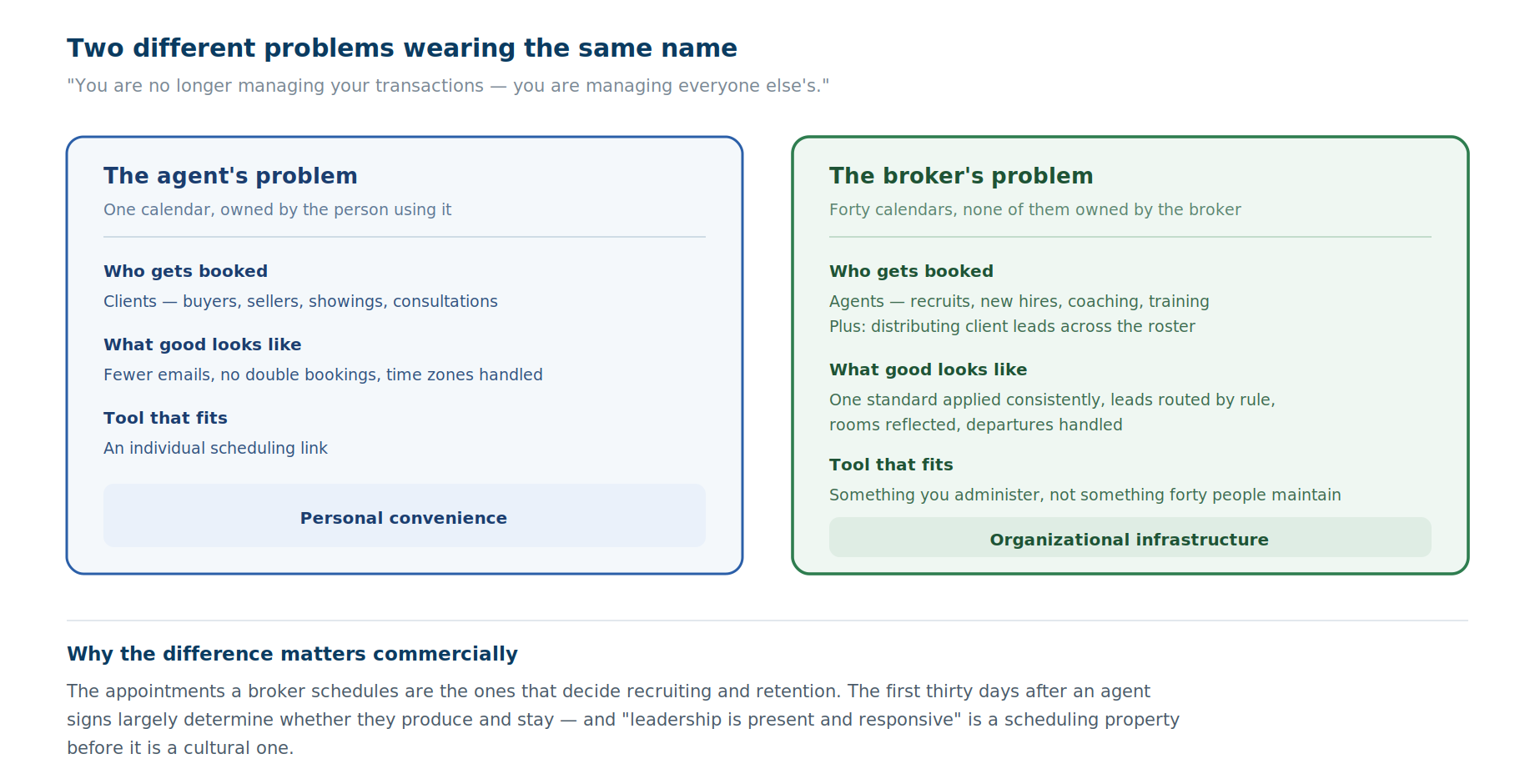
The operational shift when someone moves from producing to managing is described bluntly in Lone Wolf's 2026 guide to starting a brokerage: "you are no longer managing your transactions — you are managing everyone else's" (August 2026).
Applied to scheduling, that means three things change at once.
The people you book are internal: Recruits, new agents, existing agents needing coaching. These are relationship appointments with people who can leave, not transactions with clients.
You are scheduling across calendars you do not own: An agent's availability is theirs. A broker distributing a lead or setting a coaching cadence has to work with that, not around it.
Consistency becomes the product: One person's booking link can be idiosyncratic. Forty can't be, because the brokerage's response to an inbound lead should not depend on which agent it happened to reach.
Which appointments does a real estate broker schedule?
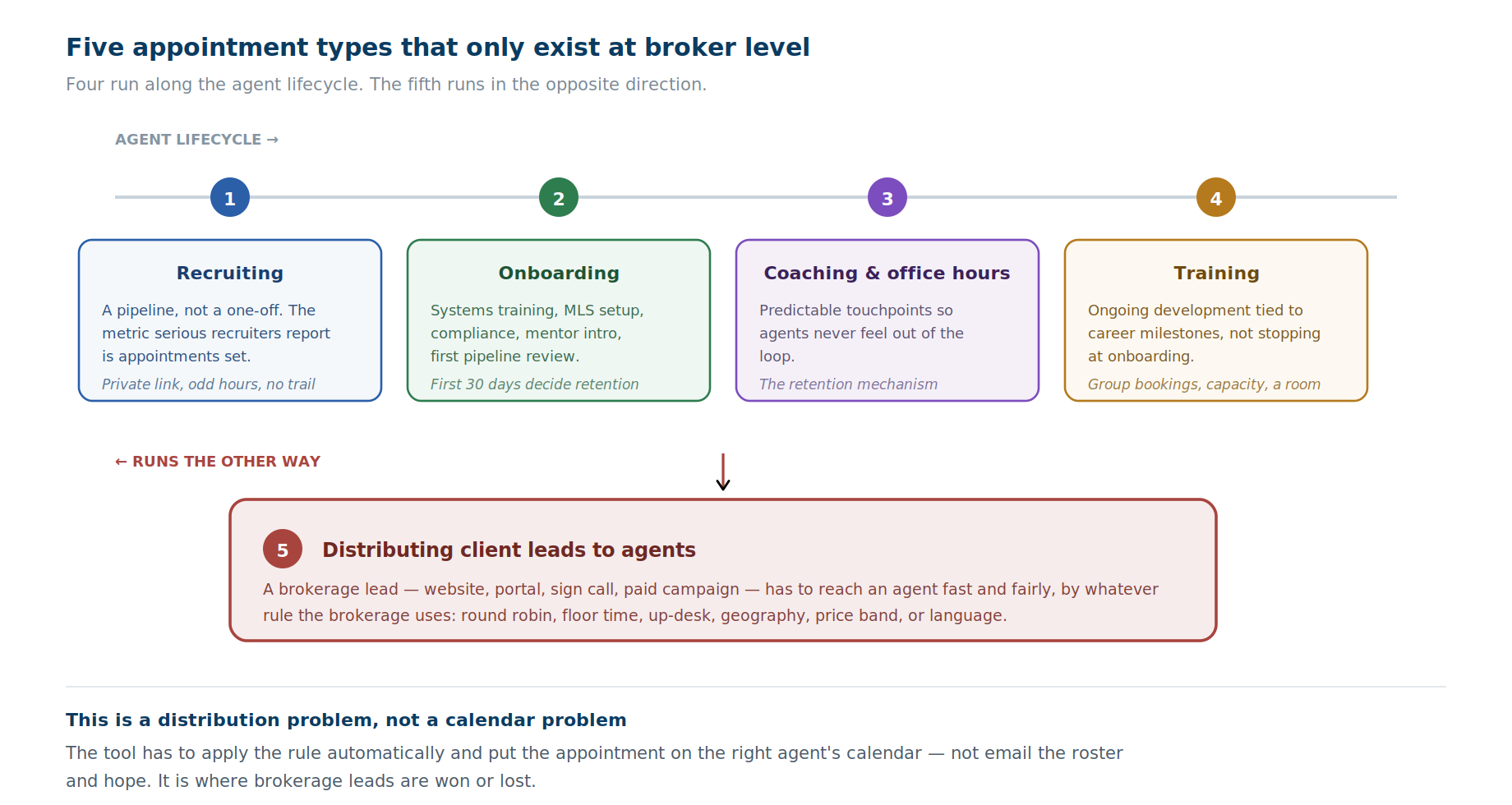
1. Recruiting conversations
Recruiting is a pipeline built on consistent outreach. Industry recruiting benchmarks show that roughly 30 to 40 engaged prospect conversations yield four interviews and one hire, making weekly booked appointment volume the critical lead indicator for growth.
The friction is specific. A recruit is a licensed professional working at a competing brokerage, often reluctant to leave a trail, frequently only free at odd hours. Any step that requires email back-and-forth loses them. A private booking link that offers real availability without a phone call is the mechanism.
2. Onboarding sessions
The first thirty days post-signing determine whether a new agent integrates and stays. As Shayla Wilhoit noted at the 2026 RE/MAX R4 conference, onboarding must operate like an assembly line because agents evaluate their transition within 72 hours.
Every item on that checklist is an appointment: systems training, MLS setup, compliance orientation, mentor introduction, first pipeline review. Scheduling them individually for each new agent is the kind of work that gets skipped when a broker is busy, which is precisely when retention risk is highest.
3. Coaching one-to-ones and open office hours
This is the retention mechanism. Maintaining standing bi-weekly team meetings and monthly check-ins ensures consistent engagement across the roster.
As Tyler Morton highlighted at RE/MAX R4, check-in cadences must adapt to experience level: new agents need structured weekly check-ins, while top producers prefer bookable office hours. Publishing bookable office hours makes leadership more reachable in practice without cluttering calendars.
4. Training
Brokerages retain talent by maintaining a clear quarterly training calendar. In OnceHub, group training is managed via Group Sessions on the Schedule plan, paired with room reservation capabilities on the Route plan.
5. Distributing inbound client leads to agents
Inbound client leads are routed through automated rules: round-robin or maximum availability via Meeting Distribution; buy/sell intent, price band, and location via Routing Forms; specialty, language, or office location through user-attribute filtering in Booking Hubs; and real-time CRM contact-owner lookup in Salesforce or HubSpot.
This is where brokerage leads are won or lost, and it is a distribution problem rather than a calendar problem. Whichever tool you use has to apply the rule automatically and put the appointment on the right agent's calendar, not email the roster and hope.
What features does real estate brokerage scheduling software need?
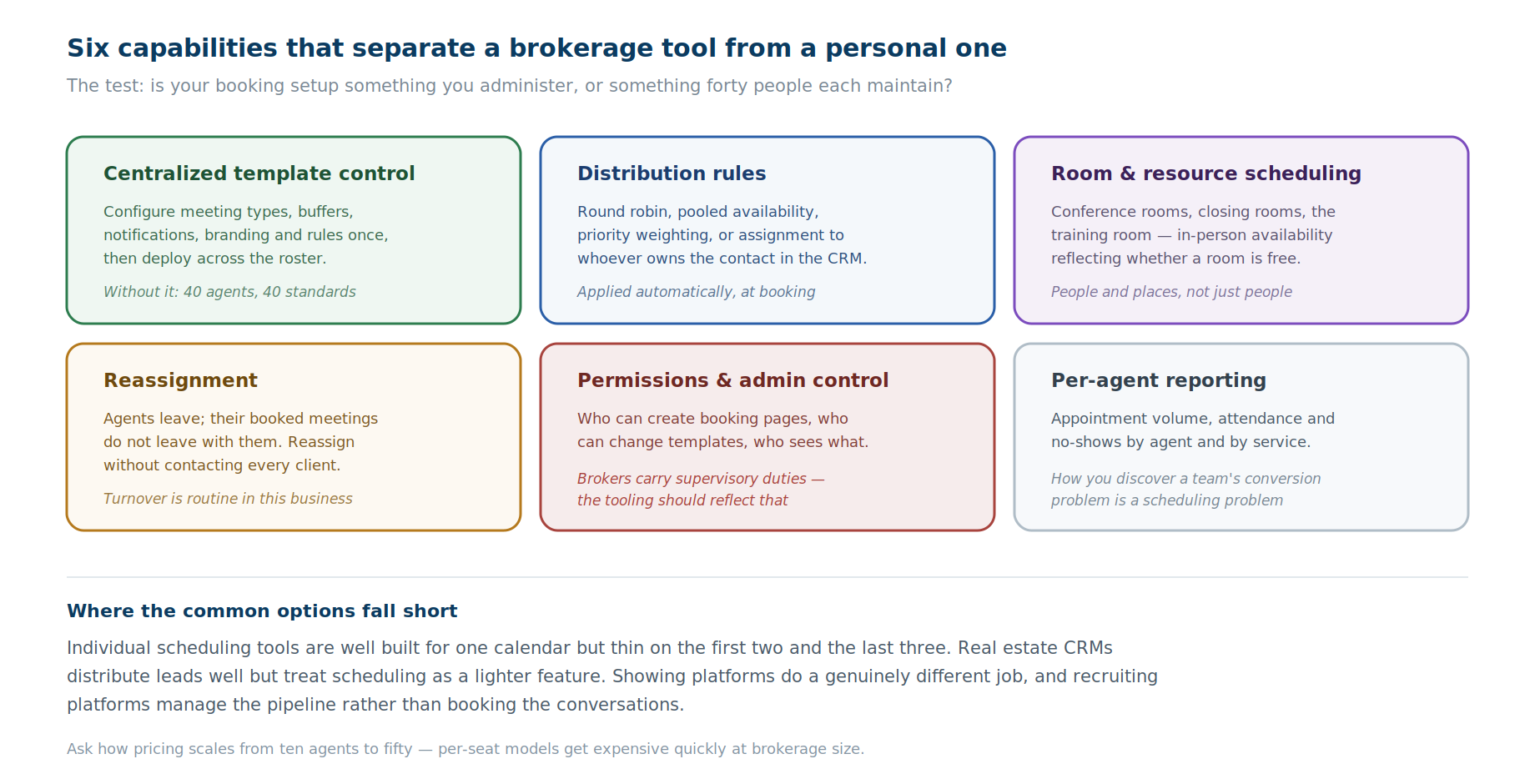
The gap between a personal scheduling tool and something a brokerage can run on comes down to six capabilities.
Real estate brokerage scheduling software options compared
Individual scheduling tools — Calendly and similar apps offer Managed Events, round-robin routing, and CRM owner lookup on higher plans. However, Calendly lacks native in-product meeting reassignment for existing bookings, requiring meetings to be canceled and rescheduled when hosts change.
Real estate CRM built-in scheduling — Platforms like Follow Up Boss and Lofty include lead routing and appointment scheduling built directly into the CRM pipeline. They are strong options if you are adopting or upgrading your primary CRM system.
Showing and tour platforms — ShowingTime+ and BrokerBay handle MLS-integrated showing coordination and lockbox access between buyer and listing agents. They do not handle internal brokerage scheduling such as recruiting or coaching.
Recruiting platforms — Brokerkit and similar. Pipeline tracking, onboarding checklists, bulk messaging and reporting for agent recruitment. Excellent at managing the recruiting pipeline; they are not scheduling infrastructure, and most brokers using them still need something to book the actual conversations.
Scheduling and routing platforms — where a brokerage-grade layer actually lives, and what the rest of this section covers.
Who should choose what: Choose Calendly for solo agents or small teams without room or reassignment needs; CRM built-in scheduling if adopting a new CRM; ShowingTime+ for MLS showings; Brokerkit for recruiting management; and OnceHub Route for centralized brokerage scheduling, room booking, and automated lead distribution across web and phone.
Why OnceHub is our pick for brokerage scheduling and lead distribution
Our recommendation for the scheduling and distribution layer, with the scope stated plainly first: OnceHub is not a brokerage management system, a CRM, or a transaction management platform. It does not handle commission splits, compliance files, or MLS data. It sits alongside those systems and handles the calendar layer across your roster.
Booking Hubs present the roster: A Booking Hub combines multiple agents' calendars into one branded page, so a client, a recruit or a lead can pick the right person — by specialty, location, or name — without being handed a list of individual links. For a brokerage with several offices or specialisms, that is the front door.
Routing Forms distribute leads: Routing Forms ask two or three qualifying questions — buying or selling, price band, area, language, timeline — and branch to the right agent's calendar based on the answers. Distribution options include round robin, maximum availability and priority-based assignment, and assignment to the CRM contact owner via a real-time lookup in Salesforce or HubSpot, so an existing client goes back to the agent who knows them.
Booking Calendars hold individual availability: Each agent's Booking Calendar handles personal meeting types and schedules. On the Route plan, room reservation syncs directly with Microsoft 365 or Google Workspace room directories across location pools.
Account-level control ties it together: Settings are locked in templates and enforced across linked Booking Calendars. Role-based permissions, Team Managers, and individual meeting reassignment provide full admin oversight.
The phone channel covers what the website misses: OnceHub Phone Agents execute qualification rules and book appointments directly over phone calls. For more details, see our guide to real estate answering services.
OnceHub offers a free plan for single-user scheduling (one user, one calendar, one link). The Route plan ($19/seat/month billed annually or $23 monthly) includes routing forms, meeting distribution, room booking, and template locking. Non-booking admin users do not require paid seats, and sign-up includes a 14-day trial.
How to roll it out without losing the room
Agent adoption is where brokerage tech dies, and scheduling is unusually exposed because agents already have their own links and see no reason to change. Four things make the difference.
-
Start with the broker's own calendar, not the agents': Publish bookable recruiting slots and coaching office hours first. It costs nothing politically, demonstrates the thing working, and delivers the two appointment types with the clearest payoff. Agents notice when leadership becomes easier to reach.
-
Pilot lead distribution with one team: Pick a single office or a single lead source, set the routing rule, and run it for a month against your existing process. You will learn whether your distribution rule is actually fair before you have defended it to fifty people.
-
Let agents keep their personal links at first: The brokerage-standard page handles brokerage-generated leads and brokerage appointments. Their own client scheduling can stay untouched. Forcing a full migration on day one turns an operational upgrade into a referendum.
-
Build the onboarding Booking Hub once, then measure it: Group training, compliance orientation, and pipeline reviews can be presented in a dedicated Onboarding Booking Hub built from locked templates. Completion is tracked through Activities filters and reporting exports.
The pattern across brokerages growing in a shifting market is repeatable systems rather than ambition. A rollout that proves itself on the broker's own calendar before asking anything of the roster is the version most likely to survive contact with it.
Evaluation checklist
- Can you configure once and deploy to the whole roster, or does every agent set up their own?
- What distribution rules are supported — round robin only, or weighted, attribute-based and CRM-owner assignment?
- Does it check room availability for in-person appointments, or only people?
- Can you reassign a departing agent's booked meetings without contacting each client?
- What admin permissions exist, and can you restrict who changes brokerage-standard templates?
- Does reporting break down by agent and service, or only account-wide?
- Does the same logic apply to phone leads as to web leads?
- Which users require a paid seat? Platforms like OnceHub do not charge for administrative users who manage settings without taking bookings.
- What happens to booking pages when an agent leaves — and who owns the historical booking data?
Conclusion
The brokerages growing in a shifting market are doing it on repeatable systems rather than ambition structured onboarding, consistent coaching rhythms, and operational support that removes friction from an agent's day. Scheduling is unglamorous infrastructure inside all three.
The practical test is whether your booking setup is something you administer or something forty people each maintain. If a new agent's onboarding sequence has to be built by hand, if a lead's routing depends on who happens to see the email, or if a departing agent's calendar becomes a week of client calls, you are running the second one.
For the layer that fixes that, presenting the roster, distributing leads by rule, and holding individual availability under central control, OnceHub is where we would start, alongside the CRM and recruiting tools you already run rather than in place of them.
Frequently asked questions
What is the best appointment booking software for a real estate brokerage?
For real estate brokerage scheduling software, OnceHub Route ($19/seat/month billed annually) provides Booking Hubs for roster display, Routing Forms for qualification, Meeting Distribution for lead assignment, and Booking Calendars for agent availability under central template control.
How is broker scheduling different from agent scheduling?
An agent books clients; a broker books agents. Recruiting conversations, onboarding sessions, coaching one-to-ones, open office hours and training are broker-level appointments that individual scheduling tools are not designed for. Brokers also distribute inbound client leads across a roster whose calendars they do not control, which is a distribution problem rather than a calendar problem.
Can Calendly work for a real estate brokerage?
Yes, Calendly Teams includes managed events, round-robin routing, and CRM lookup. However, brokerages face limitations when reassigning existing bookings to new hosts without canceling them, or when booking physical meeting rooms and phone channels, where OnceHub Route provides native features.
How should a brokerage distribute leads to agents?
By an explicit rule applied automatically at booking rather than by email. Common approaches are round robin, pooled or maximum availability, priority weighting for top producers, geography or price band, and assignment to whoever already owns the contact in the CRM. The important part is that the rule executes without a human deciding each time.
Does appointment booking software replace a real estate CRM?
No. A CRM holds contacts, pipeline and communication history; scheduling software books time against real availability and routes people to the right agent. Several CRMs include basic scheduling, and several scheduling tools integrate with CRMs. Most brokerages run both, with the scheduling layer handling distribution and booking and the CRM holding the record.
What should a broker look for in onboarding scheduling?
A repeatable sequence rather than manual coordination: systems training, MLS setup, compliance orientation, mentor introduction and first pipeline review, each bookable without the broker arranging them individually. Since the first thirty days largely determine whether a new agent stays, onboarding scheduling that depends on the broker having a free week is a retention risk.
How do I reassign a departing agent's booked appointments?
In OnceHub, admins reassign bookings directly within the Activities view. Reassigning automatically updates host calendars and sends updated meeting notifications to guests without requiring manual cancellations.
Can an AI phone agent book appointments and route leads for a brokerage?
Yes. OnceHub Phone Agents execute qualifying questions over inbound phone calls and schedule meetings directly onto agent calendars using defined distribution rules.
How much does brokerage scheduling software cost?
OnceHub provides a free plan for single users. Brokerage features on the Route plan cost $19 per seat per month billed annually ($23 monthly), with no seat fees for non-booking admin users.
**Disclosure: OnceHub publishes this guide and recommends its own products for the scheduling and distribution layer described here. OnceHub is not a brokerage management system, CRM, transaction management platform or recruiting platform — it does not handle commission splits, compliance files or MLS data — and is positioned here as a layer alongside those systems. Other platforms are described from published documentation and third-party comparisons.