

.png?width=767&name=The%20Ultimate%20Guide%20to%20Rescheduling%20Appointments%20Like%20a%20Pro%20(1).png)
To reschedule professionally, tell the client as soon as you know, apologise once and briefly, offer two or three specific alternatives or a booking link, and confirm the new time in writing. The single biggest factor is notice: a change flagged three days out barely registers, while the same change two hours out reads as disorganisation. Templates and a reschedule policy are below.
According to a Tebra survey, 42% of patients reported that they would switch providers after being rescheduled just twice. This finding highlights how sensitive clients and customers are to repeated rescheduling, directly connecting appointment management with trust and retention.
I have rescheduled on clients more times than I would like, and the one that still bothers me was not the late notice. It was the one where I moved a call, they agreed, and neither of us updated the invite. They dialled in at the original time. I did not.
That is the failure mode nobody warns you about. Everyone focuses on the apology and forgets the administration, which is the part that actually damages trust, because it looks like you did not care enough to write it down.
What Does "Reschedule" Really Mean?
At its core, to reschedule means to change the time of a planned event to a later date or time. It's a simple concept with significant implications in both our professional and personal lives. Unlike canceling, which implies the event will not happen at all, rescheduling keeps the commitment intact but adjusts when it will take place.
The perspective of who initiates the reschedule and why can greatly influence how it's perceived and handled. A guest needing to move a meeting due to an unforeseen conflict requires a different approach than a host needing to adjust due to an operational issue. Understanding this difference is the first step towards mastering the art of professional rescheduling.
When is it okay to reschedule?
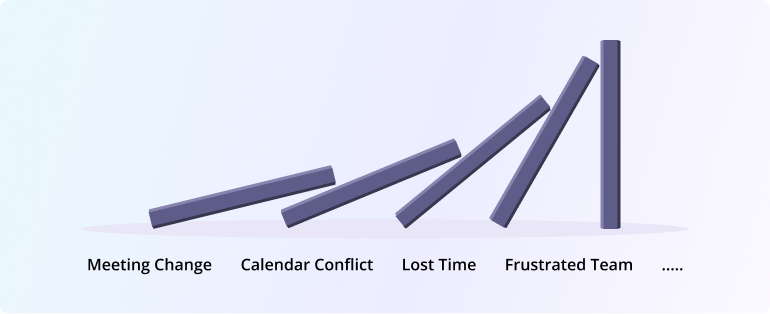
Before the how, the question people actually type: is it acceptable at all?
Yes, and more often than most people assume. These are legitimate reasons, and none of them requires an elaborate explanation:
- Illness, yours or the client's
- A family emergency
- A double booking or calendar error
- Unexpected closure, whether weather, power or a systems failure
- Travel delays
- Mental health needs
- A genuine conflict with a fixed commitment
What is not a good reason is a vague "something came up," which reads as a more attractive offer arriving. You do not owe anyone details, but you do owe them a category.
The thing that determines how it lands is notice, not reason. Three days out with a weak reason is fine. Two hours out with a perfect reason is not.
8 best practices for rescheduling appointments
In rough order of how much each one affects whether the client minds. The first four cover most of it.
1. Tell them the moment you know
Not when you have found a replacement slot. Not when you have worked out how to phrase it. The moment you know.
Every hour you wait shrinks the client's own options for rearranging their day, and a late notice makes a reasonable request look like an inconsiderate one.
"Hi Taylor, I've just realised I have a conflict with our 10am tomorrow. Can we move it? I have midday tomorrow or anything Friday."
2. Apologise once, briefly
One sincere line. That is the whole apology.
Over-apologising has the opposite of the intended effect. Three paragraphs of contrition makes the client feel the situation is worse than it is, and it puts them in the position of having to reassure you.
"I'm sorry for the short notice, and I want to make this as easy as possible for you."
What to avoid: repeated apologies in the same message, dramatic framing, or explaining at length. It reads as insincere precisely because it is excessive.
3. Offer two or three specific times, not an open question
"When are you free?" hands the work back to them. It is the most common mistake in reschedule messages and it doubles the length of the exchange.
Give real options, spread across different days and times of day so at least one is likely to fit.
"Would Tuesday at 2pm, Wednesday at 11am, or Friday morning work? Happy to look at other times if none of those do."
4. Better still, let them choose from your calendar
Options are good. A live calendar is better, because it removes the round trip entirely.
A booking calendar showing your genuine availability means the client picks a slot, it confirms instantly, and neither of you sends another message. It also removes the double-booking risk that comes with proposing times you have not blocked.
"You can grab any open slot here: [link]. It'll confirm straight away."
Our guide to double booking covers why proposing times manually creates that risk in the first place.
5. Confirm the new time in writing, explicitly
This is the step I got wrong, and it is the one most often skipped because the hard part feels finished.
A verbal or in-passing agreement is not a booking. Send a message that states the new date and time in full, and update the calendar invite rather than leaving the old one in place.
"Confirmed for Wednesday 12 March at 11am. I've updated the invite, so you should see it move on your side."
6. Automate the confirmations and reminders
Once the new time is set, the confirmation and the reminder should send themselves.
This matters more after a reschedule than before one, because a moved appointment is measurably more likely to be forgotten. The client has already mentally filed the original slot. A reminder 24 hours out, ideally with a reschedule link included, catches the ones who would otherwise not show. Our guide to reducing no-shows covers the reminder sequences that work best.
7. Stay calm when they are not
Some clients will be annoyed, particularly if they rearranged something to accommodate you. That is a fair reaction.
Do not match their tone or over-explain. Acknowledge the inconvenience specifically rather than generally, offer flexibility, and if the disruption was genuinely significant, offer something concrete.
"I completely understand, and I'm sorry, particularly as you moved things to make this work. Would a 10% discount on this session help?"
The specific acknowledgement is what defuses it. "Sorry for any inconvenience" is boilerplate. "Sorry, particularly as you moved things to make this work" shows you understood what it cost them.
8. Set a reschedule policy before you need one
The best time to decide your notice period is not while you are drafting an apology.
Publish it on your booking page: how much notice you require, what happens with paid bookings changed late, and how many times a booking can be moved. Clients rarely object to a policy stated upfront. They object to one that appears when it is inconvenient for them.
This also protects you in the other direction, which is the far more common one.
When the client reschedules on you
Almost every article on this subject covers only your reschedules. In practice most reschedules come from the other side, and handling those well is where the trust is actually built or lost.
Make it genuinely easy: A reschedule link in every confirmation and reminder email, not buried in a footer. The alternative is not a client who keeps the appointment. It is a client who no-shows because cancelling felt awkward. If you run several appointment types, Booking Hubs keep them on one page so a rebooking client lands in the right place.
Respond quickly: Sitting on a reschedule request for a day tells them their time matters less than yours.
Do not ask why: If they volunteer a reason, acknowledge it. If they do not, do not ask.
Have a reassignment path: If you cannot cover the new time but a colleague can, offering that beats pushing them two weeks out. On a team, reassigning the meeting to another host keeps the original slot rather than restarting the conversation.
Rescheduling Events or Webinars: Communicating Changes to a Large Audience
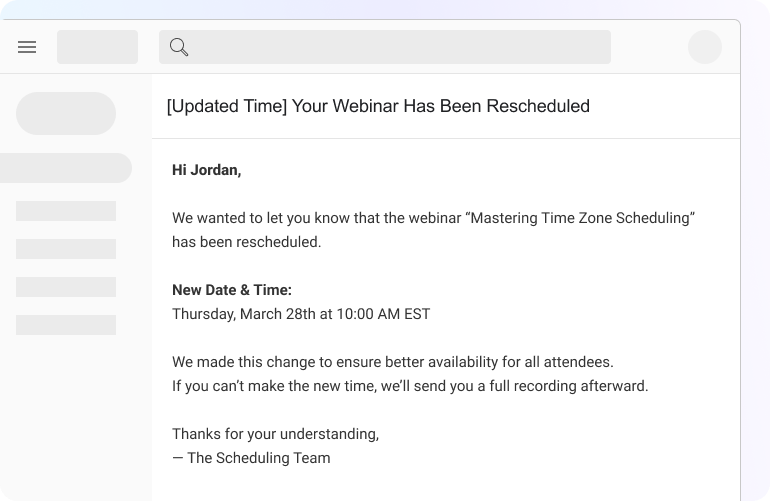
According to Eventbrite, nearly half of event attendees say that clear and timely communication about schedule changes is crucial to maintaining their trust and willingness to participate in rescheduled events. When you need to reschedule an event or webinar, you’re communicating with a potentially large group of people, and clear, proactive communication is crucial. A well-handled change can minimize frustration and maintain trust with your audience.
Here are some specific considerations for rescheduling events or webinars:
-
Early and Prominent Announcements: As soon as the decision to reschedule is made, inform your attendees through all available channels: email, website banners, social media posts, and any event registration platforms you’re using.
-
Provide a Clear and Concise Reason: Briefly explain why the event or webinar needs to be moved. Transparency helps attendees understand the situation.
-
Clearly state the New Date and Time: Make the new schedule very easy to find and understand in all your communications. Include time zone information or clarify that the time provided is in a specific time zone.
-
Offer Options and Alternatives: Depending on the situation, consider offering attendees options like a full refund if the new time doesn’t work for them, access to a recording of the event if it takes place later, or the opportunity to attend a future event.
-
Utilize Your Communication Platforms Effectively: Leverage email marketing platforms to send out mass notifications and registration systems to update event details automatically.
Here are a few sample announcement templates for event/webinar reschedules:
Template 1: General reschedule announcement with new date/time.
Subject: Important Update: [Event/Webinar Name] Rescheduled
Dear [Attendee Name],
Please note that the [Event/Webinar Name] originally scheduled for [Original Date] at [Original Time] has been rescheduled to [New Date] at [New Time] due to [brief, professional reason].
We apologize for any inconvenience this may cause. We are looking forward to seeing you at the new date and time!
[Link to updated event page/calendar invite]
Sincerely,
The [Your Company/Organization] Team
Template 2: Reschedule due to unforeseen circumstances.
Subject: Important Information Regarding [Event/Webinar Name]
Dear [Attendee Name],
We are writing to inform you that due to unforeseen circumstances, we have had to reschedule the [Event/Webinar Name] that was to take place on [Original Date].
The new date and time for the [Event/Webinar Name] is [New Date] at [New Time].
We understand this may be disruptive, and we appreciate your understanding. If the new time does not work for you, please reply to this email, and we will be happy to discuss alternative options.
Thank you for your patience.
Sincerely,
The [Your Company/Organization] Team
Template 3: Offering alternatives (e.g., recording) if rescheduling isn’t feasible for all.
Subject: Update Regarding [Event/Webinar Name]
Dear [Attendee Name],
This email is to inform you that the [Event/Webinar Name] scheduled for [Original Date] has been rescheduled to [New Date] at [New Time] due to [brief, professional reason].
We understand that the new time may not work for everyone. For those who are unable to attend the live session, a recording will be made available to all registered participants shortly after the event.
If you have any questions or concerns, please do not hesitate to contact us.
Thank you for your continued interest.
Sincerely,
The [Your Company/Organization] Team
Want to see how easy rescheduling can be with the right tool?
If you're using OnceHub, you can update appointments and notify attendees in just a few clicks.🎥 Watch this quick demo on how to reschedule using OnceHub:
It’s a quick walkthrough that shows how to update appointments and automate notifications — perfect for busy teams managing interviews, client meetings, or webinars.
From large-scale events, let’s now focus on a more personal interaction: the job interview. Rescheduling here requires a delicate touch, as it impacts both the candidate’s experience and the hiring process itself.
Rescheduling Job Interviews: For Candidates and Recruiters
Rescheduling a job interview requires a high degree of professionalism and respect for everyone’s time. For candidates, it’s an opportunity to demonstrate their communication skills and continued interest. For recruiters, it’s about maintaining a positive candidate experience while keeping the hiring process on track.
Here’s a look at the etiquette and best practices for both sides:
Professional Etiquette for Candidates Needing to Reschedule:
-
Provide Ample Notice: As soon as you anticipate a conflict, inform the recruiter. Aim for at least 24-48 hours’ notice whenever possible.
-
Be Prompt and Direct: Email is usually the best method. Clearly state that you need to reschedule and the specific interview you’re referring to (date, time, interviewer’s name if you have it).
-
Offer a Brief and Professional Reason: You don’t need to overshare personal details, but a concise explanation (e.g., “due to an unforeseen prior commitment”) is appropriate.
-
Suggest Your Availability: Show your continued interest by offering a few specific alternative times that work for you shortly. This demonstrates your eagerness to still move forward with the interview.
-
Express Gratitude and Apology: Thank the recruiter for their time and apologize for any inconvenience your request may cause.
-
Confirm the New Time: Once a new time is agreed upon, promptly confirm it in writing.
-
Adjust Trip Plans if Necessary: If your interview requires travel, be prepared to rearrange your trip plans to accommodate the new schedule. This shows flexibility and commitment to the opportunity.
Best Practices for Recruiters Handling Interview Reschedules:
-
Be Understanding and Accommodating: Recognize that candidates may have legitimate reasons for needing to reschedule. Try to be flexible when finding a new time.
-
Respond Quickly and Professionally: Acknowledge the candidate’s request promptly and communicate the next steps.
-
Offer Alternatives: If you need to reschedule, provide the candidate with a few specific options for new interview times.
-
Maintain Clear Communication: Keep the candidate informed throughout the process and confirm the new interview details.
-
Be Mindful of the Candidate Experience: A smooth and respectful rescheduling process reflects well on your company’s culture.
-
Use Scheduling Tools Efficiently: Leverage your scheduling software (like OnceHub, if integrated with your hiring process) to easily manage and update interview times and notify candidates automatically.
Here are a few sample interview reschedule templates:
Template 1 (Candidate-initiated): Polite request with availability.
Subject: Reschedule Request - Interview for [Job Title] - [Your Name]
Dear [Recruiter Name],
Thank you again for the opportunity to interview for the [Job Title] position on [Original Date] at [Original Time].
Due to an unforeseen prior commitment, I am writing to respectfully request a reschedule of our interview.
I am very interested in this opportunity and would be available to meet at any of the following times:
-
[New Date] at [New Time]
-
[Another New Date] at [Another New Time]
-
[Yet Another New Date] at [Yet Another New Time]
Please let me know if any of these times work for you. I apologize for any inconvenience this may cause and appreciate your understanding.
Sincerely,
[Your Name]
Template 2 (Recruiter-initiated): Apology with new proposed times.
Subject: Regarding Your Interview for [Job Title] on [Original Date]
Dear [Candidate Name],
Thank you for your interest in the [Job Title] position at [Your Company].
Due to an unexpected scheduling conflict on our end, we need to reschedule your interview that was originally scheduled for [Original Date] at [Original Time].
We sincerely apologize for any inconvenience this may cause. Would either of the following times work for you instead?
-
[New Date] at [New Time]
-
[Another New Date] at [Another New Time]
Please let us know your availability. We look forward to speaking with you.
Sincerely,
[Recruiter Name]
Template 3 (Recruiter to Candidate): Confirmation of candidate’s rescheduled time.
Subject: Your Rescheduled Interview for [Job Title]
Dear [Candidate Name],
Thank you for your flexibility. This email confirms your interview for the [Job Title] position has been rescheduled to [New Date] at [New Time].
Please use the following link to join the virtual meeting: [Link to meeting, if applicable].
If you have any questions before the interview, please do not hesitate to reach out.
We look forward to speaking with you then.
Sincerely,
[Recruiter Name]
We’ve covered the best practices for rescheduling in various situations. Now, let’s shine a light on the flip side: the common missteps that can turn a simple schedule change into a negative experience.
The Power of Automation: How Scheduling Tools Simplify Reschedules
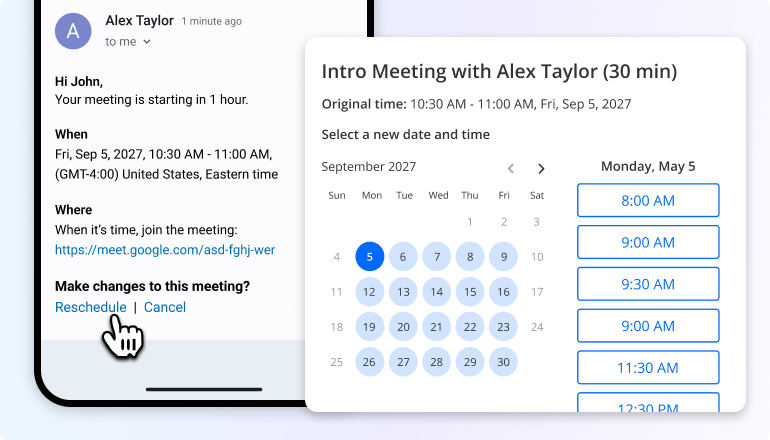
Think about how much time gets eaten up by the simple act of trying to reschedule a meeting. The emails, the back-and-forth, the potential for missed messages – it’s a productivity black hole. This is where automation, specifically through smart scheduling tools, truly shines. Automation helps arrange new times efficiently, reducing the hassle and time spent on rescheduling.
These platforms aren’t just about booking appointments; they’re incredibly powerful when it comes to managing changes. Imagine a world where your clients or guests can reschedule themselves with a few clicks, without even needing to email you. That’s the beauty of self-service options offered by many scheduling tools.
And it works both ways. With two-way calendar sync, if you need to adjust something on your end directly from your calendar, the scheduling tool can automatically notify everyone involved and even offer alternative times based on your updated availability.
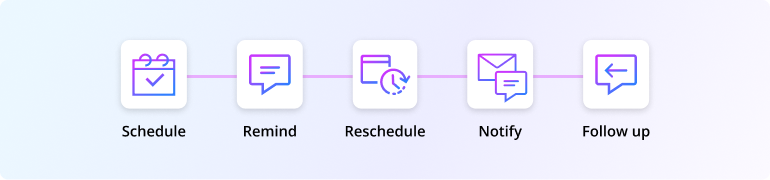
Let’s look at some specific ways OnceHub streamlines the reschedule process:
OnceHub's Streamlined Rescheduling Features:
-
Dynamic Reschedule Links: Forget static meeting links. OnceHub often includes dynamic links in confirmation emails that allow invitees to view your current availability and choose a new time that works for them, instantly updating the calendar for everyone.
-
Automatic Calendar Updates: When a reschedule happens – whether initiated by you or your guest – OnceHub automatically updates everyone’s calendars, eliminating the risk of double-bookings or missed appointments due to outdated information, even if there are logistical challenges at several airports.
-
Integration with Calendars and Communication Tools: OnceHub seamlessly connects with your existing calendars (like Google Calendar, Outlook) and other communication tools, ensuring that reschedule notifications and updates are delivered efficiently and where you need them.
-
Customizable Reschedule Notifications: You can often customize the messages that go out when a meeting is rescheduled, ensuring they align with your brand voice and provide all necessary information.
-
How AI Scheduling Chatbots Can Assist with Rebooking: Some advanced features, like AI-powered chatbots integrated with OnceHub, can even help guide guests through the rebooking process, answering questions and suggesting optimal new times based on availability and even the reason for rescheduling.
Rescheduling vs. Reassigning: When a Different Host Takes Over
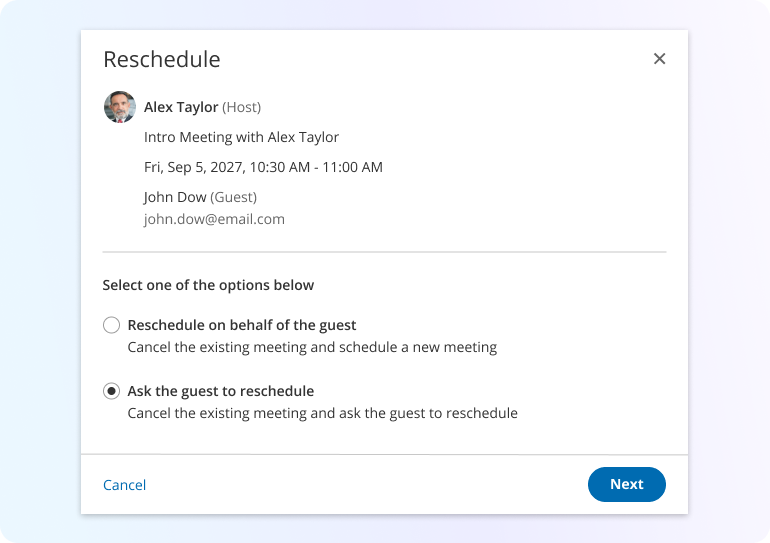
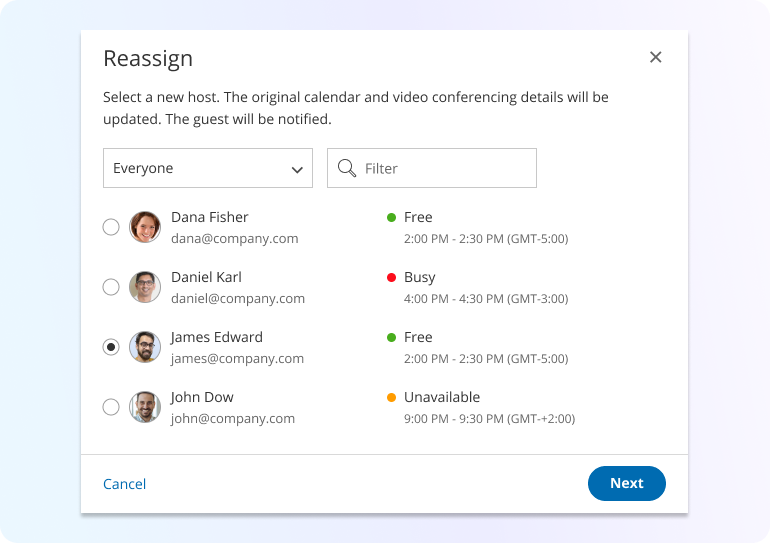
Sometimes, a simple reschedule of time isn’t enough. If the original host becomes completely unavailable, the meeting might need to be reassigned to another qualified team member. OnceHub supports this functionality, allowing for a seamless transition without requiring the guest to completely rebook. The system can notify the guest of the host change, ensuring the meeting still proceeds smoothly.
Automation offers significant advantages for managing reschedules. But with so many scheduling software options available, how do you choose the right one to ensure a smooth and efficient process?
Also read: Create Engaging Scheduling Experiences With Gary the Tortoise
How to Choose the Right Scheduling Software for Rescheduling Efficiency
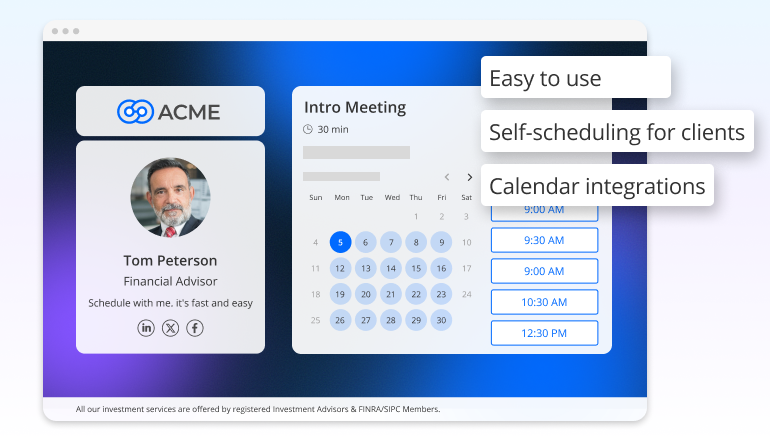
So, you’re convinced that automation is the way to go for handling those inevitable reschedules instantly. But with a sea of scheduling software out there, how do you pick the right one to ensure a smooth and efficient process for both you and your contacts? Here are some important features to keep in mind:
-
Ease of Use: The software should be intuitive for both you and the people you’re meeting with, especially when it comes to finding and selecting new times. A clunky or confusing interface will just add to the frustration.
-
Self-Service Rescheduling Options: Look for tools that empower your guests or clients to reschedule themselves easily, often through dynamic links or a clear booking management portal.
-
Calendar Integration: Seamless syncing with your primary calendar (like Google Calendar or Outlook) is crucial for accurate availability and automatic updates when reschedules occur.
E.g., managing flights scheduled and other critical appointments for passengers can be streamlined with the right software. -
Customizable Notifications: The ability to tailor the messages that go out when a meeting is rescheduled ensures clear communication and aligns with your brand voice.
-
Customer Management and Data System Integrations: Consider how well the scheduling software connects with your CRM (Customer Relationship Management) or other data management platforms. This allows for a seamless flow of information regarding rescheduled appointments, ensuring your customer records are always up-to-date and providing a holistic view of interactions.
-
Scalability: If you anticipate growth, choose a solution that can handle an increasing volume of appointments and reschedules without becoming cumbersome.
Choosing the right tools can significantly ease the burden of rescheduling. But what if you could minimize the need to reschedule in the first place? Let’s explore some proactive strategies to keep your calendar running smoothly.
What Are the Best Strategies to Prevent Last-Minute Reschedules?
The best strategies to prevent last-minute reschedules include conducting weekly calendar audits to identify conflicts early, using two-way calendar sync to prevent double bookings, and configuring automated SMS reminders to confirm attendance 24 hours before the appointment.
Here are some strategies to implement:
-
Build in Buffer Times: Don’t schedule meetings back-to-back without any breathing room. Adding even 10-15 minutes between appointments can provide a cushion for unexpected delays and reduce the pressure to reschedule if one runs over. This also allows you to stay ready for unexpected schedule changes, ensuring you remain organized and ready for the next task at hand.
-
Send Effective Confirmation: Emails and Reminders: Utilize the automation features of tools like OnceHub to send timely confirmation emails with all the necessary details and set up reminders leading up to the appointment. This helps reduce no-shows and ensures everyone has the correct information from the start.
-
Clearly Communicate Your Availability and Policies Upfront: Make your available hours and any policies regarding cancellations or reschedules easily accessible on your website and booking pages. This helps manage expectations from the outset.
-
Regularly Review and Optimize Your Schedule: Take some time each week to look at your upcoming appointments and identify any potential conflicts or overbookings before they become a problem. Adjusting things proactively can save you headaches down the line, especially in the coming months.
By implementing these proactive strategies and choosing the right tools to manage unavoidable changes, you can significantly reduce the stress and negative impact of rescheduling. Let’s wrap up with some final thoughts on mastering this crucial skill.
Conclusion
“The key is not to prioritize what’s on your schedule, but to schedule your priorities.” - Stephen Covey
Let’s face it: needing to reschedule is often an unavoidable part of both our professional and personal lives. But as we’ve explored, it doesn’t have to be a source of stress or a relationship killer. By understanding the importance of clear communication, embracing thoughtful etiquette, and leveraging the power of automation, you can navigate these changes with confidence and grace.
Mastering the art of the professional reschedule is about more than just moving a time slot. It’s about respecting the time and commitments of others, maintaining your credibility, and ultimately, keeping your valuable connections strong.
Ready to experience smoother rescheduling and take control of your calendar? Sign up for a free trial with OnceHub today and discover how its powerful features can simplify your booking process and make those necessary changes seamless for everyone involved.
FAQs
What's the ideal timeframe for needing to reschedule a meeting or appointment?
Ideally, you should provide as much notice as possible. Aim for at least 24-48 hours in a professional setting. However, we all know emergencies happen, so even a short notice with clear communication is better than silence.
What's the most polite way to handle a guest reschedule request?
Acknowledge their request promptly and with understanding. If they offer a reason, acknowledge it briefly. Then, clearly state your availability or provide a link for them to reschedule themselves if you use a tool like OnceHub.
What's the major difference between cancel vs reschedule, and why does it matter?
Canceling means the event is off entirely, with no future commitment implied. Rescheduling means moving the event to a new time. Being clear about what you're doing is crucial for managing expectations and maintaining relationships.
As the host, what's the best way to reschedule a meeting, especially at the last minute?
Notify all attendees immediately with a sincere apology and a brief explanation. Offer a few specific alternative times. Using a scheduling tool like OnceHub can automate this process and make it easier for attendees to respond.
How can a clear reschedule policy help my business?
Having a well-defined policy, communicated upfront, sets expectations for clients regarding notice periods, fees for late changes, and how reschedules are handled. This can minimize misunderstandings and streamline the process.
What's the best way to ensure everyone has the correct appointment confirmation after a reschedule?
Always send a new confirmation with the updated date, time, and any other relevant details. If you're using a scheduling tool, it should handle these automated appointment confirmations for you.