

Most AI voice assistants answer calls professionally. The problem is they do not know your niche, your client criteria, your language, or your coaching philosophy. A prospect calling a life coach and a prospect calling an executive coach need to be screened differently — the AI needs to know the difference.
What "training" an AI voice assistant actually means for a coach is configuring the qualification questions, the screening logic, the tone, the greeting, and the routing rules so that the AI represents your practice accurately before you are ever involved. The practical payoff: a well-configured AI voice assistant screens out poor-fit prospects before they reach your calendar, captures the information you need before the discovery call begins, and represents your brand in the first 60 seconds of every inbound interaction.
This article is for coaches and consultants who have decided to deploy an AI voice assistant and want to configure it to reflect their specific practice — not run a generic inbound call handler.
According to Calendly's 2024 State of Meetings report, the proportion of client-facing professionals spending at least three hours a week on scheduling has grown year over year. For coaches managing inbound enquiries alongside delivery, the administrative layer of the practice is one of the most consistent drains on billable time.
OnceHub's AI Receptionist is built for exactly this context — a scheduling-native AI receptionist that can be configured to reflect your specific coaching practice, qualification criteria, and availability rules. This article walks through how to do that configuration well, regardless of which platform you use.
What Does "Training" an AI Voice Assistant Actually Mean for Coaches?
Configuring an AI voice assistant to represent your practice means making a series of deliberate decisions about what the AI says, what it asks, how it responds, and what it does with the information it captures. This is done through configuration — not through uploading content for the AI to learn from.
The four configuration layers that matter:
Greeting and tone — how the AI introduces itself and what the caller's first impression is. This should reflect the voice and professionalism of your practice — not a generic automated greeting.
Qualification questions — the specific questions the AI asks before offering a calendar slot. These are the heart of configuring the AI with your coaching framework — the questions you would ask a prospect yourself in the first three minutes of a discovery call.
Routing logic — what happens at the end of the qualification flow. Who gets a booking, who gets directed to a different resource, and who the AI recognises as a poor fit and handles accordingly.
Availability rules — the scheduling constraints that protect the coach's time. Buffer times, booking limits, session type differentiation, and VIP access for existing clients.
What it is not: configuring an AI voice assistant is not the same as building a chatbot clone of yourself. The AI's job in this context is to handle the first-contact inbound call — screening, qualifying, and booking — not to deliver coaching or simulate your conversational style beyond the intake flow.
Where OnceHub fits: OnceHub's AI Receptionist handles all four configuration layers — greeting, qualification questions, routing logic, and availability rules — within the same native system that confirms the booking. This means everything configured in the steps that follow operates within a single, connected workflow rather than across separate tools.
Step 1 — Define Your Coaching Framework Before You Configure Anything
Every configuration decision — the questions, the routing logic, the availability rules — should follow from a clear answer to one question: what does a good-fit client look like for your specific coaching practice?
The answer is different for every coach. An executive coach working with C-suite leaders on strategic decision-making has entirely different screening criteria from a life coach working with individuals on career transitions. Configuring the AI before answering this question produces a generic intake flow that could belong to any coaching practice.
The four questions to answer before opening the configuration:
Who is your ideal client?
Define the specific characteristics that make someone a good fit — professional context, life stage, the specific problem they are trying to solve, and the investment level they are prepared to make.
- Executive coach example: ideal client is a senior leader (VP or above) facing a specific organisational or leadership challenge, with a decision-making timeline of 30–60 days and a budget aligned with a retained engagement.
- Life coach example: ideal client is an individual at a defined transition point — career change, relationship shift, or personal reinvention — who has tried self-directed approaches and is ready for structured external support.
This definition becomes the filter the AI applies during every inbound call.
What are your three to five non-negotiable qualification criteria?
The specific questions you would ask in the first three minutes of a discovery call — and the answers that would tell you whether this is worth 60 minutes of your time. Keep it to three to five questions maximum. Common criteria for coaches: coaching goal specificity, timeline and urgency, investment readiness, current situation context, referral source.
Tip: write your qualification criteria as if you are briefing a trusted assistant who will be taking screening calls on your behalf. The AI needs the same level of specificity.
What is the outcome of each qualification scenario?
Define what happens at the end of the qualification flow for each possible outcome:
- Strong fit — offer a discovery call booking directly
- Possible fit — route to a waitlist, a lower-commitment entry point, or a self-service resource
- Poor fit — handle professionally and direct to an appropriate resource without burning the relationship
Coaches who skip this step end up with an AI that offers a booking to everyone — which defeats the purpose of qualification entirely.
What does your practice's voice and tone sound like?
The greeting and conversational tone should reflect how your practice presents itself — warm and conversational for a life coach, direct and professional for an executive coach, energetic and forward-focused for a business coach. Write a sample greeting in your own voice before configuring the AI — this becomes the template for the intake flow language.
In OnceHub's AI Receptionist, the greeting and intake flow language are fully configurable to your practice's specific voice — it does not default to a generic platform greeting.
Step 2 — Configure Your Qualification Questions by Coaching Niche
The principle that applies to all coaching niches: three to five questions, delivered conversationally — not as an interrogation. Each question should serve the dual purpose of gathering qualification information and giving the prospect a sense of what working with you is like.
Life Coaches
- "Can you tell me a little about what has brought you to reach out today?"
- "What does the situation look like right now — and what would you like it to look like in six months?"
- "Have you worked with a coach before, or would this be your first time?"
- "What is your timeline for making a decision about starting?"
- "How did you find out about [practice name]?"
What these questions capture: nature of the presenting challenge, readiness for coaching, timeline urgency, referral source — without asking about budget directly, which can feel premature in a life coaching context.
Executive and Leadership Coaches
- "What is the specific leadership or organisational challenge you are looking to address?"
- "What is your current role, and what does your team or organisation look like?"
- "Have you engaged an executive coach before — and if so, what worked or did not work about that experience?"
- "What is your timeline for making progress on this?"
- "Is this a personal investment, or is your organisation sponsoring the engagement?"
What these questions capture: problem specificity, seniority and organisational context, coaching experience and expectations, urgency, and budget source.
Business and Marketing Coaches
- "Tell me about your business — what do you do and who do you serve?"
- "What is the primary growth challenge you are trying to solve right now?"
- "What is your current monthly revenue, roughly — and where are you trying to get to?"
- "Have you worked with a business coach or consultant before?"
- "What is driving your timeline for getting started?"
What these questions capture: business context, specific problem, financial readiness signal, coaching experience, and urgency.
Health and Wellness Coaches
- "What is the specific health or wellness goal you are working toward?"
- "How long have you been dealing with this, and what have you already tried?"
- "Are you currently working with any other health professionals — a doctor, nutritionist, therapist?"
- "What does your schedule look like in terms of time to commit to a coaching programme?"
- "How did you find out about [practice name]?"
What these questions capture: goal specificity, persistence of the challenge, any contraindications requiring referral, practical availability, and referral source.
In OnceHub's AI Receptionist, these qualification questions are configured as a conversational intake flow — delivered naturally before checking availability and offering a calendar slot. The questions, their sequence, and the routing logic that follows are all set during configuration. No developer involvement required for standard use cases.
Step 3 — Build the Routing Logic Around Your Qualification Outcomes
The qualification questions capture the information. The routing logic decides what to do with it. A well-designed routing flow turns an inbound call into one of three defined outcomes — each handled appropriately without the coach being involved.
The strong-fit scenario — direct to booking
When a caller meets the qualification criteria, the AI offers a discovery call slot directly from the coach's live calendar. The booking is confirmed during the call — not sent as a link to complete later. The coach receives a booking notification with the qualification responses already captured.
Workflow: Inbound call → greeting → qualification questions → strong fit identified → availability checked → slot offered → booking confirmed → notification sent to coach with context
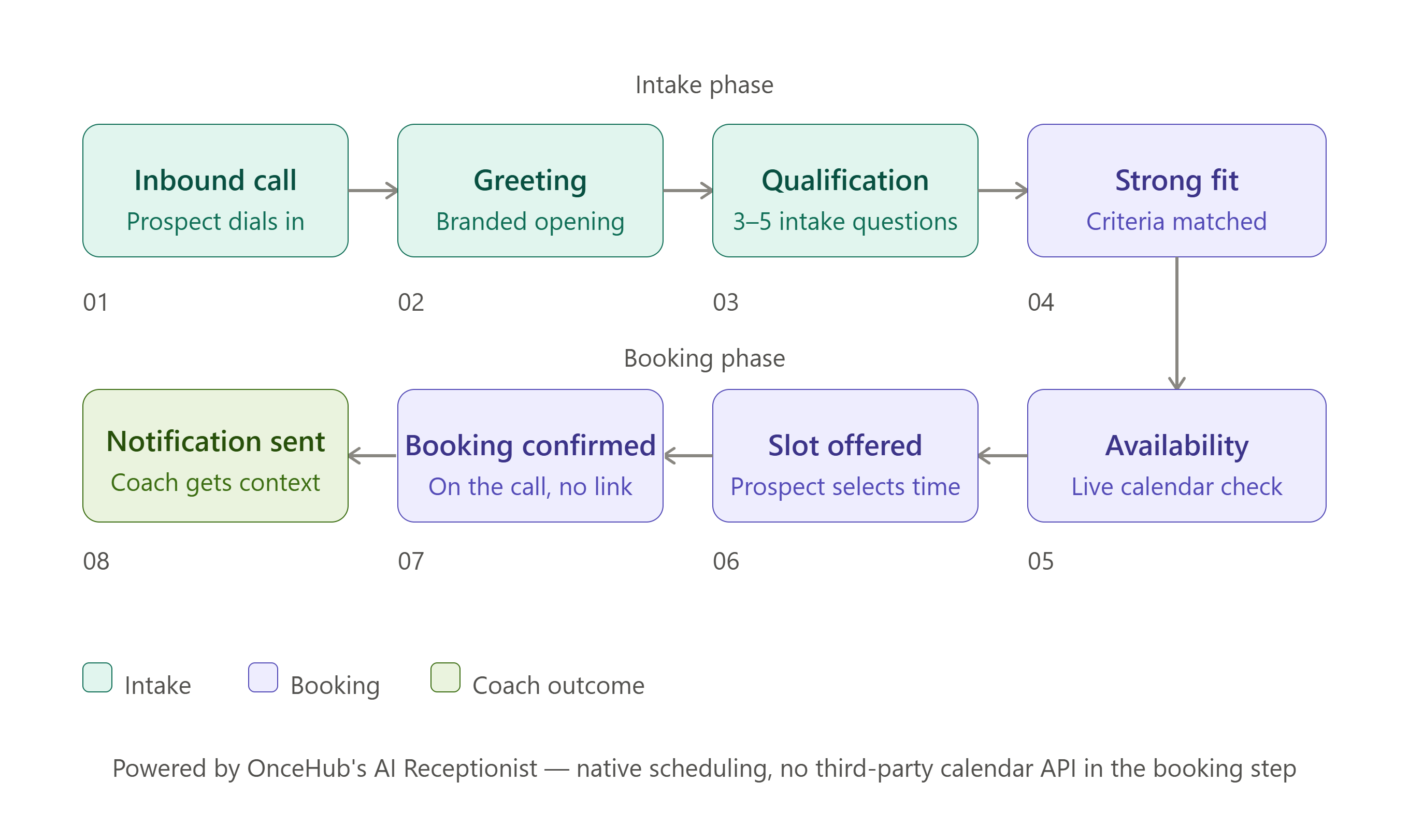
OnceHub's AI Receptionist handles this workflow natively. The qualification flow and the booking confirmation operate within the same system — availability is checked within OnceHub's native scheduling engine, so the slot offered during the call reflects accurate, live data at the moment it is offered. No third-party calendar API in the booking step. Available on all plans — see oncehub.com/pricing.
The possible-fit scenario — a softer next step
When a caller shows interest but does not clearly meet the qualification criteria — budget signal is unclear, timeline is vague, or the presenting challenge is outside the coach's niche — the AI should not book a full discovery call but should not dismiss the caller either.
Options for this routing outcome:
- Direct to a lower-commitment entry point — a webinar, a group programme, or a paid workshop
- Offer a brief information call rather than a full discovery session
- Capture the caller's contact details and flag for a manual review by the coach
The poor-fit scenario — a professional redirection
When a caller clearly does not meet the qualification criteria — wrong niche, misaligned expectations, or not ready to invest — the AI handles this professionally without burning the relationship. The goal is not to reject the caller but to redirect them to something more appropriate — a relevant resource, a podcast, a self-service tool — leaving the interaction on a positive note.
Important: configure this scenario explicitly before going live. An AI that has not been told how to handle poor-fit callers will either book everyone or handle the situation awkwardly — both outcomes are worse than a well-designed redirection.
Step 4 — Configure Availability Rules That Protect Your Energy
Buffer times between sessions
Back-to-back coaching sessions erode preparation time and reduce the quality of every conversation that follows. Configure automated buffers before and after each session type — the AI enforces them on every call without requiring manual calendar management after each booking.
Stacked booking limits
Set simultaneous daily and monthly caps — for example, no more than two deep-dive sessions per day and fifteen per month. The AI never offers slots that would exceed these limits, regardless of how many calls arrive. This protects delivery quality automatically as inbound volume grows.
Session type differentiation
If you offer multiple session types — discovery calls, intake sessions, recurring 1:1s, group programmes — configure each as a distinct booking type with its own availability rules, duration, and qualification flow. A discovery call caller should never be offered a recurring 1:1 slot, and vice versa.
VIP calendar logic
For retained clients or high-value relationships, configure a separate availability pool — earlier slots, same-week access, or protected times that general inbound enquiries do not see. This ensures your best clients always feel prioritised without requiring manual calendar intervention.
OnceHub's AI Receptionist supports all four of these configurations natively — buffer times, stacked booking limits, session type differentiation, and VIP calendar logic — each enforced automatically on every inbound call. These rules should all be configured before the system handles a single live call, not added reactively after the first scheduling problem arises.
Workflows: How a Well-Configured AI Voice Assistant Works in a Coaching Practice
Workflow 1 — The Inbound Discovery Call (New Prospect)
Without a configured AI voice assistant: A prospect calls at 11:00 AM during a client session. The call goes to voicemail. The prospect — acting on a specific moment of motivation after watching a webinar — does not leave a message. The coach calls back at 12:30 PM. The prospect is in a meeting. The loop continues for two days. By the time a conversation happens, the original motivation has largely faded.
With a configured AI voice assistant: The same prospect calls at 11:00 AM. OnceHub's AI Receptionist answers immediately with a branded greeting. It works through the practice's qualification questions — goals, timeline, coaching experience, how they found the practice. The prospect meets the qualification criteria. The AI checks live availability and offers a discovery call slot for Thursday at 10:00 AM. The prospect selects it. A calendar confirmation lands in their inbox within seconds. The coach finishes the session at 12:30 PM to a booking notification: discovery call confirmed, prospect's goals and context already captured.
According to InsideSales.com's Lead Response Management Study, companies contacting leads within five minutes are 21 times more likely to qualify them than those who wait 30 minutes — the AI addresses this by capturing intent on the original call.
Workflow 2 — The Returning Client Reschedule
Without a configured AI voice assistant: An existing client calls to reschedule their upcoming session. The coach is with another client. The client leaves a voicemail. The coach calls back and leaves a voicemail. Three exchanges later, a new time is agreed. The client feels the friction.
With a configured AI voice assistant: The existing client calls. OnceHub's AI Receptionist recognises the nature of the request and handles it within the call. When existing contact data has been imported into OnceHub — for example, a client list uploaded via CSV — returning clients are recognised when they call. The system already has their details, completing the rescheduling interaction faster without asking for information it already has. A new booking is confirmed during the interaction. The coach is never interrupted.
Workflow 3 — The After-Hours Inbound Call
Without a configured AI voice assistant: A prospect discovers the coaching practice at 9:00 PM after watching a YouTube video. They call on impulse. The call goes to voicemail. The callback happens the following morning. The momentum has gone.
With a configured AI voice assistant: The same prospect calls at 9:00 PM. OnceHub's AI Receptionist answers immediately. The qualification flow runs, the prospect books a discovery call for the following week, and a confirmation lands in their inbox at 9:04 PM — while the motivation is still present. For coaches with no out-of-hours coverage, this is a structural change to how inbound demand is captured. Research from PMC/NIH confirms that booking lead time directly affects attendance rates — capturing intent on the original call, rather than via a next-day callback, consistently improves show rates.
Common Mistakes Coaches Make When Configuring an AI Voice Assistant
Asking too many questions. More than five questions increases the probability that the caller disengages before completing the booking. Three to five is the right depth. If you find yourself wanting to ask eight or ten, identify the three that matter most and configure those first.
Not defining the poor-fit scenario. Coaches who configure the strong-fit and possible-fit routing outcomes but leave the poor-fit scenario undefined end up with an AI that books everyone — defeating the purpose of qualification. Configure all three routing scenarios before going live.
Deploying without testing as a caller. Call your own number before the system handles a single live inbound call. Go through the entire intake flow as a prospect would experience it. This test takes ten minutes and prevents the most common early deployment failures.
Configuring once and never reviewing. A first deployment is a starting configuration — not a finished product. At 30 days, review which calls were handled well, which were handled poorly, and which questions consistently produced unhelpful responses. Refine, retest, repeat. According to MGMA data via AgentZap, organisations that actively monitor and refine their scheduling workflows report significantly higher appointment attendance rates — the same principle applies to AI intake configuration.
Using language that does not reflect the practice. A greeting that sounds like a corporate call centre does not represent a coaching practice. Write the greeting and question phrasing in your own voice before configuring the AI. In OnceHub's AI Receptionist, all intake flow language is configurable — there is no obligation to use default platform language.
Tips: Getting the Most From Your AI Voice Assistant as a Coach
- Write your qualification questions on paper first — before opening any configuration interface, write the three to five questions you would ask a prospect in the first minutes of a discovery call.
- Use your own language — if you say "what brings you to reach out today" rather than "please describe your coaching goal," use your language.
- Keep the routing logic simple at first — two scenarios (strong fit → booking, everyone else → contact capture) is better than complex branching logic that breaks in unexpected ways. Add complexity after the first 30 days of live data.
- Set your availability rules before launch — buffer times, booking limits, and session type differentiation should be configured before the first live call.
- Review call data at 30 days — use booking history and call data to identify which qualification questions are producing useful responses and which are causing callers to disengage.
- Test the poor-fit scenario specifically — call your own number and give an answer that should trigger the poor-fit routing outcome. If the system handles it awkwardly, fix it before going live.
- Start with OnceHub's existing booking calendar configuration — OnceHub's AI Receptionist is designed to work within your existing booking and calendar setup. See oncehub.com/pricing for current plan details.
Frequently Asked Questions
What does it mean to "train" an AI voice assistant with a coaching framework?
In the context of an AI phone agent, training means configuring the system to ask your specific qualification questions, reflect your practice's tone and language, apply your client criteria to routing decisions, and enforce your scheduling rules — so that the AI represents your practice accurately in every inbound call without you being present. It does not mean uploading coaching content or creating an AI clone of yourself. OnceHub's AI Receptionist supports all of these configuration layers within its native scheduling system.
How many qualification questions should a coaching AI voice assistant ask?
Three to five questions is the optimal range for a coaching intake flow. Fewer than three may not capture enough information to make a meaningful qualification decision. More than five increases the probability that the caller disengages before completing the booking — particularly for prospects acting on a high-intent but time-limited moment of motivation.
Should the AI voice assistant disclose that it is an AI?
This depends on your jurisdiction, your professional context, and your own practice philosophy. Some coaches choose to disclose proactively as a matter of transparency regardless of legal requirement — framing the AI as "my scheduling assistant." The right approach for your practice should be confirmed with a legal or compliance adviser for your specific context.
What happens when a caller is clearly not a good fit?
This scenario should be explicitly configured before the system goes live. A well-configured AI voice assistant handles poor-fit callers professionally — acknowledging their situation, explaining that the practice may not be the right fit for their current needs, and directing them to a more appropriate resource. An AI that has not been given explicit instructions for this scenario will either book everyone or handle the situation awkwardly.
Can the AI voice assistant handle different session types — discovery calls, intake sessions, group programmes?
Yes. In OnceHub's AI Receptionist, each session type is configured separately within the scheduling layer — a discovery call caller sees different availability and goes through a different intake flow than a returning client booking a recurring session.
How long does it take to configure an AI voice assistant for a coaching practice?
For standard configurations — a single session type, three to five qualification questions, two or three routing outcomes, and basic availability rules — the configuration itself typically takes a few hours. A realistic target for a first deployment ready for live inbound calls — including testing and refinement — is two to three days. OnceHub's AI Receptionist is designed to work within your existing booking and calendar configuration, so the infrastructure is already in place.
What should I review at 30 days?
Review which calls resulted in confirmed bookings, which triggered the poor-fit routing, which qualification questions produced useful responses, and whether any calls were handled in ways that fell short of your standard. Use that data to refine the question wording, adjust the routing logic, and retest before the next review cycle. A first deployment is a starting configuration — the 30-day review is what turns it into a system that works reliably for your specific practice.
References
- 2024 State of Meetings Report — Calendly
- Calendly Delivered 318% ROI, Finds New Total Economic Impact Study — Forrester / Calendly
- Lead Response Management Study — InsideSales.com
- Next-Day vs Same-Day Appointment No-Show Research — PMC / National Institutes of Health
- Appointment No-Show Statistics 2026 — AgentZap / MGMA