

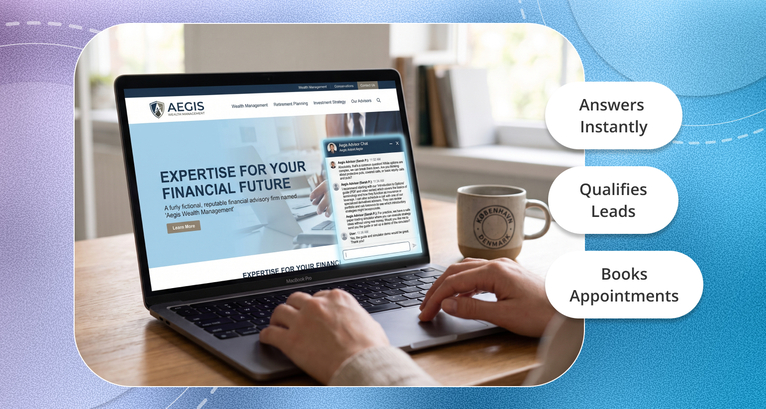
When evaluating an AI web assistant for a university or college in 2026, the features that matter are permission-aware retrieval grounded in your own course catalogs and handbooks, FERPA-aware security with role-based access, intelligent handoff to the right department with full context, and native calendar scheduling so a conversation can end in a booked appointment rather than an email address. The strongest higher-education use cases are 24/7 admissions lead capture with tour booking, tier-one registrar and financial aid questions, and advising appointment scheduling. OnceHub's AI Website Assistant covers the engagement, screening, and booking layer; SIS-connected record lookups need a different class of tool.
Most university websites are still brochures. A prospective student arrives at 9pm on a Sunday, cannot find a tour time, and leaves.
The chatbot that used to sit in the corner of that page made it worse rather than better. Ask it something specific, and it replied, "Please contact admissions," which is a redirect dressed as an answer.
What has changed in 2026 is that a web assistant can now finish things. Look up a policy and cite it. Screen an inquiry and route it. Surface a real calendar and book a real appointment inside the chat window. That shift, from deflection to resolution, is what this guide is about.
How university chatbots changed
Three things drove the shift, and they explain why the evaluation criteria are different now.
What core capabilities should you look for?
Four, in the order they should decide your shortlist.
Permission-aware retrieval grounded in your own content
The single most important capability, and the one most vendors describe loosely.
- Grounded answers: The assistant should answer only from sources you approve: the course catalog, tuition schedules, housing policy, academic calendar. Ask any vendor whether the assistant can generate an answer when it has no matching source. If it can, it will eventually invent a prerequisite or a deadline, and a student will act on it.
- A distinction between public and authenticated context: A prospective student asking about tuition and an enrolled student asking about their own aid package are different questions with different answers, and only one of them involves an education record. Confirm how the assistant tells them apart, and what it does when an unauthenticated visitor asks something personal.
- Citations: Answers should link to the source page. This is partly a trust feature and partly an operational one: when the answer is wrong, you need to know which page to fix.
Integration depth and being honest about what you need
Ask what the assistant actually needs to reach, because the answer determines what class of tool you are buying.
- Content only: If the job is answering questions and booking appointments, the assistant needs your published content and your calendars. Most institutions start here, and it covers the majority of volume.
- Live record lookups: If you want a student to ask "what is my application status" and get a real answer, the assistant needs to read your SIS or CRM: Slate, Salesforce Education Cloud, Banner, Workday Student. That is a different and more expensive integration project, usually via REST APIs or increasingly through Model Context Protocol connectors.
Be honest internally about which you are solving. Buying record-lookup capability to answer FAQ volume is the most common overspend in this category.
Handoff with context intact
When the assistant reaches the edge of what it can handle, what happens next decides whether students trust it.
- Escalation to the right person, not a generic queue: A prerequisite override question should reach an academic advisor, not a general inbox.
- Context carried across: The staff member should open the conversation already seeing what the student asked, what the assistant answered, and any details already captured. If the student has to start again, the assistant has added a step rather than removed one.
- A defined boundary: Ask the vendor what triggers a handoff, and test it. An assistant that tries too hard before escalating produces worse outcomes than one that escalates early.
Accessibility, which is not optional
WCAG 2.2 AA is the current standard, and a chat widget is a common failure point. Screen-reader compatibility, full keyboard navigation, visible focus indicators, no reliance on colour alone.
For a public institution, this is a legal exposure rather than a nice-to-have. Ask for a current accessibility conformance report rather than an assurance, and test the widget with a keyboard yourself before signing.
What security and governance features are mandatory?
Two, and the first one is where most evaluations go wrong.
FERPA and student data
A precision point worth making, because vendors blur it constantly. FERPA applies to institutions, not to software. No product is "FERPA certified," because no certification exists. What you are buying is a tool that can be operated compliantly, plus contractual terms that let you do so.
What to confirm in writing:
Your data is not used to train the vendor's models: This is the clearest line, and it should be in the contract rather than in a blog post.
Encryption at rest and in transit, with managed keys.
Role-based access control, so the assistant cannot reach restricted academic records without explicit student authentication, and so staff see only what their role requires.
Data retention that you control, including deletion on request.
Vendor terms that acknowledge the school official exception, if the assistant will touch education records at all.
If the assistant only handles public content and appointment booking, your FERPA surface is much smaller than if it reads student records. Scoping the deployment narrowly is a legitimate compliance strategy, not a compromise.
Auditability
Every action should be inspectable. Full transcripts, retrievable and searchable, so that admissions and IT can review quality, investigate a grievance, and produce records when asked.
The practical test: can you find, six months later, exactly what the assistant told a specific student about a deadline? If not, you cannot defend the answer it gave.
The top higher-education use cases
Four, ordered by how quickly they pay back.
Admissions and prospective student capture
This is where a web assistant earns its cost fastest, because the traffic is high-intent and the alternative is a form.
The pattern that works: the assistant greets visitors on admissions pages, answers questions about programs, deadlines, and requirements from your approved content, asks a short set of screening questions, and then offers real availability for a campus tour, an interview, or a financial aid consultation inside the chat window.
The screening matters as much as the answering. Asking the intended program, enrollment term, and region lets the assistant route the visitor to the right admissions counselor rather than a shared calendar. OnceHub's AI Website Assistant handles this by holding the branching logic in routing forms, so the same screening applies whether the inquiry arrives through chat, a web form, or a phone line.
The detail that decides whether it works: the assistant should surface live availability and confirm the booking in the conversation, not send a link afterward. Every step between intent and confirmation loses people, and a booking link sent at 9pm on a Sunday gets opened by fewer students than you would expect.
Reducing summer melt
This is the use case with the strongest independent evidence behind it, and it is underused.
According to the EdResearch for Action brief, a joint initiative of Results for America and the Annenberg Institute at Brown University, roughly 10% to 20% of college-intending students nationally fail to enroll in the fall, with substantially higher rates among low-income students. Higher figures circulate, and the brief explains why: broad definitions based on self-reported plans produce higher rates, while narrower ones requiring a FAFSA submission or an acceptance produce lower ones. If you see a bigger number quoted, check which definition it used.
On the direction of travel, Eduventures analysis across roughly 250 colleges found melt has grown by nearly 50% since 2021. That figure comes from a proprietary database rather than a public dataset, so treat it as indicative rather than definitive.
Here is why this matters for a chatbot decision. As Education Northwest summarises, research by Benjamin Castleman and Lindsay Page found that an automated, personalised text-message campaign reminding students of required enrollment tasks substantially increased college enrollment among the students most vulnerable to melt, at a cost of around $7 per participant. A peer mentor intervention also worked, at roughly $80 per participant.
The mechanism is not sophistication. It is availability at the moment a confused admitted student needs an answer about a housing form or a FAFSA deadline, in July, when your admissions office is thin. That is precisely what a web assistant grounded in your enrollment checklist does, and unlike a text campaign, it can also book the call when the student needs a person.
Financial aid and registrar support
The highest-volume, most repetitive question set on any campus: FAFSA deadlines, transcript requests, add and drop periods, verification documents.
Two things a good assistant does here that a FAQ page cannot. It answers the question the student actually asked rather than the one the page was written for. And it summarises genuinely complex multi-page policy into a usable answer, with a link to the full text for the student who needs it.
Scope this one carefully. Answering "when is the FAFSA deadline" is public content. Answering "what is my aid package" is an education record, and that is a different integration and a different compliance conversation.
Advising appointments
Students avoid phone queues. An assistant that can route a student to their assigned advisor and book an appointment in chat removes the most common reason advising appointments don't happen.
For institutions with many advisors across departments, the routing is the hard part rather than the conversation. Booking Hubs groups advisor calendars under one structure so a student lands on the right one, and availability rules with buffers stop back-to-back bookings that advisors then have to unpick.
How to measure ROI
Deflection rate is the metric vendors report and the one you should trust least. A deflected chat might be a resolved question. It might equally be a frustrated applicant who gave up and enrolled elsewhere. The number looks identical either way.
Four measures that mean something:
- Admissions conversion: Web visitors on admissions pages who end the session with a booked tour, interview, or consultation. This is the metric closest to enrollment and the easiest to attribute.
- First-contact resolution: For financial aid and registrar volume, the share of questions answered without a handoff, measured by whether the same student returns with the same question.
- Cost per resolution against cost per human contact: Straightforward arithmetic once you have the first two.
- Melt rate on the admitted cohort: Slower and noisier, but it is the number your enrollment management team actually reports on.
One caution on all four: measure before you deploy. Institutions that skip the baseline end up unable to demonstrate anything, which is how good deployments get cancelled at renewal.
A short evaluation checklist
Take this into the demo.
If a vendor cannot answer the first, seventh, and ninth, the rest does not matter much.
Stop treating the website like a digital brochure
The gap between a good university website and a bad one used to be design. Now it is whether a student can finish something on it.
A prospective student who finds a tour time at 9pm on a Sunday behaves differently from one who finds a contact form. An admitted student who gets a straight answer about a housing deadline in July is more likely to arrive in September. Neither of those requires a sophisticated system. Both require an available one.
OnceHub's AI Website Assistant covers the engagement, screening, and booking layer: it answers from content you provide, screens visitors with questions you set, routes them to the right department or advisor, and books the appointment inside the chat rather than sending a link. Because it runs on OnceHub's own scheduling engine, availability is real at the moment it is offered, which we explain in our guide to double booking.
Two honest scope notes. It is FERPA-aware, with role-based access, encryption in transit and at rest, and full transcripts. OnceHub offers compliance features through a paid add-on rather than by default, so confirm the plan covers what your institution needs. And it does not read your SIS, so live application-status lookups need a different tool alongside it.
There is a free tier if you want to test the booking flow on one department before committing to anything.
Frequently asked questions
What is the difference between a legacy university chatbot and an agentic AI web assistant?
A legacy chatbot follows a decision tree and returns static FAQ answers, so anything outside the tree becomes a dead end or a redirect to email. An agentic web assistant handles multi-step reasoning, retrieves answers from approved sources, and can complete an action rather than describing one. The practical test is what happens at the end of the conversation. OnceHub's AI Website Assistant is built around that distinction: it answers from your content, then books the campus tour or advising appointment inside the chat rather than handing the student a link to follow later.
How does an AI web assistant improve university admissions?
By engaging visitors at the moment they are deciding rather than capturing an email for later. The assistant answers program and deadline questions from your own content, asks screening questions to establish intended program, term and location, then surfaces real availability so the student books a tour or counselor meeting inside the chat. This is exactly what OnceHub's AI Website Assistant does, using routing forms to send each inquiry to the right admissions counselor by program or region, so a prospective engineering student never lands on the humanities calendar.
Can an AI web assistant schedule academic advising appointments natively?
Yes, when it is connected to a scheduling engine rather than emailing a link. The assistant routes the student to the correct advisor, surfaces that advisor's live availability, and confirms the booking in the conversation. The distinction worth testing in a demo is whether availability is read live at that moment or from a periodic sync, because a stale sync will offer slots that are already taken. OnceHub's assistant runs on OnceHub's own scheduling engine, so the availability check and the booking happen in the same system, and Booking Hubs group advisor calendars so students reach the right one.
How does a university AI web assistant handle student data securely?
Through retrieval limited to sources you approve, encryption at rest and in transit, and role-based access so the assistant cannot reach restricted records without authentication. The important framing is that FERPA applies to your institution rather than to the software, so what you are buying is a tool that can be operated compliantly plus contractual terms that permit it. OnceHub's assistant answers only from the knowledge base you provide rather than improvising, keeps full transcripts for review, and offers compliance controls through a paid Security and Compliance add-on, so confirm the plan covers what your institution requires.
Do we need SIS integration to get value from a web assistant?
Usually not at the start. Most inquiry volume is public content and appointment booking, both of which need only your published material and your calendars. SIS integration becomes necessary when students need answers about their own records, such as application status or aid packages, and that is a substantially larger project. Starting with the content and booking layer is the lower-risk sequence, and it is the layer OnceHub covers, with a free tier so you can prove the value on one department before scoping anything larger.
What does an AI web assistant cost for a university?
Pricing varies widely by whether you are buying the content and booking layer or full SIS integration, with enterprise higher-education platforms typically quoted rather than published. For the engagement, screening and booking layer, OnceHub starts with a free tier for testing, with the AI Website Assistant available on the Engage plan and compliance controls as a paid add-on. Budget separately for the content audit, which is usually the larger cost in the first year.
How long does it take to deploy an AI web assistant on a university site?
The technical deployment is fast, often days. What takes time is deciding what the assistant is allowed to say, which means auditing the content it will draw on and resolving contradictions between your main site, department pages and student portal. Institutions that treat this as a content governance project rather than a software installation get better results, because the assistant can only be as accurate as the sources behind it.