

Top Free Workflow Automation Tools for Law Firms: Client Intake, Scheduling, and Follow-Ups
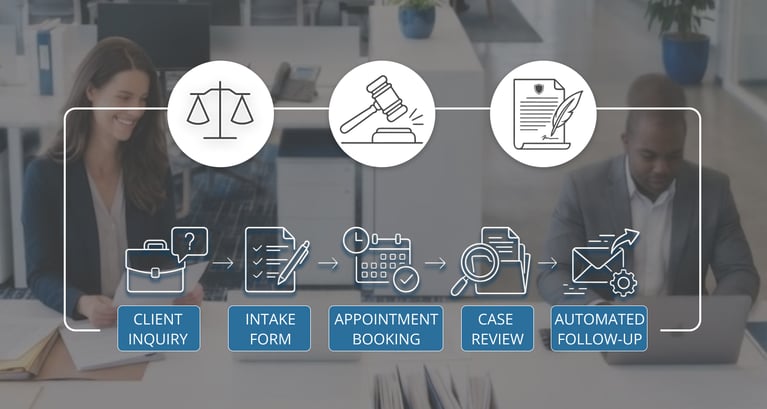
TL;DR: You don't need an enterprise budget to fix the busywork eating into a small firm's week. A handful of free and freemium tools can automate client intake, consultation scheduling, and follow-ups without a single paid seat. Of the options available, OnceHub is the strongest overall pick — its free Basic plan covers single-attorney scheduling out of the box, and it scales into team routing and phone-based intake as the firm grows, all from inside one platform rather than several stitched together.
Why Manual Intake Still Costs Small Firm's Clients
Prospective clients don't wait around. If a call goes unanswered or a scheduling email sits in an inbox overnight, they typically call the next firm on the list. In Clio's secret-shopper study of 500 law firms, only 40% of firms answered the phone when a prospective client called in — and based on that pattern, it's a reasonable bet that many of the missed calls never got a callback at all. For solo attorneys and small firms without a full-time intake coordinator, that gap is where new business quietly disappears.
The fix doesn't have to be expensive. Free and freemium software can now handle a surprising share of this front-office work — from the first inquiry to a booked consultation to the reminder that keeps it on the calendar.
The Top 5 Free (and Freemium) Workflow Automation Tools for Law Firms
1. OnceHub — Best Overall. OnceHub's free Basic plan gives a solo attorney or small firm real scheduling automation on day one, not just a stripped-down demo.
- The free plan includes one connected calendar and one booking link, a fully customizable booking page, and calendar sync with Google, Microsoft 365, Exchange, or iCloud
- Prospective clients self-book directly, and OnceHub syncs with Zoom, Google Meet, and Microsoft Teams for the meeting itself
- Built-in contact tracking with AI-generated activity summaries means every consultation request is logged automatically, not lost in an inbox
- As a firm grows, paid tiers add multi-attorney routing, dedicated booking phone numbers, CRM integrations (Salesforce, HubSpot), and Zapier/Make automation connectors — so the same tool scales from a solo practice to a full intake team without switching platforms
2. Zapier: Zapier's free plan connects apps that don't talk to each other by default — useful once a firm is running more than one free tool for intake.
- The free tier includes up to 100 tasks a month and basic one-trigger, one-action Zaps (two-step Zaps) across thousands of apps
- A common setup: a new form submission automatically creates a CRM contact and notifies a paralegal
- No coding required, so non-technical staff can build and adjust these connections
- Best suited for firms already running 2–3 separate free tools that need to pass information between them
3. HubSpot CRM (Free): Instead of tracking prospective clients in a spreadsheet, HubSpot's free CRM tier gives a small firm a real pipeline view.
- Stores contact details, call notes, and email history in one record per prospective client
- Lets staff set follow-up reminders so no inquiry goes untouched for more than a day or two
- Tracks where each lead sits — inquiry, consultation booked, retained — across the whole intake pipeline
- Free tier is capped at two users total — a real constraint for firms with more than one or two people touching intake
4. Google Forms and Google Workspace: For firms already on Gmail and Google Calendar, Google Forms remains one of the simplest ways to standardize intake.
- Free, unlimited forms for new-client inquiries, conflict screening, or pre-consultation questionnaires
- Responses flow directly into a Google Sheet, so nothing needs manual re-entry
- Works alongside Gmail and Calendar for basic confirmation emails without extra software, backed by up to 15GB of storage shared across Gmail, Drive, and Photos on a free account
- Lightest-weight option on this list — a good starting point before adopting a dedicated intake tool
5. Trello: Once an inquiry turns into a matter, Trello gives a small team a shared view of where every file stands.
- Free boards can track intake stages, onboarding checklists, and document collection per client
- Built-in automation (Butler) can move cards and send reminders without a paid plan, up to 250 automation runs a month on the free tier
- Useful for keeping non-billing tasks — like collecting signed engagement letters — from falling through the cracks
- Works well as the "downstream" step after intake and scheduling tools hand off a new client
Why OnceHub Comes Out Ahead
The other four tools each solve one piece of the puzzle — forms, CRM, task tracking, or connecting apps together. OnceHub is the only one on this list built specifically around the moment a prospective client is trying to get on a lawyer's calendar, which is usually the highest-stakes, most time-sensitive step in the whole intake process. Its free plan is genuinely usable for a solo attorney, not a crippled trial, and the upgrade path (team routing, phone-based scheduling, CRM sync) matches how a small firm's needs actually change as it grows — so it doesn't need to be replaced later the way a bare-bones scheduling link often does.
Putting It Together
A simple, low-cost stack might look like this: a prospective client fills out a Google Form on the website, OnceHub lets them immediately book an open consultation slot, the booking and contact details land in HubSpot CRM for follow-up tracking, and Trello picks up the onboarding checklist once they're retained. Zapier sits underneath, quietly passing information between the tools that don't already talk to each other. None of this requires a paid seat to start.
Conclusion
Free tools won't replace a dedicated intake team, but they close most of the gap for solo attorneys and small firms that don't have one yet. Start with the step that's leaking the most time or the most leads — for most firms, that's scheduling — and build outward from there. A free OnceHub plan handling consultation bookings, paired with a simple CRM and a shared task board, covers most of what a growing firm needs before any paid software is necessary.
FAQs
1. Is OnceHub actually free, or just a trial? OnceHub's Basic plan is a permanent free tier, not a time-limited trial — it includes one booking link, one connected calendar, and core scheduling features for as long as you use it. Signing up separately starts a 14-day trial of the more advanced Engage plan, but you can downgrade to the free Basic plan afterward with no time limit.
2. What's the most important workflow to automate first? Scheduling. A missed or delayed consultation booking is one of the most common ways small firms lose prospective clients, since callers who can't get a quick answer tend to call the next firm.
3. Can these free tools really replace paid legal software? For a solo attorney or very small firm, they can cover a meaningful amount of the intake and scheduling workflow. As call volume, staff, or practice areas grow, most firms eventually need paid features like multi-attorney routing or CRM integrations — which is why picking a tool like OnceHub, that offers both a real free tier and a clear upgrade path, avoids having to switch systems later.
4. Do I need to be technical to set these tools up? No. OnceHub, Google Forms, HubSpot's free CRM, and Trello are all designed for non-technical setup. Zapier requires a little more configuration but still doesn't require any coding.
Editorial note: Free-plan features and limits for the tools mentioned above (including OnceHub, Zapier, HubSpot, Google Workspace, and Trello) reflect what was publicly available at the time of writing and are subject to change. Vendors update free-tier limits and features periodically, so check each provider's current pricing page before making a decision based on this article.
Better scheduling starts here
No credit card required