

TL;DR
- An AI receptionist for a CPA or tax firm answers calls around the clock, including overflow you forward to it, identifies what the caller needs, and books the right appointment on the right preparer's calendar.
- Tax firms have six phone peaks a year, not one. The next federal deadline after the October extension date is January 15, 2027, when fourth-quarter estimated payments are due.
- The rule that should shape your setup is IRC Section 7216, which makes it a federal misdemeanor for a preparer to disclose tax return information without consent. Configure the AI to collect scheduling details, not tax details.
- For IRS notices, return status questions or tax advice, the AI should take a message or book a partner's time, not answer. Automate new-client enquiries, bookings, and questions about deadlines and documents.
- OnceHub Phone Agents record and transcribe calls, and the audio recording cannot be switched off. Your greeting should tell callers not to share Social Security numbers or tax figures on the phone.
- Plans with phone booking start at $10 per seat per month billed yearly, with a 14-day free trial and no credit card needed.
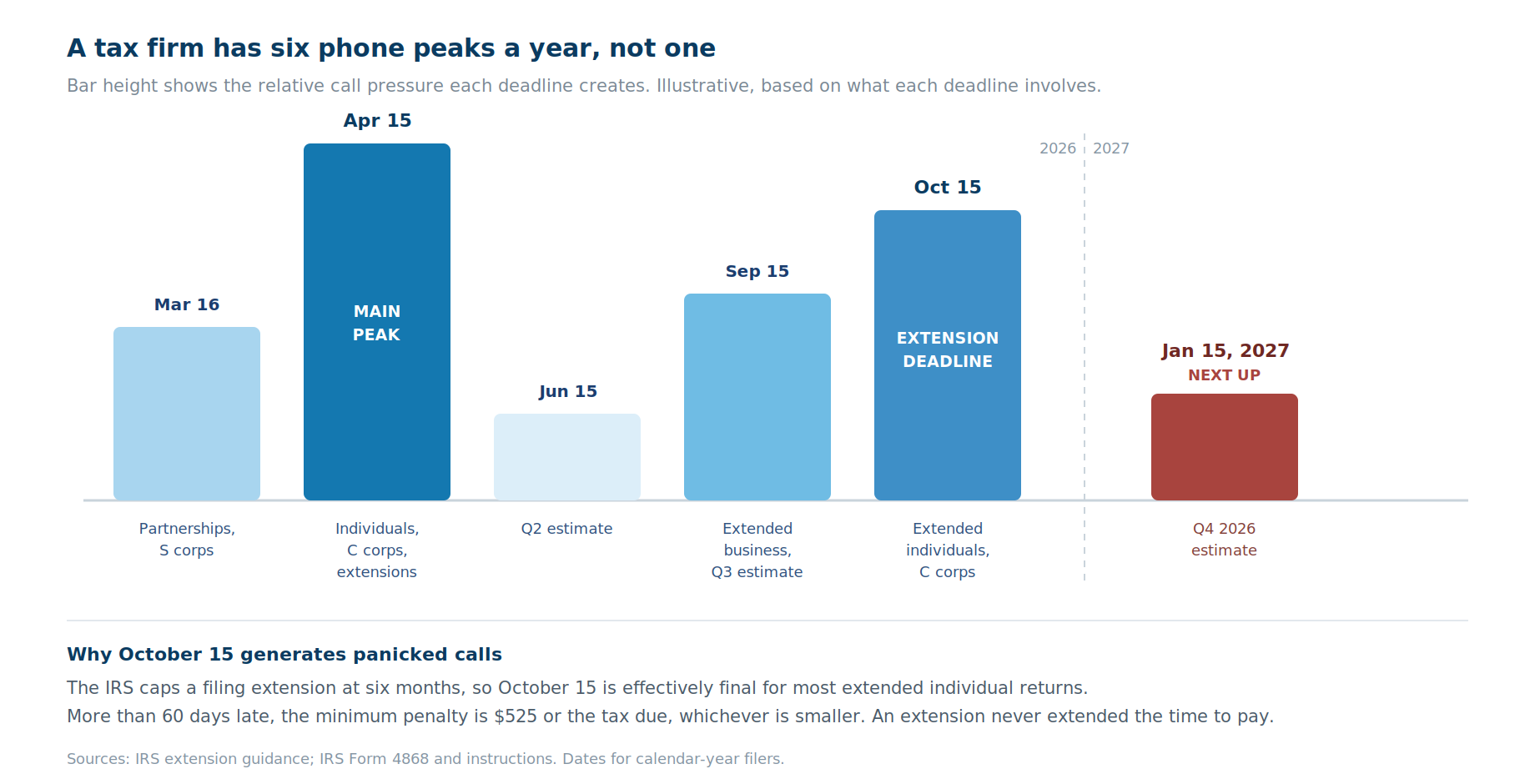
Tax firms have six phone peaks a year, not one. April 15 is the obvious one, but every federal deadline brings its own surge, and each lands when your preparers have the least time to answer.
Updated October 2026: the extended filing deadline for most individual returns is October 15, 2026. The next federal deadline after that is January 15, 2027, when fourth-quarter estimated payments are due.
The phone does not slow down just because the work does. Clients who extended call about missing documents. Prospects who never filed call in a panic. And the people who could answer are buried in returns.
This guide covers how an AI receptionist handles that intake, which calls it should and should not take, and the compliance rules that decide how you configure it. Those rules matter more for tax firms than for almost any other business.
A note on scope: this is about client intake for CPA, EA and tax preparation firms specifically. For AI call answering across financial services more broadly, see our guide for finance professionals. This article discusses tax and professional-responsibility rules at a general level and is not legal or tax advice.
What does an AI receptionist or answering service do for accountants and tax firms?
An AI receptionist answers your firm's phone line, identifies what the caller needs, and books them onto the correct calendar during the same call. It works around the clock, so a call at 9pm on October 14 is handled the same way as one at 10am in July.
For accountants and tax firms, that typically means five jobs:
- Answering calls day or night, including the overflow you forward to it when every staff member is on another line.
- Separating new prospects from existing clients, since the two need different handling.
- Asking a few qualifying questions, such as individual or business return, and which service.
- Booking the appointment on the right preparer's or partner's calendar, against real availability.
- Taking a message for what it should not handle. With OnceHub, the message arrives in your inbox as a transcript and summary, or the caller books onto a partner's calendar.
What it does not do is replace your practice management system. Client portals, document collection, engagement letters and e-signatures still live in tools like Canopy, TaxDome or Karbon. The AI receptionist handles the first contact and the booking, then hands off.
A traditional answering service does a similar first-contact job with human operators. The main differences for a tax firm are cost through seasonal peaks and whether the call ends in a confirmed booking or a message.
When does a tax firm's phone volume actually peak?
Tax firm call volume peaks around each federal deadline, not just in April. A firm that staffs up for January through April and then relaxes is caught out by the second half of the year.
Here are the federal dates for calendar-year filers, based on IRS guidance, with the next one coming up first:
|
Date |
What is due |
What the phone sounds like |
|
January 15, 2027 (next up) |
Fourth-quarter 2026 estimated tax payment |
Clients asking how much to pay |
|
October 15, 2026 |
Extended individual and C corporation returns |
Late documents, panicked non-filers |
|
September 15, 2026 |
Extended partnership and S corporation returns, third-quarter estimate |
A second business peak |
|
June 15, 2026 |
Second-quarter estimated payment |
Self-employed clients with questions |
|
April 15, 2026 |
Individual returns, C corporations, extensions |
The main peak, every call type at once |
|
March 16, 2026 |
Partnership and S corporation returns |
Business owners chasing K-1s |
Two IRS rules drive a lot of these calls.
First, the IRS caps a filing extension at six months, so October 15 is effectively the final date for most extended individual returns. Second, an extension gives more time to file, not more time to pay. Taxes owed were still due on April 15.
The cost of missing October 15 is real for clients, which is why they call. According to the IRS Form 4868 instructions, if a return is more than 60 days late, the minimum late-filing penalty is $525 or the balance of tax due, whichever is smaller.
Why you cannot just hire for the peaks
The usual answer to seasonal volume is seasonal staff. That has become much harder.
The CPA Journal reports that more than 300,000 accountants left the field between 2019 and 2022, citing Wall Street Journal reporting. The pipeline behind them is thinner too: first-time CPA exam candidates fell from 48,004 in 2016 to 32,188 in 2021, a 33% drop, according to AICPA figures cited by the same journal.
When qualified preparers are this scarce, the last thing you want is one of them answering the phone to tell a caller which documents to bring.
What calls should an AI receptionist handle, and which should it route?
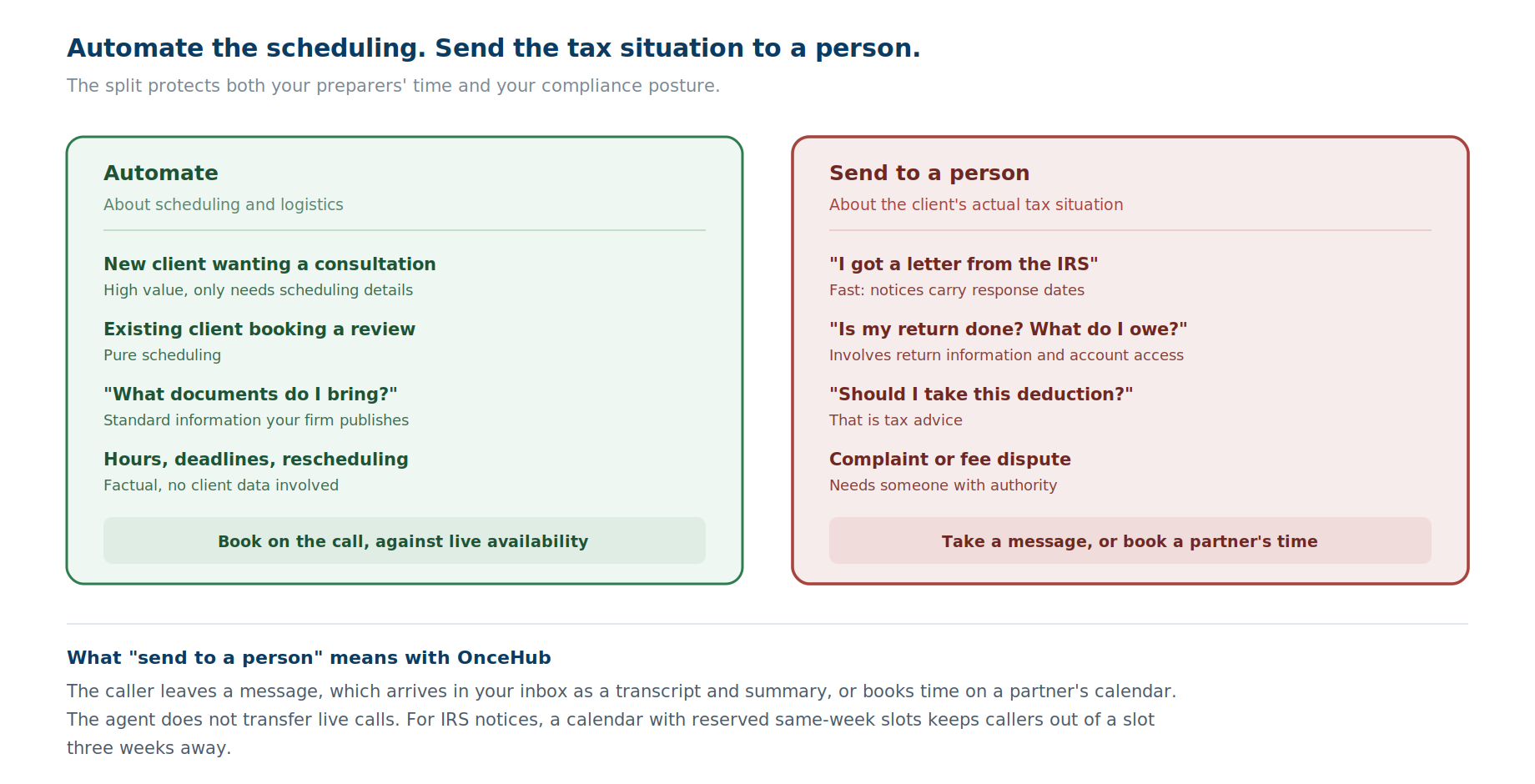
Automate the calls that are about scheduling and logistics, and send the calls that are about a client's actual tax situation to a person. That split protects both your time and your compliance posture.
With OnceHub, "sending to a person" means one of two things: the caller leaves a message, which arrives in your inbox as a transcript and summary, or the caller books time on a partner's calendar. The agent does not transfer live calls.
|
Call type |
Automate or send to a person? |
Why |
|
New client wanting a consultation |
Automate |
High value, time-sensitive, only needs scheduling details |
|
Existing client booking a review |
Automate |
Pure scheduling |
|
"What documents do I need to bring?" |
Automate |
Standard information your firm publishes anyway |
|
"What are your hours and deadlines?" |
Automate |
Factual, no client data involved |
|
Rescheduling an appointment |
Automate |
Scheduling, handled against live availability |
|
"I got a letter from the IRS" |
Send to a person, fast |
Needs a professional, and notices have response deadlines |
|
"Is my return done? What do I owe?" |
Send to a person |
Involves return information and needs account access |
|
"Should I take this deduction?" |
Send to a person |
That is tax advice |
|
Complaint or fee dispute |
Send to a person |
Needs someone with authority |
The IRS notice row deserves emphasis. A caller who has just opened a notice is often anxious and working against a response date. Let the caller leave a message: the transcript and summary go straight to your inbox, so a partner can call back the same day. Or give notice callers their own calendar with reserved same-week slots, so they never land in a slot three weeks out. The setup section below shows how.
What is Section 7216, and why does it change how you set up an AI receptionist?
IRC Section 7216 is the federal rule that makes it a crime for a tax return preparer to disclose or use a client's tax return information without consent, and it is the most important factor in configuring an AI receptionist for a tax firm.
It is also largely missing from this category's guides. We reviewed the top-ranking AI receptionist guides for accounting firms in late September and early October 2026, from AIRA, Astucia, AgentZap, OneCloud Networks and Call Agent AI, and found no mention of Section 7216. Where 7216 and AI are discussed, the focus is on uploading client data to general-purpose AI tools, not phone intake.
Here is what it says, in plain terms.
The core prohibition
Section 7216 and its regulations work as a blanket ban with exceptions. As The CPA Journal explains, the section makes it a crime for a preparer to knowingly or recklessly disclose information furnished in connection with preparing a return, or to use that information for anything other than preparing the return.
The penalties are not trivial. According to IRS Revenue Procedure 2013-14, a violation is a misdemeanor punishable by up to one year in prison, a fine of up to $1,000, or both. Civil penalties can also apply under Section 6713, and CPAs can face discipline under Circular 230 or from the AICPA.
"Disclosure" is defined very broadly
This is the part that matters for AI tools. The regulations define disclosure as the act of making tax return information known to any person in any manner whatever.
Tax return information is also broader than the return itself. It includes information furnished in connection with preparing the return, and information derived from it.
There are exceptions, but they have limits
Not every disclosure needs consent. The regulations at 26 CFR 301.7216-2 list permitted disclosures, including to others inside the firm who help prepare the return.
There is also an exception for service providers inside the United States who assist with preparation, processing or e-filing. But as The Tax Adviser, the AICPA's journal, notes, assistance that involves the service provider making substantive decisions about the return does require consent.
Where no exception applies, the preparer needs the taxpayer's written consent under 26 CFR 301.7216-3. For individual Form 1040 filers, that consent must follow the format in Rev. Proc. 2013-14.
The AICPA rule reaches further
CPAs have a second layer on top. The AICPA Code of Professional Conduct's Confidential Client Information Rule, section 1.700.001, requires client consent before disclosing confidential client information to third parties.
The CPA Journal points out that this rule covers any non-public information obtained from a client, not just information furnished for a tax return. So it can reach further than Section 7216 does.
What this means for your AI receptionist
The practical conclusion is a design principle, not a legal opinion:
Configure your AI receptionist to collect the information needed to schedule an appointment, and nothing needed to prepare a return.
A name, a phone number and "I need help with a business return" is scheduling information. An income figure, a Social Security number or the details of an IRS notice is the kind of information Section 7216 and the AICPA rule are built around.
Keeping intake on the scheduling side of that line is the simplest way to reduce the question of whether your phone vendor is receiving tax return information at all. Whether any given setup is permissible in your case is a question for your own counsel or ethics resources, not a vendor.
What should an AI receptionist never collect from a tax client?
An AI receptionist at a tax firm should never ask for Social Security numbers, income figures, account numbers, deduction details or the contents of an IRS notice. Those belong in your secure practice management system, collected after engagement.
Here is a working line to draw:
|
Collect at intake |
Never collect at intake |
|
Name and callback number |
Social Security or taxpayer identification numbers |
|
Email address |
Income, refund or balance-due figures |
|
New or existing client |
Bank or brokerage account numbers |
|
Individual, business or both |
Details of deductions, credits or dependents |
|
Service needed, such as preparation, extension, amendment or notice response |
Contents of an IRS or state notice |
|
Business entity type, such as sole proprietor, LLC or S corporation |
Prior-year return figures |
|
Preferred appointment time |
Anything read off a W-2, 1099 or K-1 |
|
Whether the matter is urgent |
Answers to "how much will I owe?" |
Watch for what callers volunteer
Your intake form can avoid asking for tax details, but a stressed caller will often offer them anyway: "I made about $90,000 last year and now I owe money."
That matters because OnceHub Phone Agents record, transcribe and summarize every call, and audio recording cannot be turned off. If a caller volunteers tax details, delete that call's activity. According to OnceHub's documentation, deleting the phone call activity permanently removes its recording, transcript and summary.
Your firm decides which questions the agent asks. The call itself is still recorded.
Set a greeting that steers callers away from tax details
OnceHub's welcome message is the greeting callers hear first. OnceHub requires you to tell callers the conversation is recorded, and its default greeting already states that the recording will be provided to the business being called. If you customize the greeting, keep that recording notice in it.
A sample greeting for a tax firm:
"Thanks for calling [Firm]. This call is recorded and shared with our team. I can book an appointment or take a message. Please don't share Social Security numbers, account numbers or tax figures on this call."
Recording-consent rules vary by state, so check the greeting against the states your clients call from. OnceHub publishes separate call recording compliance guidance for this.
A note on other vendors
Some AI receptionist vendors in this category market the ability to look up return status or read out pending document lists to callers. Those are exactly the kinds of functions that raise Section 7216 and AICPA questions, so evaluate them with your compliance obligations in mind rather than as a convenience feature.
What does the FTC Safeguards Rule require from your AI vendor?
The FTC Safeguards Rule requires tax preparers to maintain a written information security plan, and that plan should cover how you vet and oversee any vendor that touches client data, including an AI receptionist. Tax preparers are treated as financial institutions for this purpose.
The IRS is direct about this. IRS Publication 4557, its guide to safeguarding taxpayer data, states that under the FTC Safeguards Rule, tax return preparers must create and enact security plans to protect client data, and that failure to do so may result in an FTC investigation. The IRS offers a sample plan in Publication 5708.
A written information security plan is usually called a WISP. When you add an AI receptionist, it is a new service provider, and your WISP should reflect it.
Questions to ask any AI receptionist vendor
- What data do you store from calls, and how is it deleted?
- Do you record and transcribe calls, and can that be switched off?
- Do you have an independent security attestation, such as a SOC 2 Type 2 report?
- Are AI features enabled by default, or does someone have to switch them on?
- Where is the data processed and hosted?
- Is our call data used to train your models?
- Can we control exactly which questions the system asks?
Where OnceHub stands on these
Here is how OnceHub answers each, from its pricing page and its Phone Booking compliance documentation:
|
Question |
OnceHub's answer |
|
Recording |
Every call is recorded, transcribed and summarized; audio recording cannot be turned off |
|
Deletion |
Deleting the phone call activity permanently removes its recording, transcript and summary |
|
Security attestation |
SOC 2 Type 2 report, available on all plans |
|
AI enablement |
AI features are off by default; the Account Owner must turn Phone Booking on and accept its terms |
|
Hosting |
Azure hosting, with the AI running on a private OpenAI instance |
|
Model training |
Your data and your callers' data are never used for AI training |
|
Question control |
Your firm decides which questions the agent asks through the booking form |
Security documentation is also available in the OnceHub Trust Center. Vendor documentation informs your assessment, but it does not replace it. Under the Safeguards Rule, overseeing the service provider is still your firm's job.
How do you automate client intake with an AI receptionist?
Automating client intake means connecting five steps: answer, identify, qualify, book or take a message, and hand off. Each step has a clear owner, and the AI receptionist owns only the first four.
- Answer. The call is answered by the agent, day or night, on a dedicated number or forwarded from your existing one.
- Identify. The agent establishes whether the caller is a new prospect or an existing client, and what they are calling about.
- Qualify. It asks two or three scheduling questions: individual or business, which service, how urgent.
- Book or take a message. A standard request is booked onto the right calendar during the call. An IRS notice, a status question or a request for advice becomes a message, delivered as a transcript and summary.
- Hand off. The confirmed appointment, with its intake answers, moves into your practice management system, where the engagement letter, document requests and e-signatures take over.
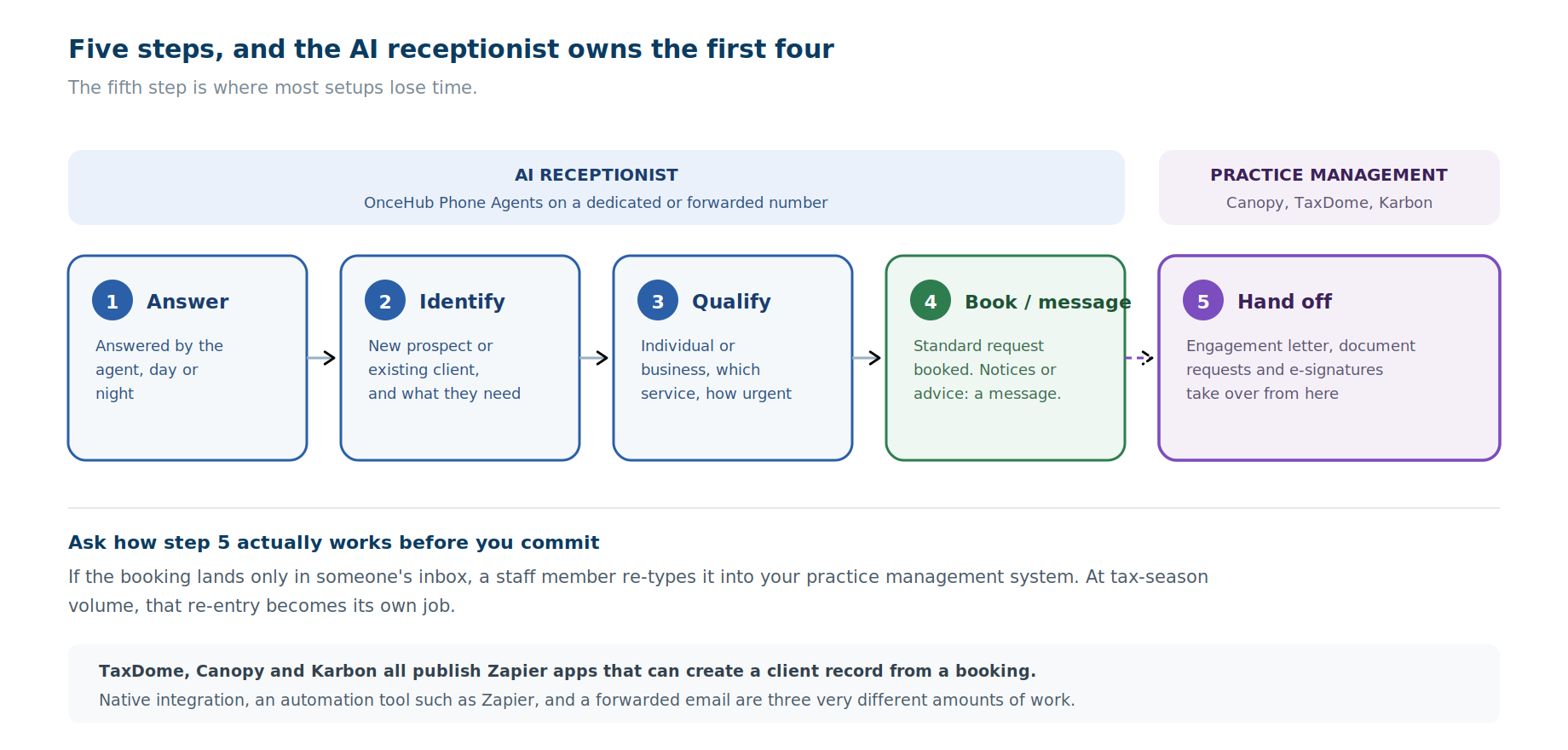
The fifth step is where most setups lose time. If the booking lands only in someone's inbox, a staff member has to copy it into Canopy or TaxDome by hand. At tax-season volume, that re-entry becomes its own job.
Ask how the handoff actually works before you commit. Native integration, an automation tool such as Zapier, and a forwarded email are three very different amounts of work.
How to set this up in OnceHub
Here is a working configuration for a small to mid-size tax firm, built from OnceHub's own help documentation. It assumes three preparers and one partner.
Step 1: Create a Booking Calendar for each preparer
Each preparer gets a Booking Calendar holding their real availability, meeting types and buffers. OnceHub connects natively to Google Calendar, Microsoft 365, Exchange and iCloud, so existing appointments block time automatically.
Set buffers generously during deadline weeks. A preparer who needs fifteen minutes between client calls to finish notes should have that protected, rather than relying on willpower.
Step 2: Group them in a Booking Hub by service
A Booking Hub combines several Booking Calendars into one branded page. For a tax firm, organize it by service rather than by person:
- New client consultation
- Individual return review
- Business return consultation
- Extension or late-filing help
- IRS notice response
Give IRS notice response its own calendar, built for speed rather than volume:
- Reserve daily slots in the partner's availability, so a notice caller can always get time this week.
- Set a short booking window, so callers can only book within the next few days. Set it by calendar days rather than "bookable days": OnceHub's documentation notes that phone calls do not enforce a booking window set to bookable days.
- Cap daily bookings with workload rules, so notice calls cannot crowd out the partner's other work.
Pair it with the take-a-message option. A caller who cannot find a slot leaves a message, and the transcript reaches the partner's inbox.
Step 3: Give the hub a dedicated phone number
OnceHub Phone Agents attach a dedicated phone number to a Booking Calendar or Booking Hub. Callers speak naturally, and the agent books against live availability during the call.
According to OnceHub's compliance documentation, Phone Booking works instantly out of the box, with no AI prompts to write or instructions to input. A number attached to a Booking Hub can offer multiple conversation flows based on how the hub is configured, so one line can serve every service above.
Two practical points:
- You can keep your published number. Forward your existing line's unanswered calls to the Phone Booking number, rather than printing a new one.
- Automatic number generation covers US and Canada numbers. For other countries, OnceHub asks you to contact its sales team.
Step 4: Keep the booking form lean, and write it for the phone
The agent schedules the meeting first, then asks the questions on the calendar's booking form. This is where Section 7216 becomes practical.
On a phone call, the agent asks only name, email, phone number and free-text questions. Single-select and multi-select questions are not asked on calls. So write your intake questions as short free-text questions: "Is this for an individual return, a business return or both?" rather than a dropdown.
Configure only the questions from the "collect at intake" column above: new or existing, individual or business, service, entity type and urgency. Leave out anything that would count as tax return information.
Do not enable attachment uploads on these calendars. The agent does not request attachments on calls, but your web booking page would. You do not want W-2s landing in your scheduling tool instead of your client portal.
Step 5: Add screening with Routing Forms, if you need it
If you want the agent to screen callers and branch them before booking, use Routing Forms. They ask conditional questions and route based on the answers, and they can be deployed as a phone agent as well as on your website.
For example, a caller who says they received an IRS notice can be routed to the notice-response calendar, while a new individual client is routed to the next available preparer.
Step 6: Test it by calling your own number
Before the next deadline, call the number yourself and try the awkward cases. Ask "how much will I owe?" Say you got an IRS letter. Try to read out a Social Security number. Confirm the agent responds the way your policy says it should.
Then open Activities → Phone Calls in OnceHub. Play back the recording and read the transcript to see exactly what was stored. When you are done, delete the test activity, which permanently removes its recording, transcript and summary.
What this costs, and which plan you need
- Phone Agents and Booking Hubs are on the Schedule plan, from $10 per seat per month billed yearly, with one phone number included.
- Routing Forms, including phone deployment, are on the Route plan, from $19 per seat per month billed yearly, with two phone numbers included. That suits firms that want separate lines for prospects and existing clients.
- Additional phone numbers are $4 per month each.
- Every signup starts with a 14-day free trial of the Engage plan, with no credit card needed, which includes both.
Phone Booking is available only on paid plans. The free Basic plan covers a single user with one booking link.
How does an AI receptionist fit with TaxDome, Canopy or Karbon?
Your practice management system remains the system of record, and the AI receptionist sits in front of it to handle first contact and booking. They do different jobs and should not be confused.
Practice management platforms handle the engagement itself: client portals, document collection, engagement letters, e-signatures and, in some cases, tax transcripts. TaxDome, Canopy and Karbon each cover that ground with different emphases.
An AI receptionist does the part those systems are not built for: answering a ringing phone during your busiest week and turning the call into a booked appointment.
Connecting the two
OnceHub's native CRM integrations are Salesforce and HubSpot. It does not integrate natively with TaxDome, Canopy or Karbon. For those, the handoff runs through OnceHub's APIs, webhooks, or automation platforms such as Zapier, Make and n8n.
Zapier is the most practical route for most firms, because all three practice management systems publish Zapier apps that can create a client or contact record:
|
Practice management system |
What its Zapier app can do |
|
Create, update or find a contact; create an account |
|
|
Create or update an individual or business client |
|
|
Create new prospects from inquiry forms; full API access through Webhooks by Zapier |
So a Zap can take a new OnceHub booking and create the matching client record, with the intake answers attached. OnceHub documents its own side in its Zapier help articles.
That works, but it is setup you need to plan and test. If native, out-of-the-box sync with your specific practice management system is your deciding factor, check that directly with each vendor you consider, including us.
What mistakes do CPA firms make with AI intake?
The most common mistake is configuring the AI to collect too much, followed closely by switching it on in the middle of the busy season. Here are the ones to avoid.
- Collecting tax details at intake. It feels efficient to capture income and filing status upfront. It moves tax return information into a system that did not need it.
- Forgetting that calls are recorded. Even a lean form cannot stop a caller volunteering figures. Set the greeting, and delete any call activity that captures tax details.
- Building the booking form for the web only. Dropdown questions are skipped on phone calls. Write intake questions as short free text, or the phone agent never asks them.
- Letting it answer "how much will I owe?" Any estimate is tax advice, and a wrong one creates a client problem.
- Treating IRS notices as a normal booking. Notices carry response deadlines. They need same-week slots or a message to a partner, not the next open Tuesday.
- Launching in March. Configure and test in the quieter months. A system that goes live on April 1 goes live under maximum pressure.
- Skipping the WISP update. A new vendor handling client contact belongs in your written security plan.
- Not testing as a caller. Ten minutes on your own phone line, then a look at the stored transcript, finds most problems before a client does.
- Forgetting the handoff. If every booking needs re-typing into your practice management system, you have moved the work rather than removed it.
Is an AI receptionist worth it for a small tax practice?
For most tax practices that regularly miss calls during deadline weeks, yes, but not for every firm. It depends on your volume and how you work.
It is probably worth it if:
- You miss calls during peaks and hear later that a prospect went elsewhere.
- Preparers are answering routine scheduling calls instead of preparing returns.
- You get calls outside business hours, particularly in the days before a deadline.
- You run several services or preparers and callers need routing to the right one.
It may not be worth it if:
- You take only a handful of calls a month, where voicemail and a same-day callback is enough.
- Nearly all your clients are long-standing and book directly with you by email.
- Your practice is built on a high-touch, person-on-every-call model that clients pay for specifically.
Conclusion
A tax firm's phone problem is not a one-season problem. It comes back every quarter, and it hits hardest in the weeks before April 15 and October 15, exactly when your preparers have the least time to answer.
An AI receptionist solves the part of that problem that is about access: getting callers answered, identified and booked onto the right calendar. What makes it work for a tax firm specifically is setting it up with Section 7216 in mind, so it captures what you need to schedule and leaves the tax information for your secure systems.
Automate the scheduling, send the tax questions to a person, set a greeting that steers callers away from sharing figures, update your WISP, and test it before the next deadline rather than during it.
If you want to see how that works on your own line, start a 14-day free trial of OnceHub, set up a Booking Hub with a dedicated number, and call it yourself. You can also read more about OnceHub Phone Agents or book a demo.
Frequently asked questions
Can an AI receptionist handle client intake for a CPA firm?
Yes, an AI receptionist can handle client intake for a CPA firm by answering calls, identifying new and existing clients, asking scheduling questions, and booking appointments onto the right preparer's calendar. It should take a message or book a partner's time for IRS notices, return status questions and requests for tax advice, and it should not replace your practice management system.
What is the best AI receptionist for a tax firm?
The right AI receptionist for a tax firm books appointments during the call, lets you control which questions it asks, is clear about what it records and how to delete it, does not train models on your call data, and connects to your practice management system. OnceHub suits firms that want bookings on live calendars, control over intake questions, and documented recording and deletion controls. Its trade-off is that it has no native practice management integration, so TaxDome, Canopy or Karbon connect through Zapier or an API.
Is an AI receptionist or an answering service better for accountants?
For accountants, an AI receptionist usually suits firms that want calls booked straight onto a calendar and costs that do not rise with seasonal call volume, while a human answering service suits firms that want a person on every call. Pricing models differ: AI receptionists are often priced per seat or per call, while answering services commonly bill per minute or per call.
Does Section 7216 apply to AI receptionists?
Section 7216 applies to tax return preparers' disclosure and use of tax return information, and it defines disclosure broadly as making that information known to any person in any manner. Whether an AI receptionist setup involves a disclosure depends on what it collects. The conservative approach is to configure it to collect scheduling information only, and to confirm your specific setup with counsel.
What information should an AI receptionist collect from tax clients?
An AI receptionist should collect only scheduling information from tax clients: name, phone, email, whether they are new or existing, individual or business, the service needed, business entity type, preferred time and urgency. It should never ask for Social Security numbers, income figures, account numbers, deduction details or the contents of an IRS notice.
Does OnceHub record calls?
Yes, OnceHub Phone Agents record, transcribe and summarize every call, and audio recording cannot be turned off. Recordings and transcripts are available under Activities, and deleting a phone call activity permanently removes its recording, transcript and summary. OnceHub requires firms to tell callers the call is recorded, and its default greeting does so.
Can an AI receptionist transfer a caller to a CPA?
With OnceHub, the AI receptionist does not transfer live calls. It either books the caller onto a calendar, such as a partner's, or takes a message that arrives in your inbox as a transcript and summary. Firms that need live transfer to a person should look at hybrid services that pair AI with human receptionists.
Do tax preparers need a WISP for an AI receptionist?
Tax preparers need a written information security plan under the FTC Safeguards Rule, according to IRS Publication 4557, and adding an AI receptionist means adding a service provider that your plan should account for. The IRS provides a sample plan in Publication 5708 as a starting point.
When is the busiest time for tax firm phone calls?
The busiest times for tax firm phone calls are the weeks before each federal deadline. In 2026 those were March 16, April 15, June 15, September 15 and October 15, and the next is January 15, 2027. April 15 is the largest peak, but the September and October extension deadlines create a significant second surge.
Can an AI receptionist answer questions about a client's tax return?
An AI receptionist should not answer questions about a client's tax return, such as whether it is finished or how much the client owes. Those questions involve return information and often need account access or professional judgment, so the caller should leave a message or book time with a preparer or partner.
How much does an AI receptionist cost for a tax practice?
AI receptionist pricing for a tax practice varies widely by vendor and pricing model, including per seat, per minute and flat subscription. OnceHub Phone Agents start on the Schedule plan at $10 per seat per month billed yearly, Routing Forms are on the Route plan at $19 per seat per month billed yearly, and a 14-day free trial is available with no credit card.
Does OnceHub integrate with TaxDome or Canopy?
OnceHub does not have native integrations with TaxDome, Canopy or Karbon. Its native CRM integrations are Salesforce and HubSpot. All three practice management systems publish Zapier apps that can create client or contact records, so a OnceHub booking can reach them through Zapier, or through OnceHub's APIs and webhooks.
Sources
Tax and compliance
- IRS, Get an extension to file your tax return: extensions run to October 15 for most filers.
- IRS, If you need more time to file, request an extension: an extension provides extra time to file, not to pay.
- IRS, Form 4868 and instructions: extensions generally capped at six months; minimum penalty for a return more than 60 days late.
- IRS, Publication 4557, Safeguarding Taxpayer Data: tax preparers must create and enact security plans under the FTC Safeguards Rule; failure may result in an FTC investigation.
- IRS, Revenue Procedure 2013-14: Section 7216 penalties; consent format for Form 1040 filers.
- 26 CFR 301.7216-2 (Legal Information Institute): permitted disclosures without consent.
- The CPA Journal, The Confidentiality of a Client's Tax Return Information: Section 7216 as a blanket prohibition with exceptions; the AICPA Confidential Client Information Rule.
- The Tax Adviser (AICPA), The Many Implications of Sec. 7216: the US service-provider exception and its limits.
- The CPA Journal, Intergenerational Solutions to Address the Crisis of the Leaking Accounting Pipeline: more than 300,000 accountants left the field between 2019 and 2022.
- The CPA Journal, The Accounting Profession Is in Crisis: first-time CPA exam candidates fell 33% from 2016 to 2021.
OnceHub (vendor-published, ours; re-verified October 2026)
- Compliance and Control for Phone Booking: scope limited to booking or leaving a message; works out of the box; Azure hosting and a private OpenAI instance; data never used for AI training; every call recorded, transcribed and summarized; recording cannot be turned off; deletion removes recordings, transcripts and summaries.
- Phone Booking Conversation Summary and Recording: Activities → Phone Calls, recording playback, transcript and summary.
- Introduction to Phone Booking: paid plans only; automatic number generation for US and Canada numbers.
- Booking Calendar Settings not Supported in Phone Booking: question types asked on calls; booking window set by bookable days not enforced.
- Call Recording Compliance Guidance for Phone Agent: recording-consent guidance and the welcome message.
- OnceHub pricing: plan features and prices, including phone numbers per plan and the 14-day Engage trial.
- OnceHub Trust Center: security documentation.
Practice management integrations
Disclosure: OnceHub publishes this guide and its own products appear in it. OnceHub is an AI automation platform with scheduling built in. It is not a practice management system, tax preparation software or a compliance service, and it does not provide tax or legal advice. OnceHub does not have native integrations with TaxDome, Canopy or Karbon.
Not legal or tax advice. This article discusses Section 7216, the AICPA Code and the FTC Safeguards Rule at a general level. How they apply depends on your firm and your setup. Consult your own counsel, ethics resources or compliance advisor before deploying any system that handles client information.